Pairing your wireless mouse
10
Pairing your wireless mouse using Bluetooth
NOTE: Before pairing your wireless mouse using Bluetooth, ensure that you update the Bluetooth driver on your Dell computer to the
latest version. For more information, see Drivers & Downloads at https://www.dell.com/support.
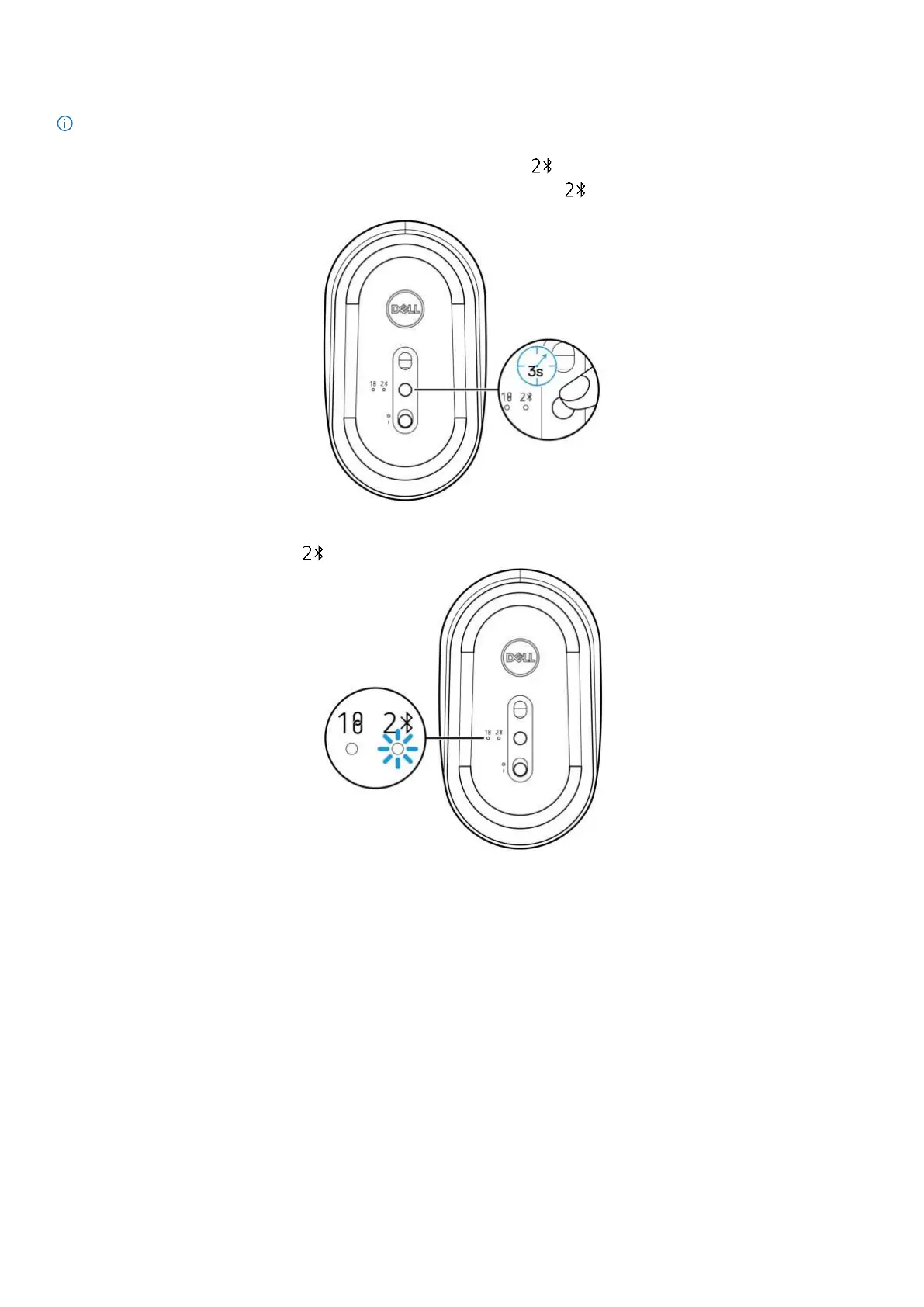
1. Press the connection-mode button to switch to the Bluetooth pairing mode ( ).
2. Press the connection-mode button for 3 seconds. Ensure that the Bluetooth LED ( ) blinks white, indicating that the Bluetooth
pairing process has been initiated.
Figure 11. Initiating the Bluetooth pairing mode
The connection-mode LED indicator (
) blinks for 3 minutes, indicating that your mouse is in the pairing mode.
Figure 12. Mouse in the Bluetooth pairing mode
3. Pair your wireless mouse with your Bluetooth-enabled computer.


 To Next Page