Features
6
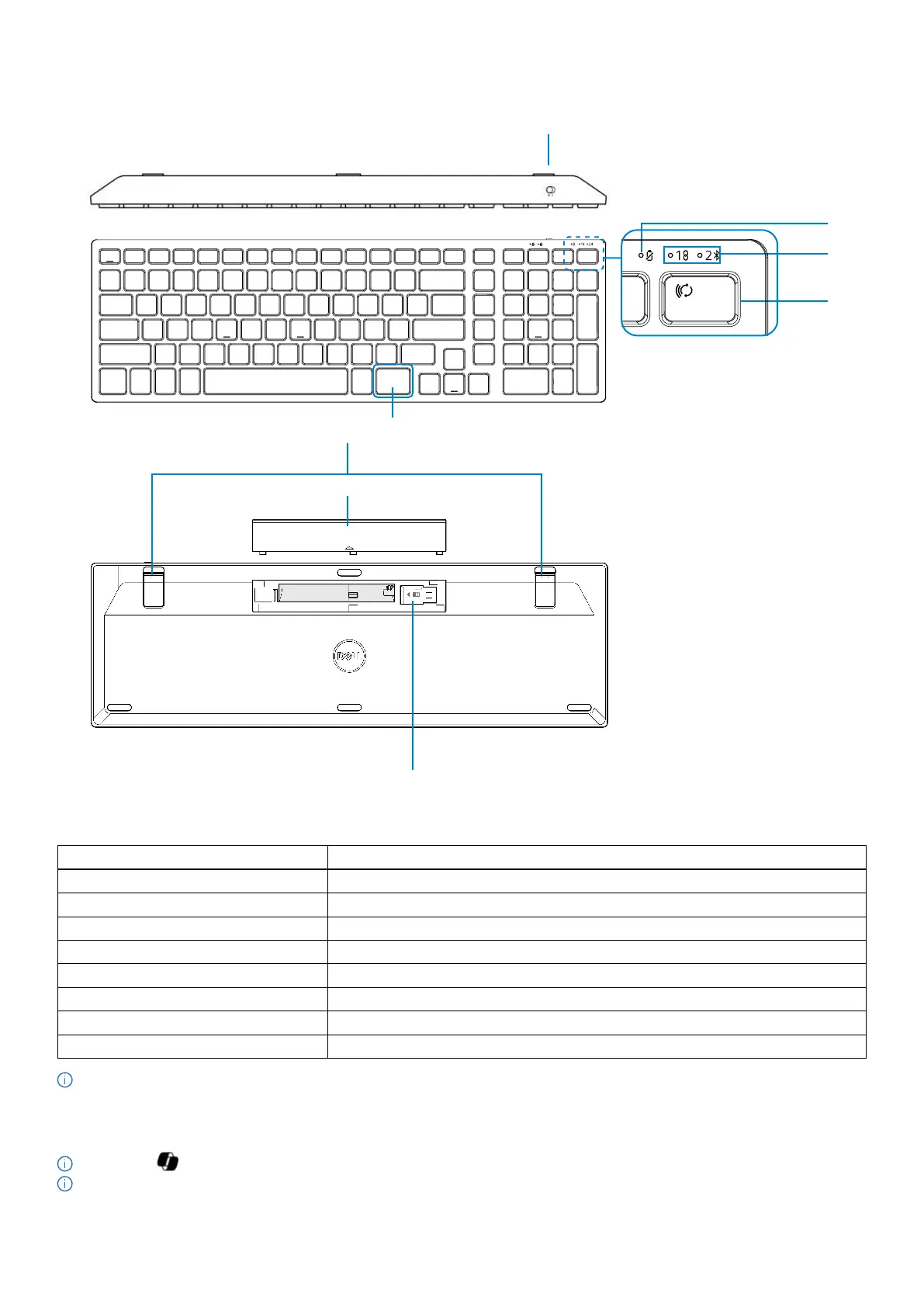
Wireless keyboard
6
5
7
Figure 2. Keyboard features
Table 3. Keyboard features.
Label Description
1 Power switch
2 Low battery LED indicator
3 Connection-mode LED indicators
4 Connection-mode key
5 Copilot key
6 Adjustable tilt legs
7 Battery cover
8 Dongle storage
NOTE: The Num Lock and Caps Lock LEDs remain on for 5 seconds after pressing the respective key. They then turn off, even if you
continue typing in their current state. The LEDs light up again upon pressing the keys. The lock state is reflected in the On-Screen
Display (OSD) on computers with Dell Peripheral Manager.
Launch Copilot in Windows
NOTE: Use key with supported Windows 11 devices; feature availability varies by device and market, see aka.ms/KeySupport
NOTE: Copilot in Windows is available only in approved markets.


 To Next Page