46 | Operating the Monitor
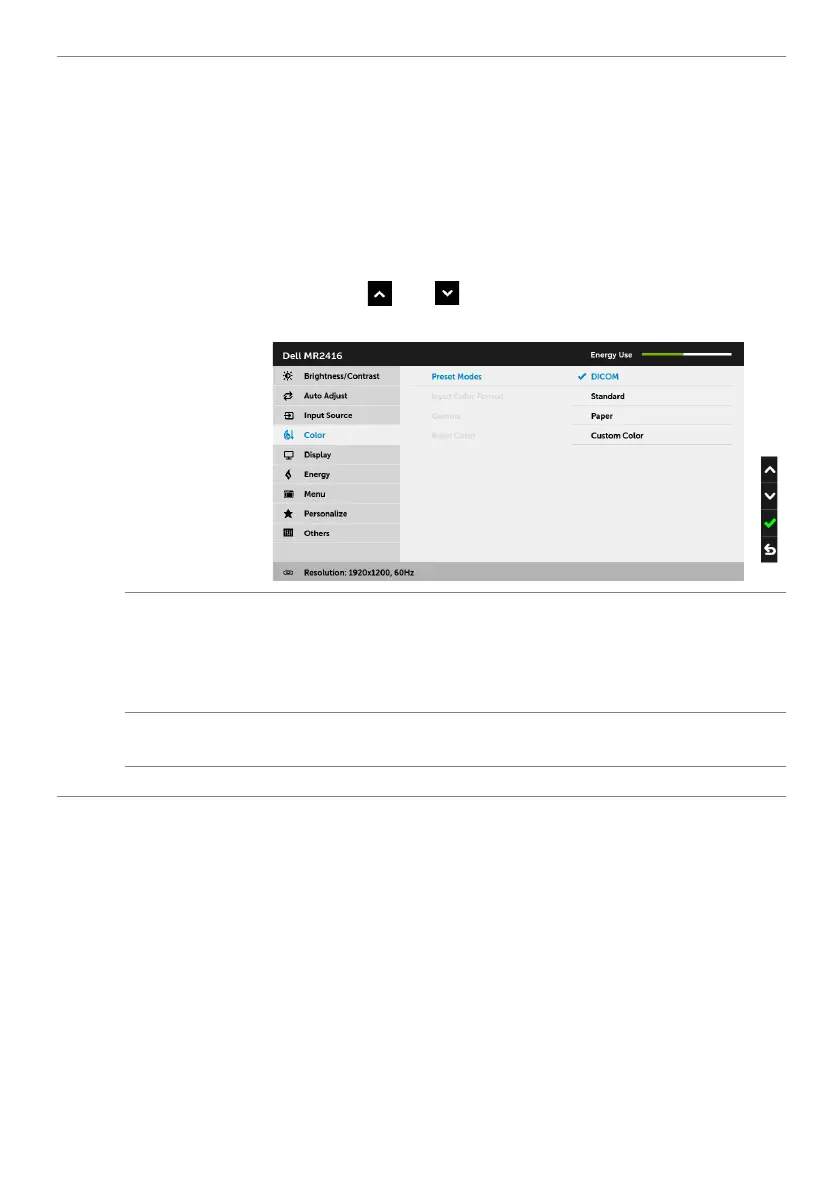
Preset Modes
When you select Preset Modes, you can choose DICOM, Standard,
Paper, or Custom Color from the list.
•DICOM: Pr
ovides consistent luminance uniformity and on diverse
displays with consistent methodology. This is the default preset
mode.
•Standard:
Loads the monitor's default color settings.
•Paper: Loads brightness a
nd sharpness settings ideal for viewing
text. Blend the text background to simulate paper media without
affecting color images. Applies to RGB input format only.
• Custom Color: Allows
you to manually adjust the color settings.
Press the
and buttons to adjust the three colors (R, G, B)
values and create your own preset color mode.
Input Color
Format
Allows you to set the video input mode to:
RGB:
Select this option if your monitor is connected to a computer (or
DVD player) using the DP or HDMI cable.
YPbPr:
Select this option if your DVD player supports only YPbPr
output.
Gamma
Allows you to set the Gamma to PC or MAC.
NOTE: This option is not available when the Preset Modes is DICOM.
Reset Color
Reset your monitor color settings to the factory settings.








 To Next Page