Operating the Monitor | 47
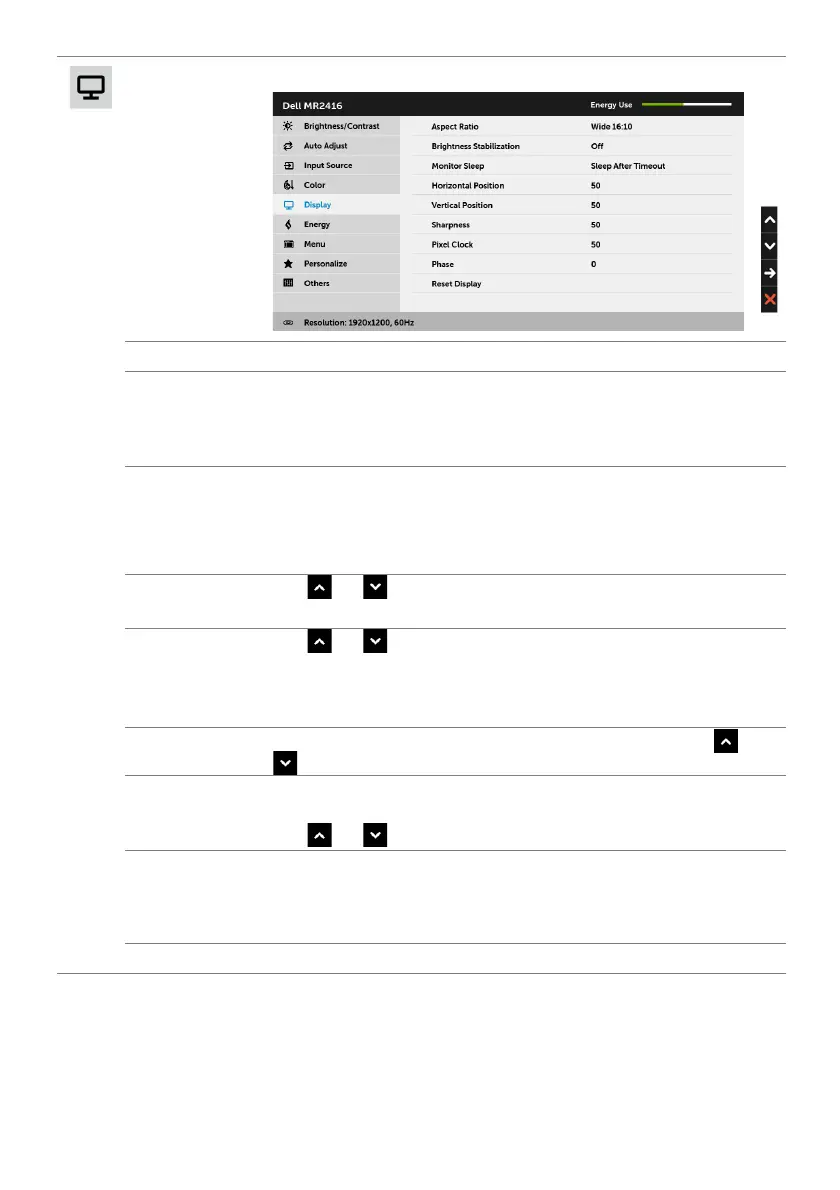
Display
Use Display to adjust image.
Aspect Ratio
Adjusts the image ratio to Wide 16:10, Auto Resize, 4:3, or 1:1.
Brightness
Stabilization
Activating this feature to maintain stable brightness level and shorten
cold startup time.
NOTE: This option is only available when the Preset Modes is DICOM
or Standard.
Monitor Sleep
Allows you to let the monitor turn off automatically or stay on when
your computer goes into sleep mode. When Sleep After Timeout is
selected, the monitor goes to sleep as the system sleeps; when Never
is selected, you may prevent the screen from going off as the system
sleeps for speedy display recovery from PC wake up.
Horizontal
Position
Use or to adjust the image left or right. Minimum is '0' (-).
Maximum is '100' (+).
Vertical
Position
Use or to adjust the image up or down. Minimum is '0' (-).
Maximum is '100' (+).
NOTE: Horizontal Position and Vertical Position adjustments are
only available for "VGA" input.
Sharpness
This feature can make the image look sharper or softer. Use or
to adjust the sharpness from '0' to '100'.
Pixel Clock
The Phase and Pixel Clock adjustments allow you to adjust your
monitor to your preference.
Use
or to adjust for best image quality.
Phase
If satisfactory results are not obtained using the Phase adjustment, use
the Pixel Clock (coarse) adjustment and then use Phase (fine), again.
NOTE: Pixel Clock and Phase adjustments are only available for "VGA"
input.
Reset Display
Select this option to restore default display settings.








 To Next Page