9. Remove the rear I/O-cover.
10.Remove the power-adapter port.
About this task
NOTE: When installing this component, see the tech sheet that is bundled with the service kit. The presence of Element 31
grease in the computer depends on the discrete Graphics Processing Unit (GPU) configuration installed.
To determine if your computer has Element 31 grease applied on the CPU or GPU, see the following table.
Table 26. CPU or GPU supporting Element 31 grease
GPU Element 31 grease
NVIDIA GeForce RTX 4080 Present in both CPU and GPU
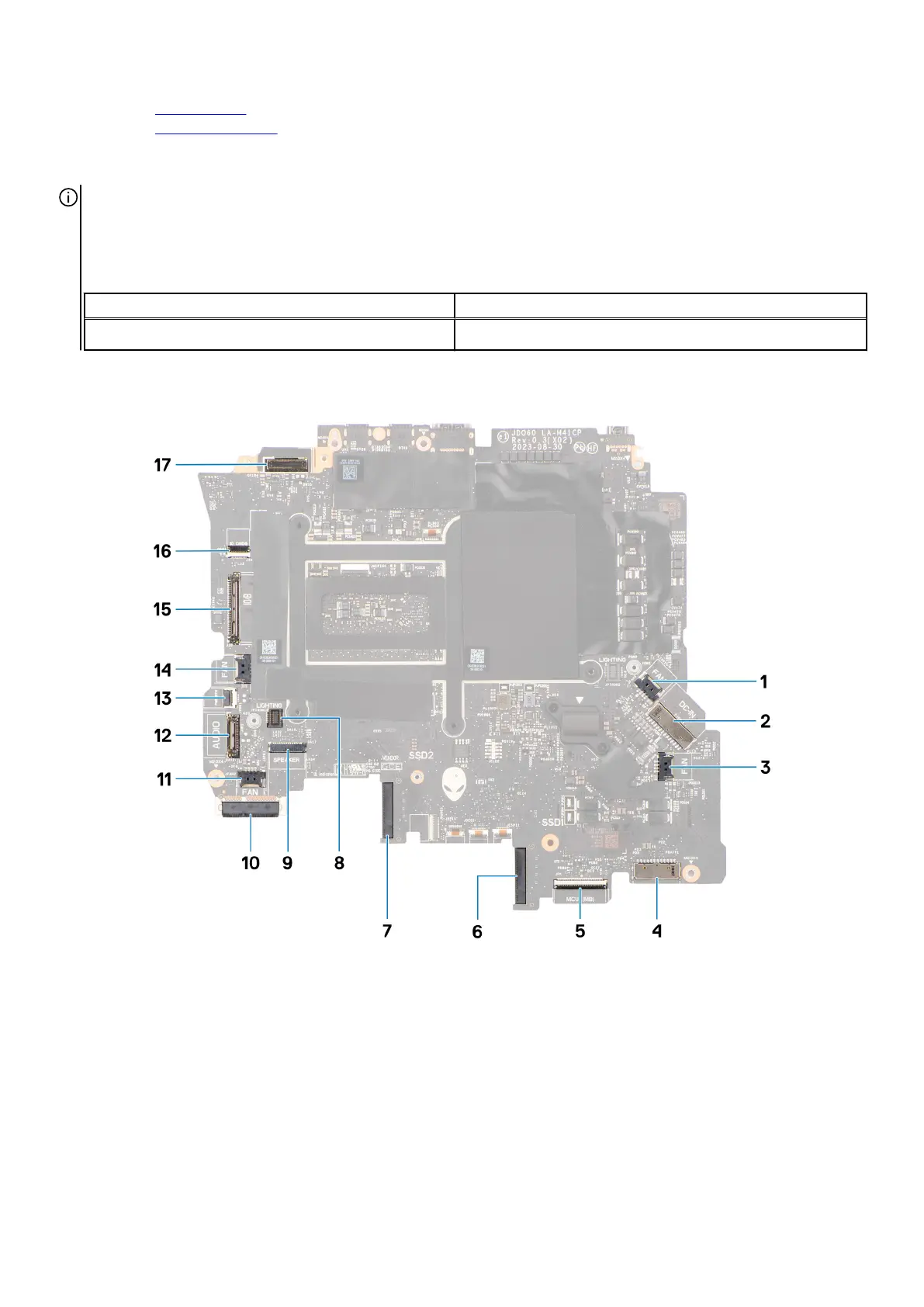
The following image indicates the connectors on your system board.
1. Right-fan cable connector
2. Power-adapter port cable connector
3. Graphics-card fan cable connector
4. Battery-cable connector
5. Keyboard-controller board cable connector
6. Solid state drive slot 1 (SSD-1)
7. Solid state drive slot 2 (SSD-2)
8. Left tron-light cable connector
9. Speaker-cable connector
10.WLAN card
11. Processor-fan cable connector
85



 To Next Page