90 Internet
NOTE: Signing in to your Google Account requires an Internet
connection. Ensure that your device has an active Wi-Fi or mobile data
connection (GPRS, EDGE, 3G, or HSPA) before you sign in. See
Connecting to the Internet for more information on how to set up a data
connection.
NOTE: Touch the Create button if you do not have a Google Account.
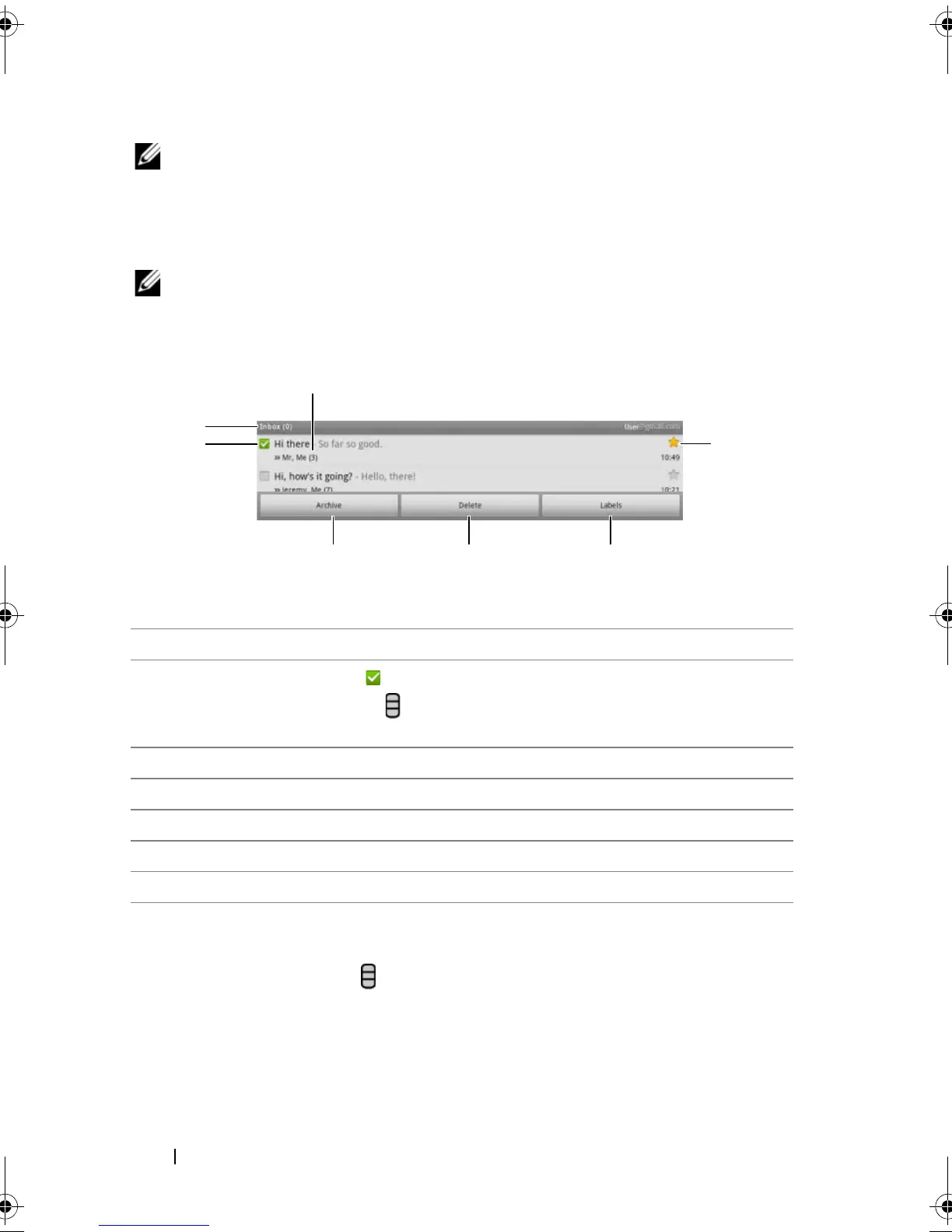
Your Gmail inbox opens as the default Gmail view. All your received e-
mails are delivered to your inbox.
To refresh Gmail
Touch the Menu button → Refresh to send or receive e-mails and to
synchronize your e-mails with your Gmail account on the Internet.
1 Folder (or Label) and number of unread e-mails.
2 Touch the check box to select the e-mail thread. To use this feature,
touch the Menu button
→ More→ Settings, then enable Batch
operations.
3 Touch Archive to store the selected e-mail thread in the All Mail folder.
4 Touch Delete to delete the selected e-mail thread.
5 Touch Labels to label the selected e-mail thread.
6 Starred e-mail. Touch the star to add or remove the star.
7 The number of e-mails grouped under the same subject.
bk0.book Page 90 Friday, November 19, 2010 12:24 PM














 To Next Page