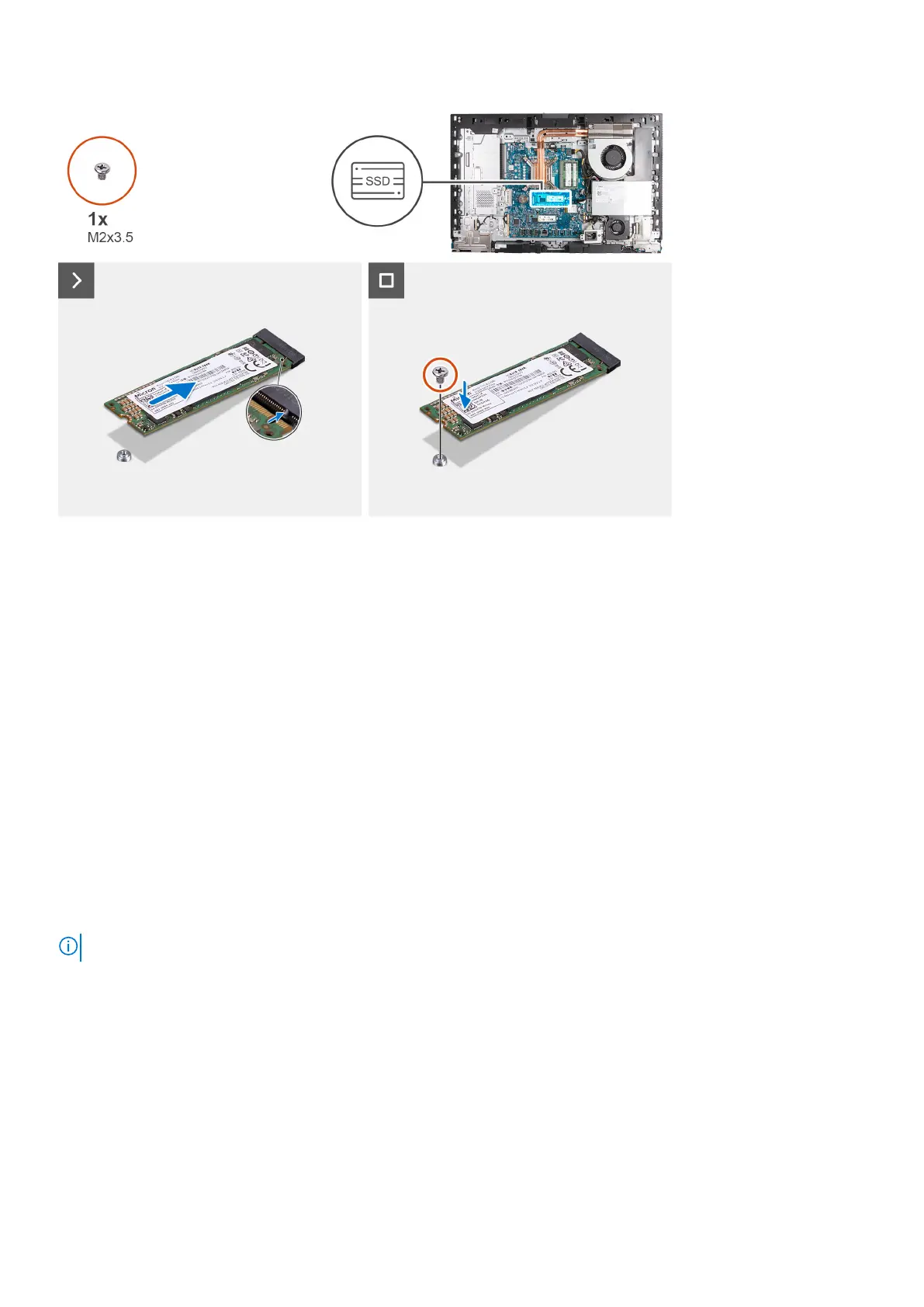
Steps
1. Align the notch on the M.2 2280 solid-state drive with the tab on the solid-state drive slot (M.2 PCIe SSD 0).
2. Slide the M.2 2280 solid-state drive into the solid-state drive slot (M.2 PCIe SSD 0) on the system board.
3. Replace the screw (M2x3.5) that secures the M.2 2280 solid-state drive to the system board.
Next steps
1. Install the system-board shield.
2. Install the back cover.
3. Install the stand.
4. Follow the procedure in After working inside your computer.
Location of the screw mount on M.2 slot 0
Prerequisites
To install an M.2 solid-state drive of a different form factor on M.2 slot 0, the location of the screw mount on M.2 slot 0 has to
be changed in order to install the M.2 solid-state drive of a different form factor.
About this task
NOTE: This procedure only applies to the screw mount located on M.2 slot 0.
The following image(s) indicate the location of the screw mount on M.2 slot 0 and provides a visual representation of the
procedure to change the position of the screw mount.
Removal and installation procedures for High Performance processors
57



 To Next Page