Installing the system board
Prerequisites
If you are replacing a component, remove the existing component before performing the installation process.
About this task
NOTE: Replacing the system board removes any changes that you have made to the BIOS using the BIOS setup program.
Make the appropriate changes again after you replace the system board.
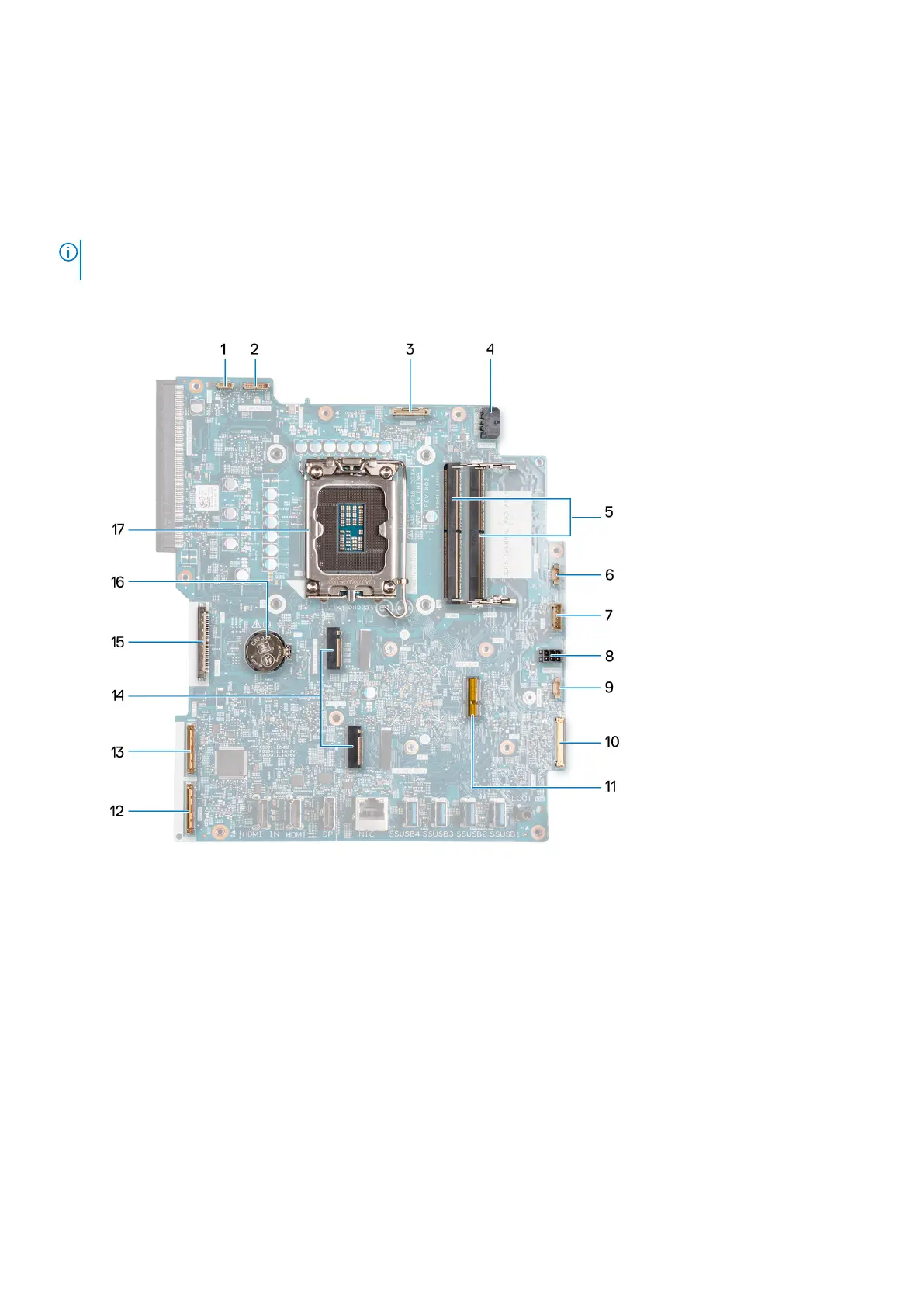
The following image indicates the connectors on your system-board.
1. Touchscreen cable (TOUCH)
2. Display-backlight cable (LCD BACKLIGHT)
3. Camera cable (WEBCAM)
4. Processor-power cable (ATX CPU)
5. Memory slots (DIMM1 + DIMM2)
6. Fan cable (FAN CPU)
7. Control-signal cable (CTRL)
8. System-board power cable (ATX SYS)
9. Power-supply fan cable (FAN SYS)
10. audio cable (MB-AUDIO)
11. Wireless-card slot (M.2 WLAN)
12. high-speed cable (MB-HS)
13. power cable (MB-PWR)
94
Removal and installation procedures for High Performance processors



 To Next Page