EasyManua.ls Logo

Delta 46-700 - Operating Controls and Adjustments; Starting, Stopping, and Locking the Switch

Delta 46-700
26 pages
Print Icon
To Next Page IconTo Next Page
To Previous Page IconTo Previous Page
Loading...
FASTENING
LATHE
TO
SUPPORTING
SURFAC
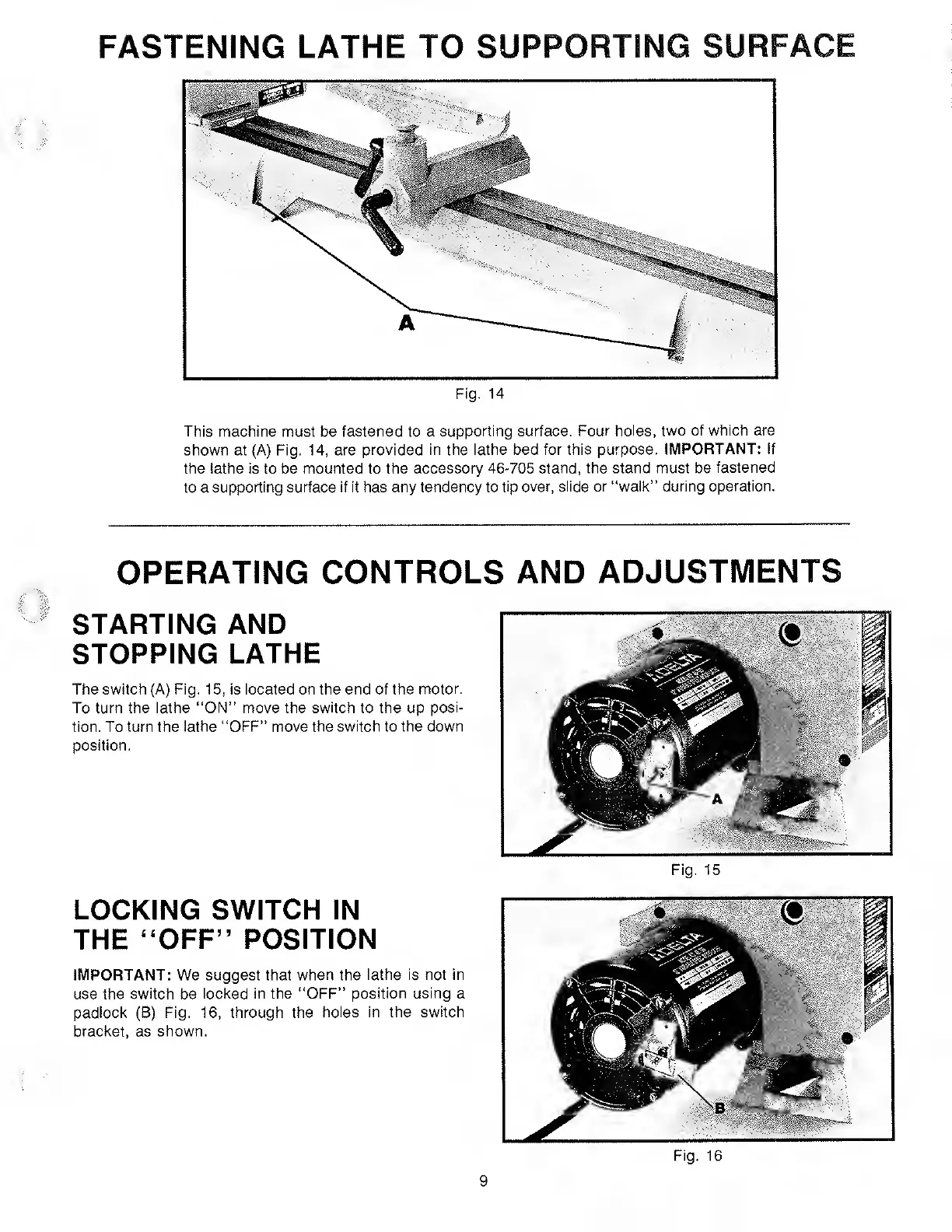
Fig.
14
This
machine
must
be
fastened
to
a
supporting
surface.
Four
holes,
two
of
which
are
shown
at
(A)
Fig.
14,
are
provided
in
the
lathe
bed
for
this
purpose.
IMPORTANT:
If
the
lathe
is
to
be
mounted
to
the
accessory
46-705
stand,
the
stand
must
be
fastened
to
a
supporting
surface
if
it
has
any
tendency
to
tip
over,
slide
or
“walk”
during
operation.
OPERATING
CONTROLS
AND
ADJUSTMENTS
STARTING
AND
STOPPING
LATHE
The
switch
(A)
Fig.
15,
is
located
on
the
end
of
the
motor.
To
turn
the
lathe
“ON”
move
the
switch
to
the
up
posi¬
tion.
To
turn
the
lathe
“OFF”
move
the
switch
to
the
down
position.
LOCKING
SWITCH
IN
THE
“OFF”
POSITION
IMPORTANT:
We
suggest
that
when
the
lathe
is
not
in
use
the
switch
be
locked
in
the
“OFF”
position
using
a
padlock
(B)
Fig,
16,
through
the
holes
in
the
switch
bracket,
as
shown.
Fig.
15
9
Fig.
16

Related product manuals