Step 9: Test Feedback Device
deltamotion.com 17
MA Module–Start/Stop or PWM
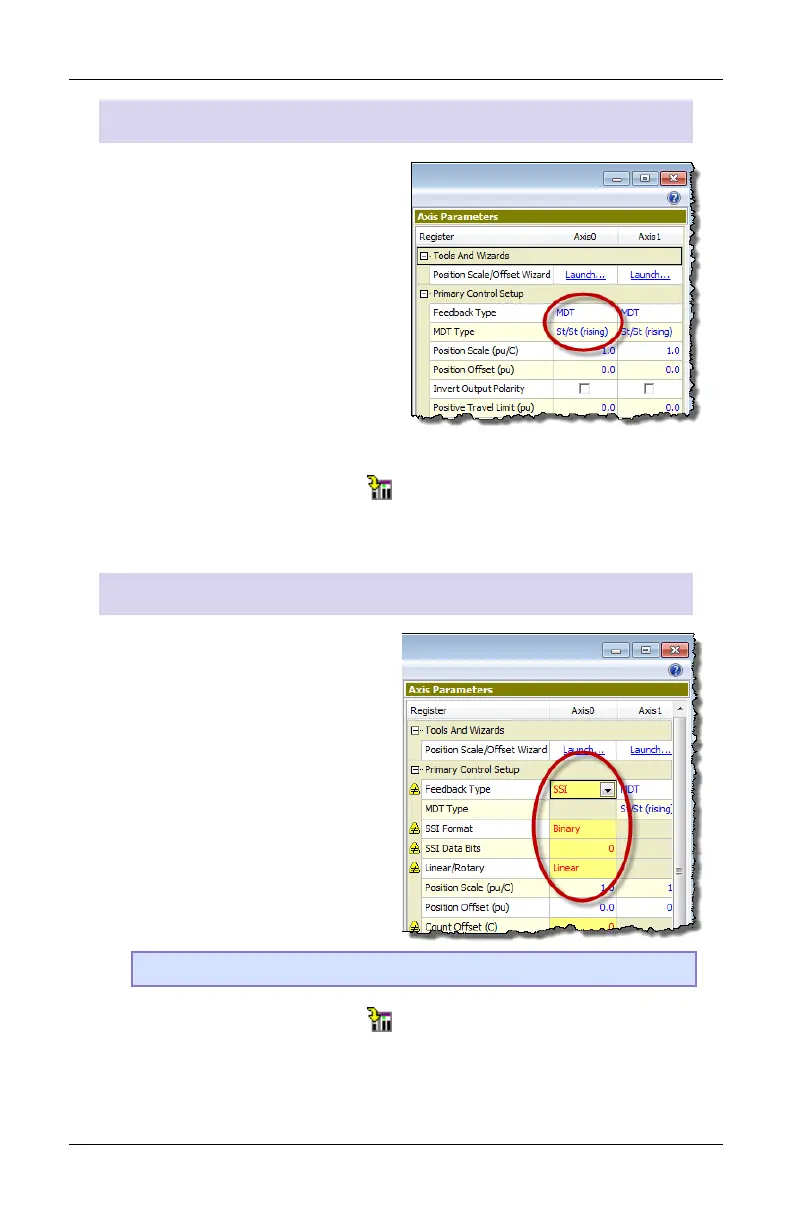
1. In the Axis Parameters, on the
Setup tab, set the Feedback
Type to MDT.
2. Set the MDT Type register to
the type of MDT transducer
you have. This information is
available on the transducer
datasheet.
3. Click the Download button to apply the changes to the RMC.
4. Continue to the Verify Feedback section on page 19.
MA Module–SSI
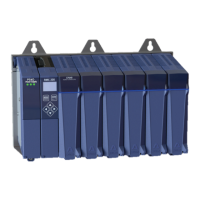
1. In the Axis Parameters pane,
on the Setup tab, set the
Feedback Type to SSI.
2. From the information in your
SSI data sheet, set the
following parameters:
• SSI Format
• SSI Data bits (e.g. 24)
• Linear/Rotary
Note: For help on a parameter, click the cell and press F1.
3. Click the Download button to apply the changes to the RMC.
4. Continue to the Verify Feedback section on page 19.



 To Next Page