RMC70 Startup Guide
20 Delta Computer Systems, Inc.
Step 10: Scale and Offset
The Scale and Offset parameters convert the Counts, Volts or Current
from the transducer into meaningful measurement units.
First, determine the approximate positions at either end of travel. This
will help you verify later that you performed the procedure correctly.
To set the Scale and Offset:
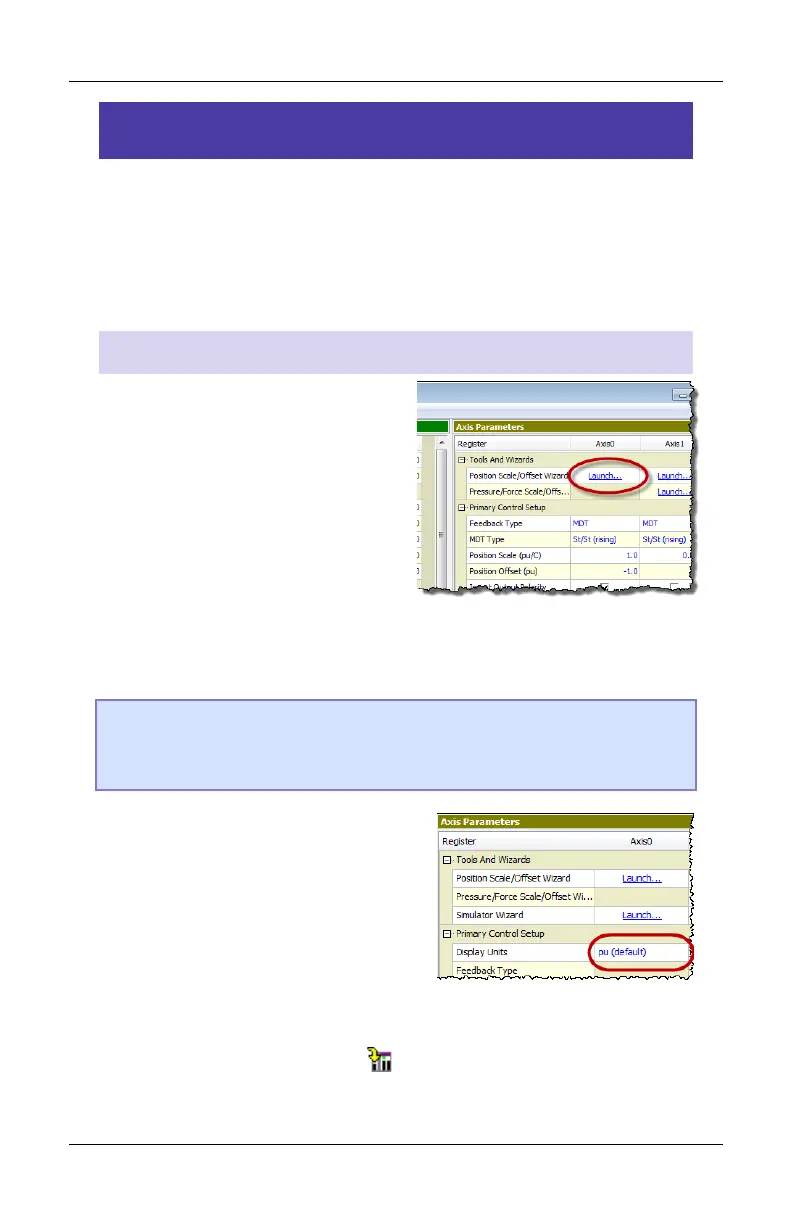
1. Go to the Axes Parameters
pane, Setup tab, Tools and
Wizards section.
2. Click Launch in the desired
axis.
3. In the wizard, follow the directions. For help, press the Help
button.
Tip: If the wizard does not work for your system, you can manually
determine the Scale and Offset parameters. See the Scaling topic
in the RMCTools help for details.
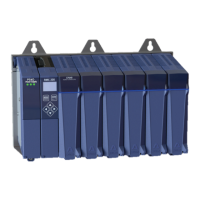
4. After completing the wizard, in
the Axis Parameters, locate the
Display Units parameter.
Select the desired display units.
If you wish to use units that are
not listed, choose Custom, then
type up to 4 characters in the Custom Units parameter.
5. Click the Download button to apply the changes to the RMC.
Remember to save your project and update Flash.



 To Next Page