G
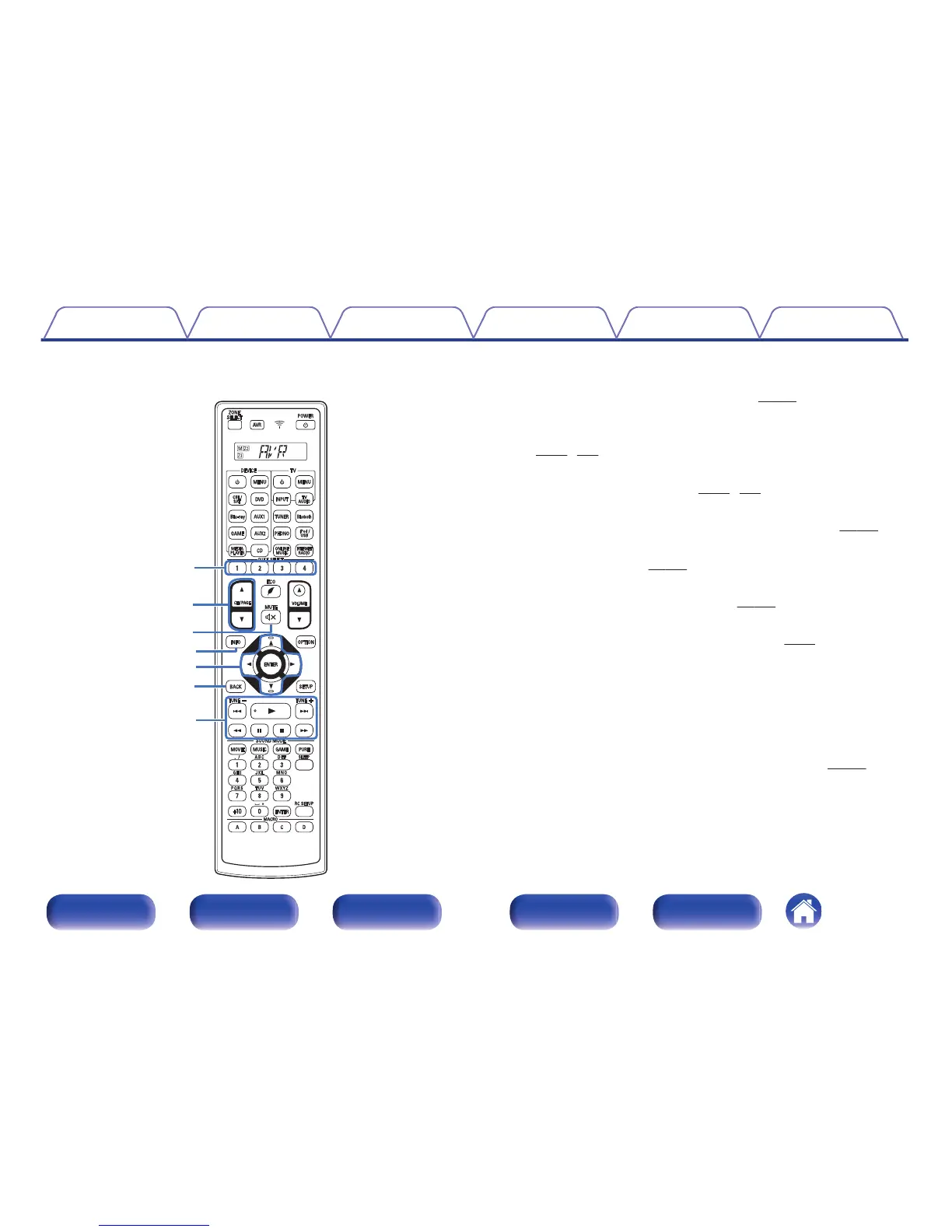
QUICK SELECT buttons (1 – 4)
These call up settings registered to each button, such as input source,
volume level and sound mode settings. (v p. 171)
H
Channel/page search buttons (CH/PAGE df)
These select radio stations registered to presets or switch pages.
(v p. 91, 108)
I
MUTE button (:)
This mutes the output audio. (v p. 88, 181)
J
Information button (INFO)
This displays the status information on the TV screen. (v p. 285)
K
Cursor buttons (uio p)
These select items. (v
p. 186)
L
BACK button
This returns to the previous screen. (v p. 186)
M
System buttons
These perform playback related operations. (v p. 91)
0
Skip buttons (8, 9)
0
Play button (1)
0
Search buttons (6, 7)
0
Pause button (3)
0
Stop button (2)
Tuning up / Tuning down buttons (TUNE +, –)
These select either FM broadcast or AM broadcast. (v
p. 104)
Contents
Connections Playback Settings Tips Appendix
29
Front panel Display Rear panel Remote Index


 To Next Page
 Loading...