5
DN-D4500
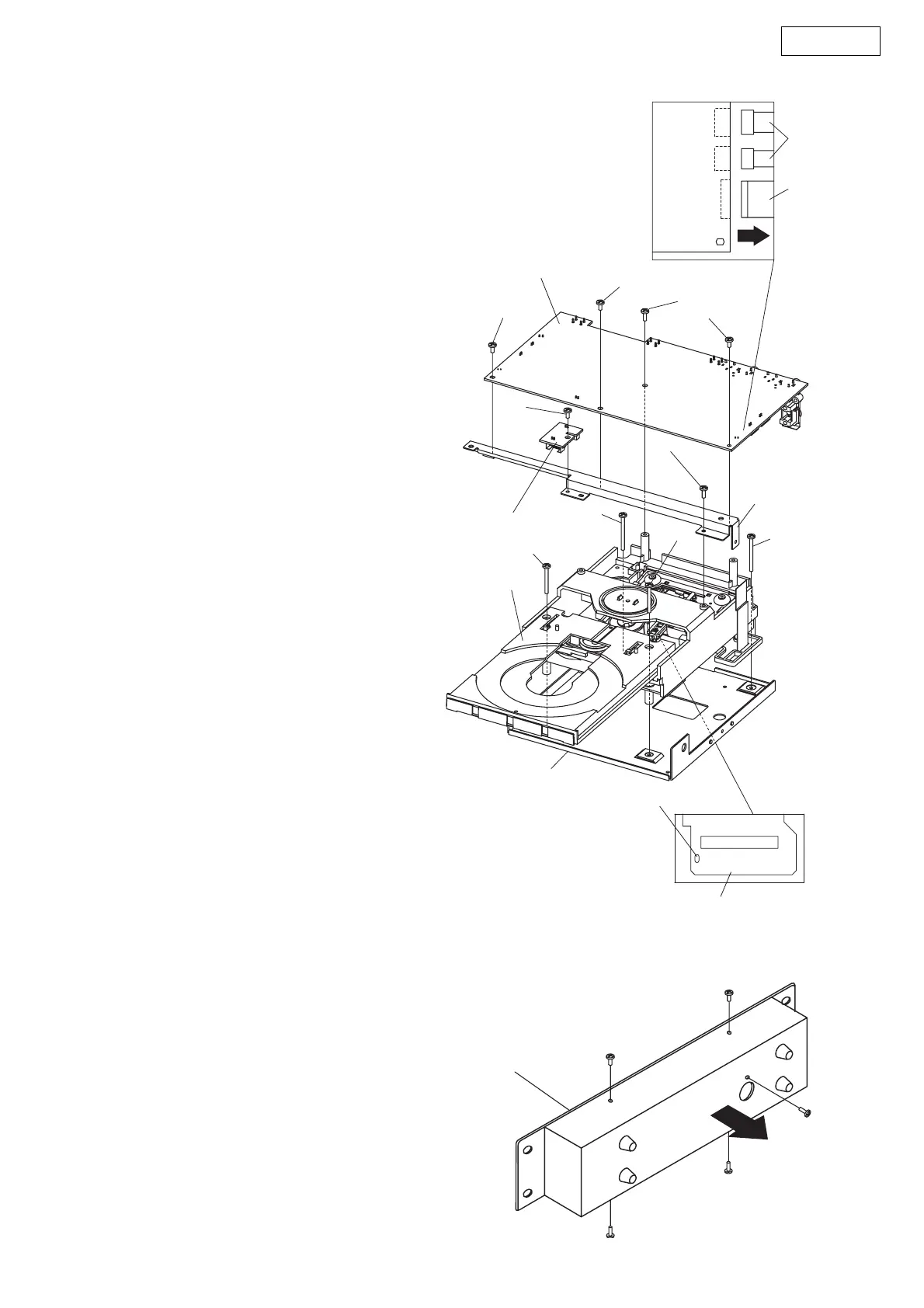
5. CD mecha
(1) Short-circuit the PU short land above.
(2) Remove 4 screws 51 and a screws 55.
(3) Disconnect FFC cable and Connectors.
(4) Detach Main pwb and Connect pwb.
(5) Remove a screws 55.
(6) Detach Pwb frame.
(7) Remove 2 screws 56 and 2 screws 57.
(8) Detach CD mecha.
Note :
● Do not pull out aslant to prevent Flat ca-
ble damage.
● Do not fail to pull AC cord from wall outlet
before disconnect the Flat cable.
If AC cord is remained plugged into wall
outlet, power is kept supplied in the unit,
which may cause danger.
6. COVER (REMOTE CONTROL UNIT)
(1) Rmove 5 screws.
Note :
● Remote Control unit and its back panel are
connected with cables, so pay attention
when removing the back panel.
51
55
51
51
Short land for laser diode
PU pwb
CX302
FFC cable
CX302
CX302
Connecto
Main pwb
Pwb frame
Connect pwb
57
57
56
51
55
56
CD mecha
Mecha bracket
Remote Control Unit


 To Next Page