Advanced
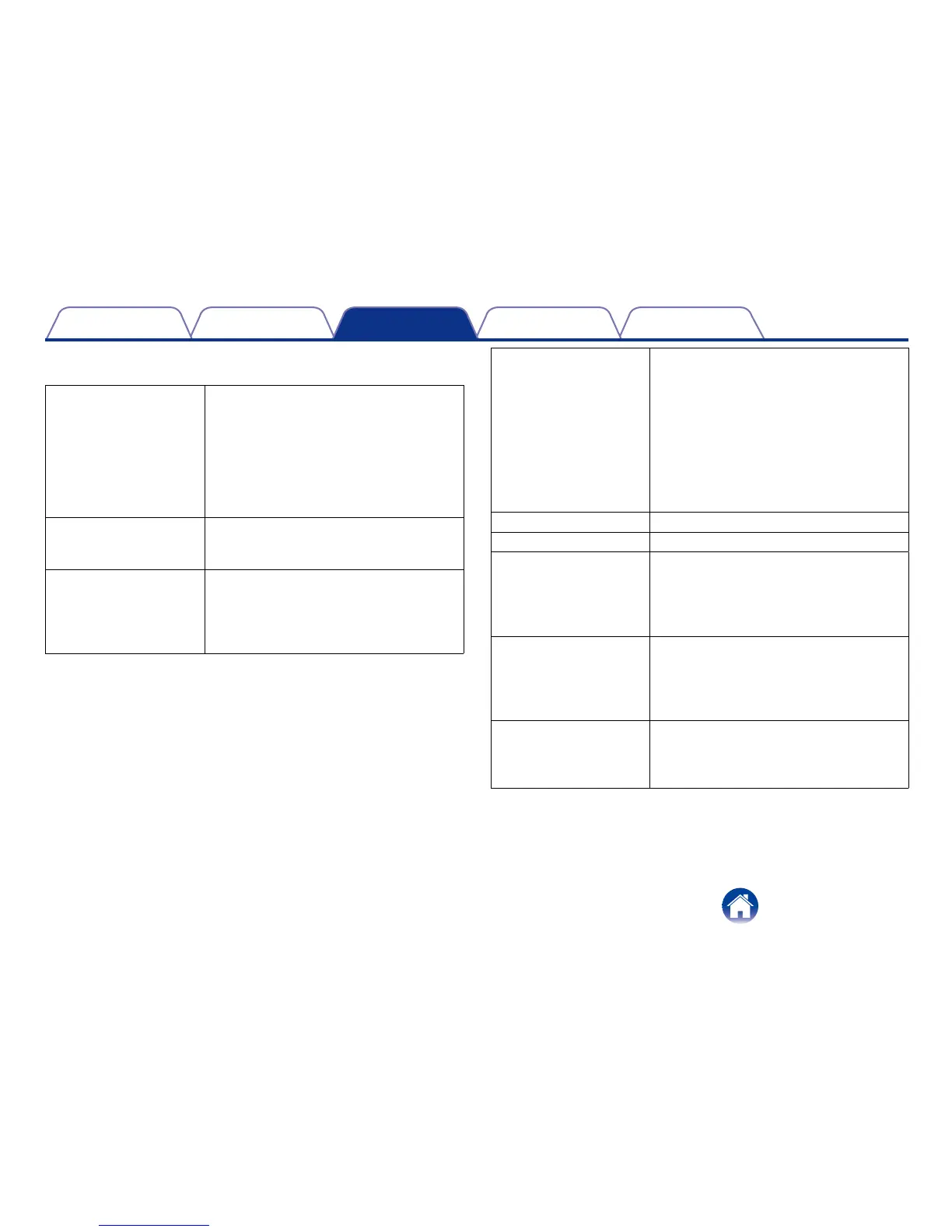
Used to access advanced network parameters.
Fragment Threshold Specifies the maximum size for a packet
before data is fragmented into multiple
packets. If you experience a high packet
error rate, you may slightly increase the
Fragmentation Threshold. Setting the
Fragmentation Threshold too low may result
in poor network performance. Only minor
modifications of this value are recommended.
RTS Threshold The RTS threshold is used as a trigger to
engage the back and forth of RTS and CTS
messages between AP and client.
Beacon Interval The Beacon Interval value indicates the
frequency interval of the beacon. A beacon
is a packet broadcast by the router to
synchronize the wireless network. 50 is
recommended in poor reception.
DTIM Period Indicates the interval of the Delivery Trac
Indication Message (DTIM). A DTIM field is
a countdown field informing clients of the
next window for listening to broadcast and
multicast messages. When the router has
buered broadcast or multicast messages
for associated clients, it sends the next DTIM
with a DTIM Interval value. Its clients hear the
beacons and awaken to receive the broadcast
and multicast messages.
N Data Rate Select 11n data rate.
Channel Bandwidth Select channel bandwidth.
Preamble Type If your wireless device supports the short
preamble and you are having trouble getting it
to communicate with other 802.11b devices,
make sure that it is set to use the long
preamble.
CTS Protection When set to Auto, a protection mechanism
will ensure that your Wireless-B devices will
connect to the router when many devices
are present. However, performance of your
wireless devices may be decreased.
Tx Power Higher power settings are not recommended
for users due to excess heat generated by the
radio chipset, which can aect the life of the
router.


 To Next Page