10
Counting
Purpose
With the Counting program you can determine the number of parts or pieces
by weight.
Example: Determine the number of uncounted parts; calculate the sample
reference quantity (in this example: 20)
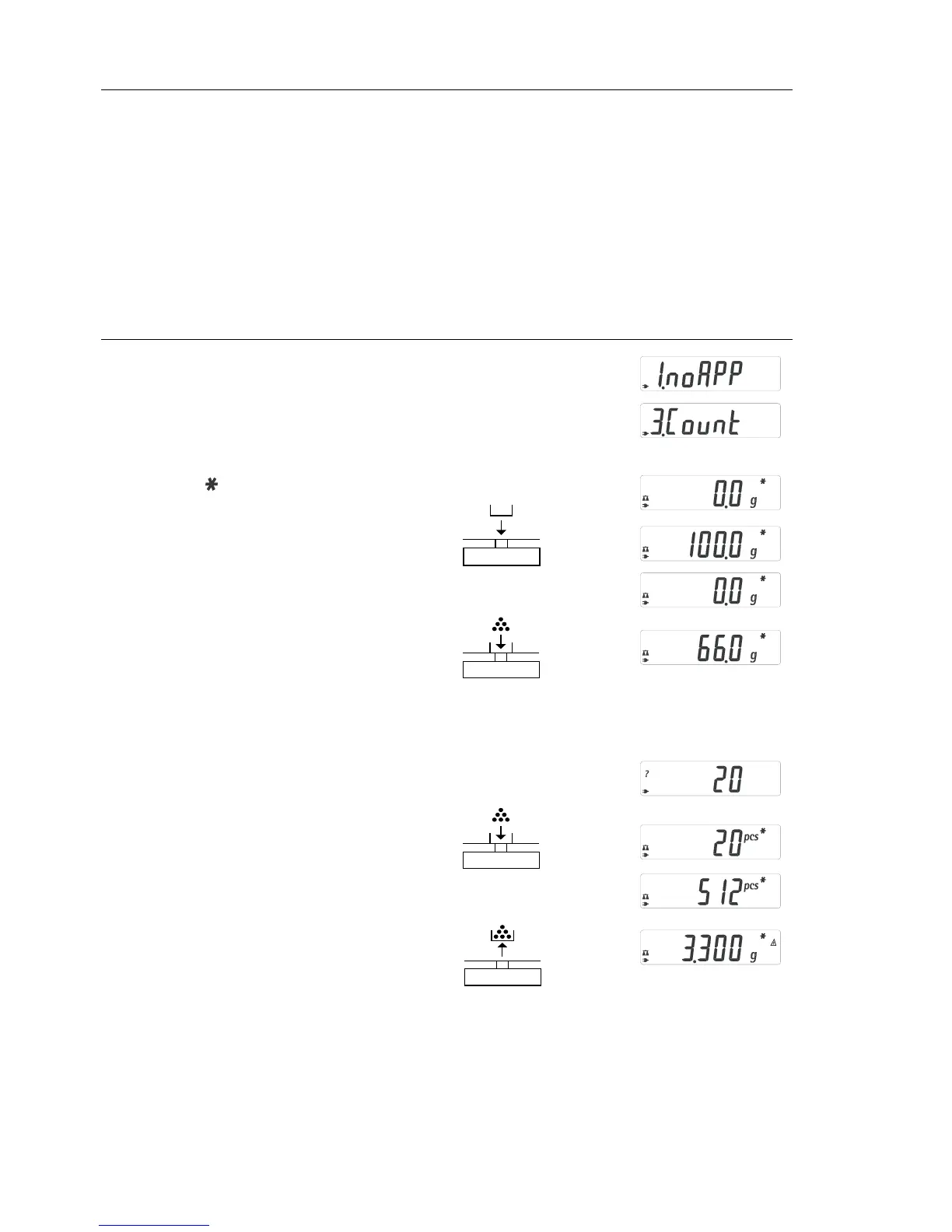
Step Key (or instruction) Display
1. Select application program (ZERO) ≥ 2 sec
2. Select Counting (F) repeatedly
3. Confirm application (ENTER)
Symbol “ “ on the display:
application is active
4. Place empty container on the
balance/scale
5. Zero the balance/scale (ZERO)
6. Place sample reference quantity (20)
on the balance/scale
7. Select sample reference quantity:
in increments of 1 (1, 2, 3, ..., 99) or (F) repeatedly (briefly) or
in increments of 10 (10, 20, 30, ...,100) (F) ≥ 2 sec.
8. Confirm selected sample reference
quantity (ENTER)
9. Place uncounted parts on balance/scale
10. Toggle display between mean
piece weight, total weight, and quantity (F) repeatedly
11. Unload the balance/scale
12. Start new Count application
or exit application (ENTER) ≥ 2 sec
13. Reactivate Counting (if no other (F)
application program has been selected)
14. Repeat procedure starting from Step 5.







 To Next Page