9
Application Programs
Toggling between Weigh Units
With this application program you can toggle the display of a weight value
back and forth between two weigh units (see table below).
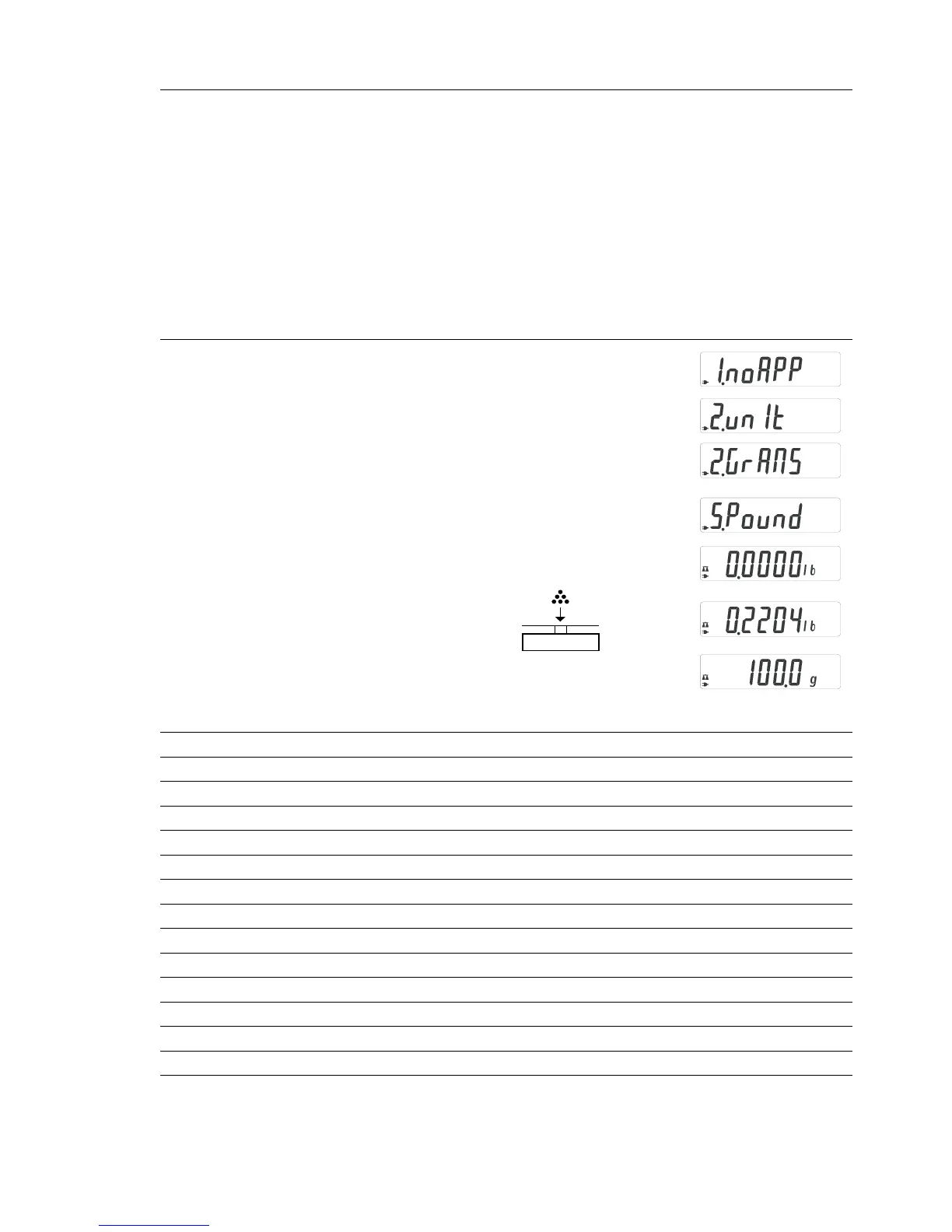
Example: Toggle weigh unit from pounds [lb] (application) to grams [g]
(basic unit)
Step Key (or instruction) Display
1. Select application program (ZERO) ≥ 2 sec
2. Select Toggling between Weigh Units (F) repeatedly
3. Confirm unit of application* (ENTER)
4. Select weigh unit; in this example: (F) repeatedly
“5. Pounds” (see table below)
5. Confirm weigh unit (pounds) (ENTER)
6. Place sample on balance/scale
7. Toggle weigh unit (F)
Menu code Unit Conversion factor Display
1. user** Grams 1.00000000000 o
2.grams (factory setting) Grams 1.00000000000 g
4.carat Carats 5.00000000000 o
5.Pound Pounds 0.00220462260 lb
6.ounce Ounces 0.03527396200 oz
7.tryo Troy ounces 0.03215074700 ozt
8.tl.hon Hong Kong taels 0.02671725000 tlk
9.tl.sin Singapore taels 0.02645544638 tl
10.tl.ta Taiwanese taels 0.02666666000 tl
11.grai Grains 15.4323583500 GN
12.peny Pennyweights 0.64301493100 dwt
15.tl.ch Chinese taels 0.02645547175 tl
22.pdoz lb/oz 0.03527396200 lb:oz
23.newt Newtons 0.00980665000 N
* Grams is chosen as 1
st
unit; to changes 1
st
unit, see Advanced Features section.
** User-defined conversion can be loaded in balance/scale with RS-232 or USB
program option. Contact Denver Instrument for more information.







 To Next Page