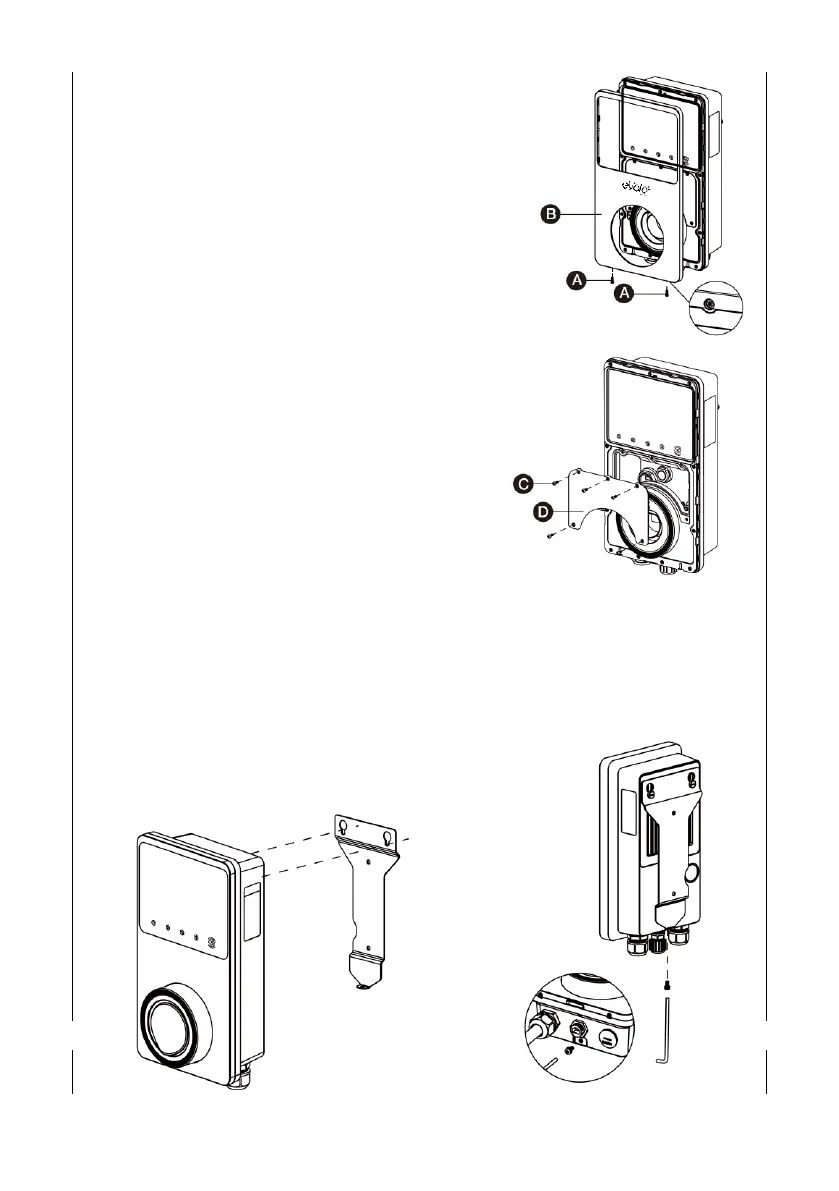
2. Remove the facial cover
• Remove the two screws (A) at the bottom of
the cover with the screwdriver type T10
• Unclip the cover (B) from the bottom
3. Remove the terminal cover
• Unscrew the five screws (C) to remove the
inner terminal cover (D).
4. Connect/Terminate Data Cables
• Remove the blanking plugs from the rear cable
entry points and replace glands or grommets
as required
• For Cat5e/6 cable - remove existing connector
(which links to the port at the bottom of the
charge point) and connect new connector
• For RS485 – again, remove and isolate existing
conductors, terminate new conductors
5. Reinstate the terminal cover and facia cover
6. Hook the charge point onto the mounting
bracket and tighten the bottom M5 x 10mm
securing screw


 To Next Page