Location of EV Charge Point
• Install your charge point on a flat and vertical surface capable of supporting its weight
(the charge point has a weight of approximately 4.2kg)
• Position the charge point in a location where it is not vulnerable to being damaged
• The eVoomXT charge point is supplied with a combined power and RS485 cable;
termination in a suitable enclosure should be considered
• Data cabling should also be considered and requires a RJ45 plug to connect to the
charge point
• The car charge point can be mounted on a suitable post
• If using Wi-Fi for communication, signal strength needs to be determined before
installation commences
• For a more reliable internet connection, it is recommended that an Ethernet cable is
routed to the charge point
• Consider the charge point location relative to the vehicle, i.e. whether the EV’s
charging cable will sufficiently reach the vehicle’s charging port
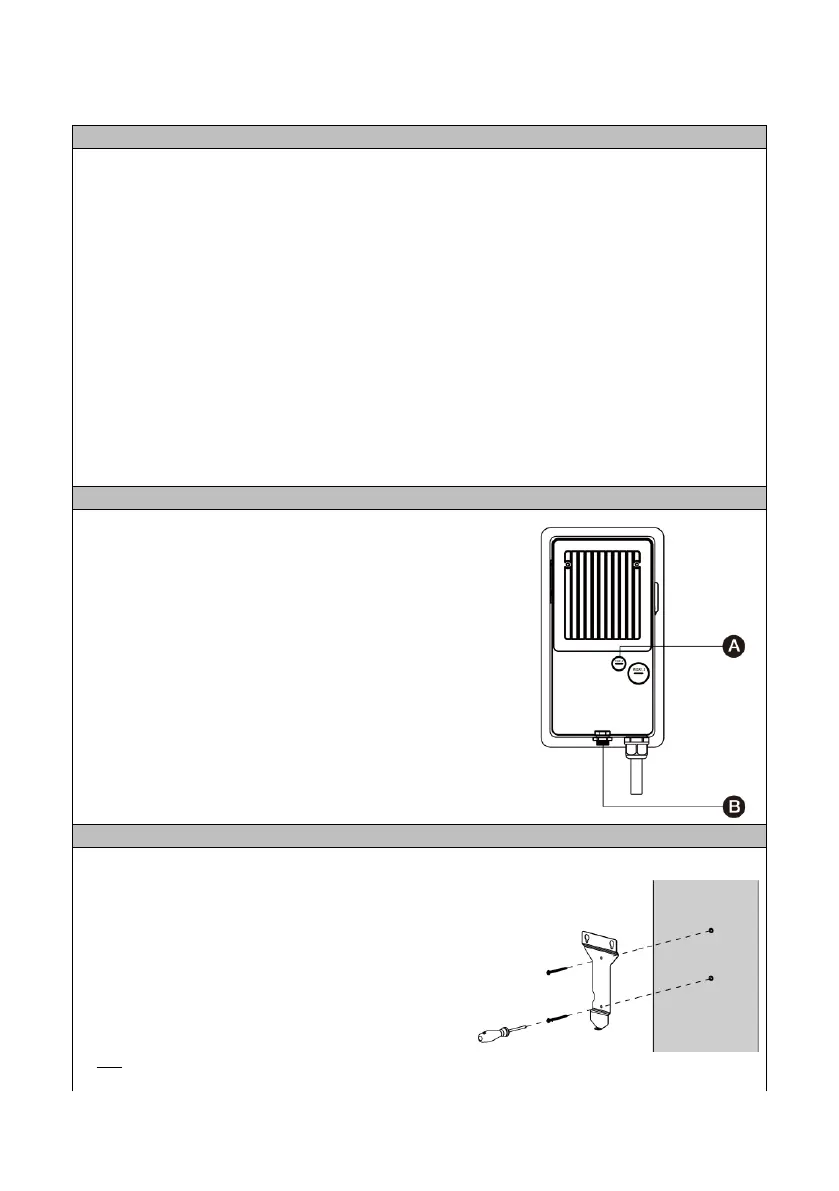
• The eVoomXT is fitted with a supply cable for
terminating in a separate junction box
• This cable has combined RS485 conductors
• The rear cable entry for data cables (A) is
recommended. Alternatively, the charge point
has an external RJ45 connection (B) at the
bottom
1. Fix the mounting bracket in the required
position, noting the correct orientation
• It is recommened that the socket height is 700
– 1000mm (as recommended in PAS1899)
• Use the 6mm screws and wall plugs supplied
to fix to a solid surface
Wall plugs require a 8mmØ hole x 50mm
If fitting a data cable from the rear, move to Step 2,
if not move to step 6.



 To Next Page