7. Terminate Mains Cable
• Connect the below wires:
• Earth (PE): green/yellow striped
• Neutral (N): blue
• Live (L1): brown
• Live (L2): black (3-phase)
• Live (L3): grey (3-phase)
• The cable has RS485 conductors combined – terminate these if
required, otherwise terminate in separate terminal block or wrap
with insulation tape
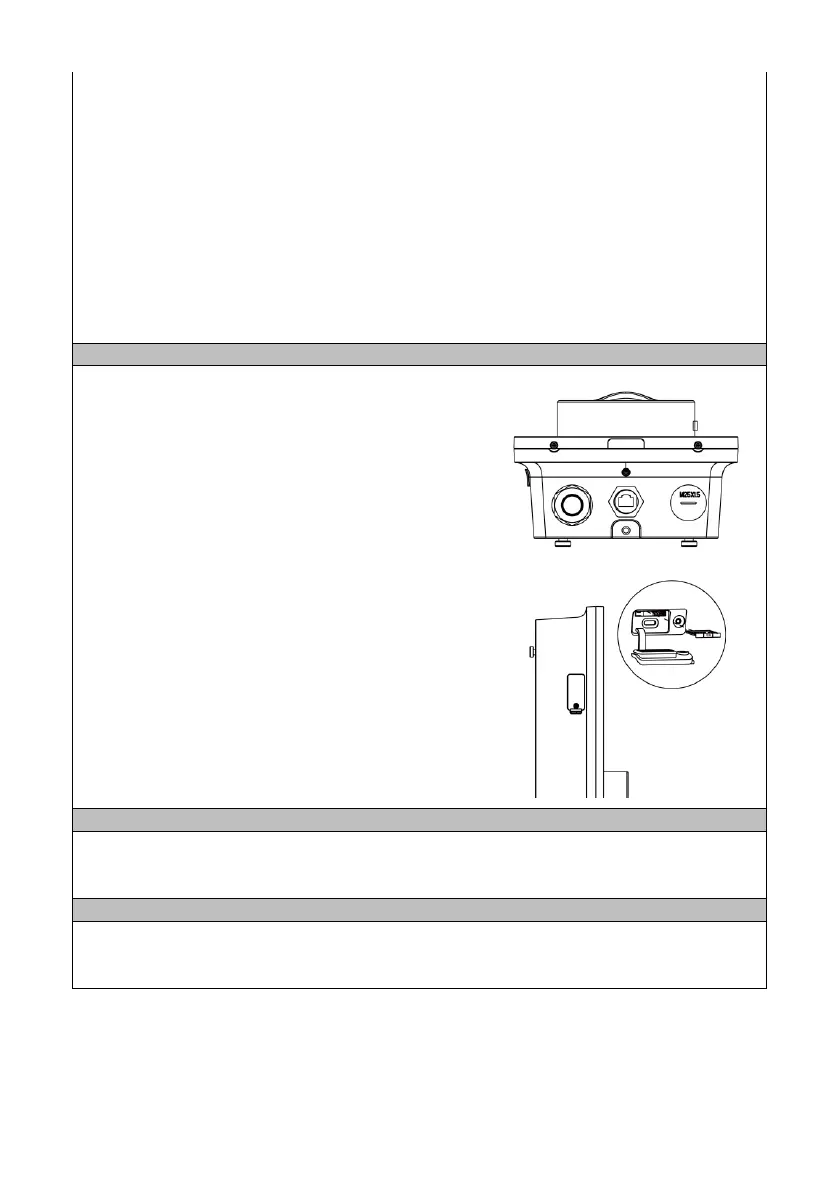
Ethernet Cable
The ethernet cable can be plugged into the port at
the bottom of the product.
Alternatively, the rear cable position can be used.
In this case, remove the cable plugged into the port
under cover (Q)
• Insert the Ethernet cable through the M16
grommet from the back entry
• Connect the Ethernet cable to the port
4G Connection
If a cabled connection is not possible, a 4G
connection can be obtained by inserting a 4G SIM
card into the slot on the left hand side of the charge
point.
RS485 communication cable, e.g. from an energy meter, CT clamp, is terminated on the
rear of the EV charge point, below the RJ45 data connector.
Electrical Installation Testing
The charge point should be disconnected from the installation during insulation resistance
testing.


 To Next Page