Introduction 12
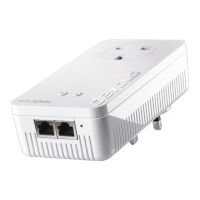
devolo Magic 1 WiFi
Air-time fairness – Quicker WiFi devices take priority
in the network.
Band steering – Use of the optimum frequency band
(2.4 and 5 GHz frequency band)
Roaming – Quickly and seamlessly connect to the
strongest WiFi access point
Security – with WPA2 for wireless ac ("IEEE 802.11a/
b/g/n/ac" WiFi high-speed standards)
Convenient additional functions such as parental
controls, guest WiFi, time control and Config Sync are
integrated in the devolo Magic 1 WiFi.
Efficiency– The integrated PowerSave mode reduces
energy consumption automatically at low data traf-
fic.
The 2 network connectors on the
devolo Magic 1 WiFi let you connect stationary net-
work devices—such as a game console, TV or media
receiver—to your Internet access point over the
Powerline network (e.g. Internet router).
Its integrated electrical socket can be used like a
normal wall socket to supply power to an additional
network device or a power strip.
The devolo Magic 1 WiFi features
An integrated electrical socket,
A PLC button with LED status display,
A WiFi button with LED status display,
Four internal WiFi antennas,
Two network connectors,
A reset button (next to the network connectors).
The LED status displays can be disabled. You can find
more information about this in Chapter 4 Network
configuration or in the product manual for the
devolo Cockpit software available online at
www.devolo.com/cockpit
.












 To Next Page