43 Network configuration
devolo Magic 1 WiFi
4.6 LAN
You make changes to the network settings in the LAN
area.
You can access the web interface for the
devolo Magic 1 WiFi using its current IP address. This may
be an IPv4 and/or IPv6 address, which is either entered
manually as a static address or automatically retrieved
from a DHCP server.
4.6.1 Status
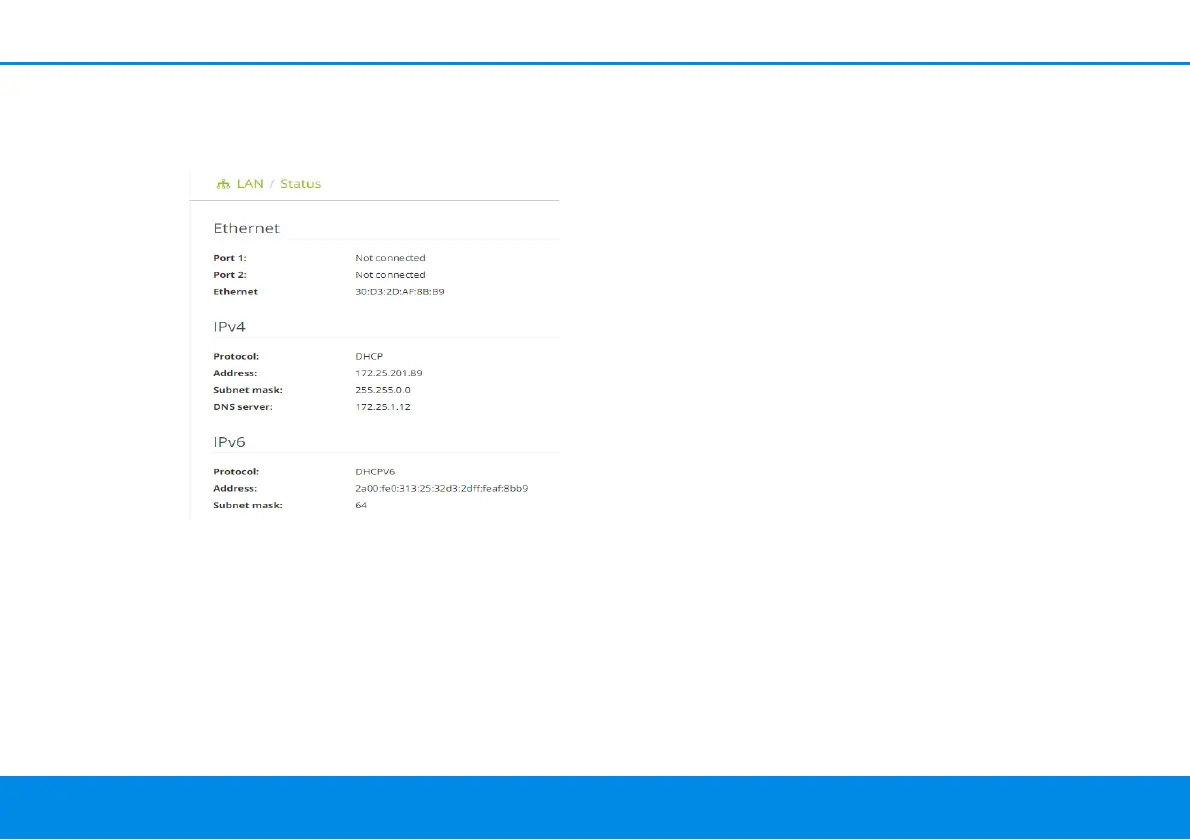
You can see the current LAN status of the devolo Magic ad-
apters here. The Ethernet area shows the network devices
connected to the two network connectors Port 1 and Port
2 (e.g. PC, NAS, etc.).
IPv4/IPv6
Depending on how the devolo Magic 1 WiFi is connected
to the Internet (IPv4 or IPv6), current network information
is displayed, such as Address, Subnet mask, Standard
gateway and DNS server.
4.6.2 IPv4/IPv6 configuration
In the factory default settings, only the Retrieve network
settings from a DHCP server option for IPv4 is enabled.
This means that the IPv4 address is retrieved automatically
from a DHCP server. The currently assigned network data
are visible (greyed out).
If a DHCP server is already present on the network for as-
signing IP addresses (e.g. your Internet router), you should
leave the Retrieve network settings from a DHCP server
option enabled so that the devolo Magic 1 WiFi automati-
cally receives an address from it.
If you want to assign a static IP address, make entries ac-
cordingly for the Address, Subnet mask, Default gate-
way and DNS server fields.












 To Next Page