Network configuration 44
devolo Magic 1 WiFi
Confirm your settings by clicking the diskette icon.
Then, restart the devolo Magic adapter (see Chapter 4.7.3
Configuration) to ensure that your changes take effect.
IPv6 configuration
If you want automatic IP address assignment and there is
already a DHCP server present on the network for as-
signing IP addresses (e.g. your Internet router), enable the
Retrieve network settings from a DHCP server option to
ensure that the devolo Magic 1 WiFi automatically recei-
ves an address from it.
If you want to assign a static IP address, make entries ac-
cordingly for the Address, Subnet mask, Default gate-
way and DNS server fields.
Confirm your settings by clicking the diskette icon.
Then, restart the devolo Magic adapter (see Chapter 4.7.3
Configuration) to ensure that your changes take effect.
4.7 System
In the System area, you can configure the settings for se-
curity and other devolo Magic adapter device functions.
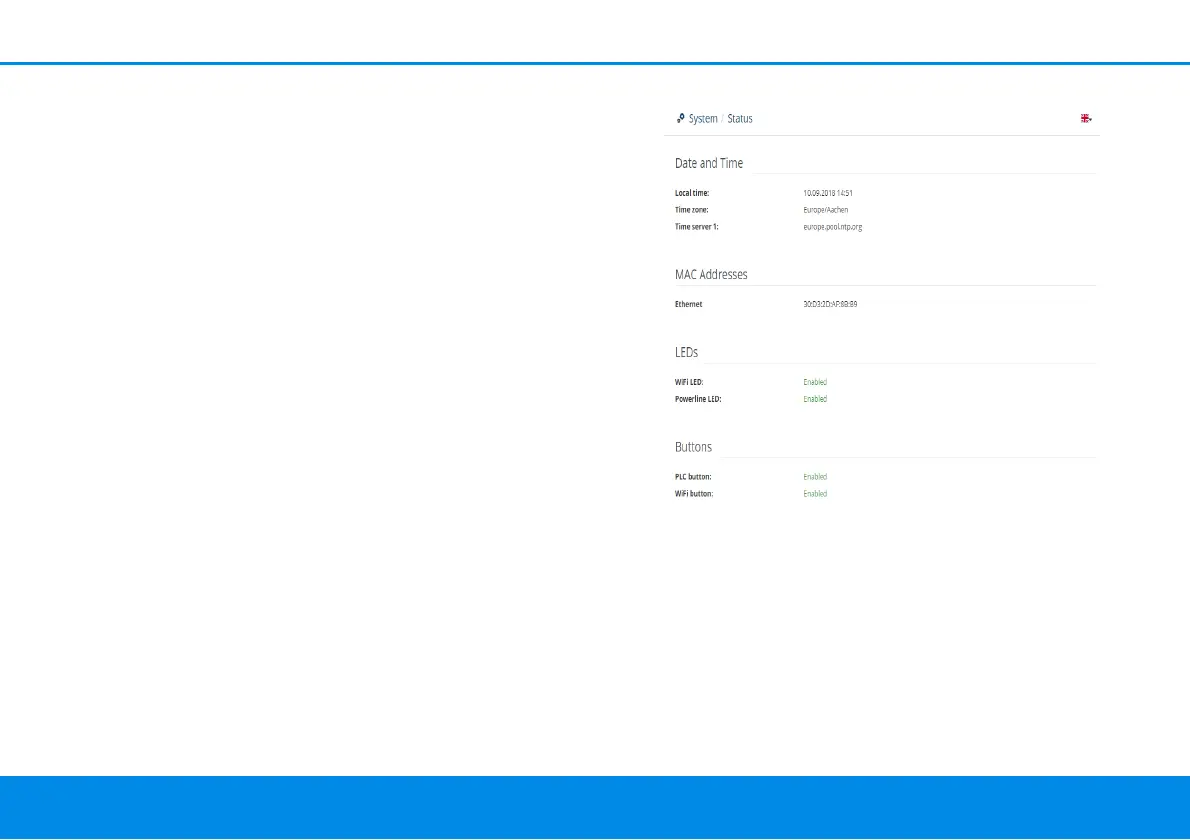
4.7.1 Status
Here you can view the most important information on
the devolo Magic adapter, including the current date and
time, time zone, MAC address of the adapter, status of
the WiFi and Powerline LEDs and the two operating but-
tons (PLC button and WiFi button).












 To Next Page