20
Performance Tests
0-60, 0-100, 1/4 Mile, & 1/8 Mile Tests
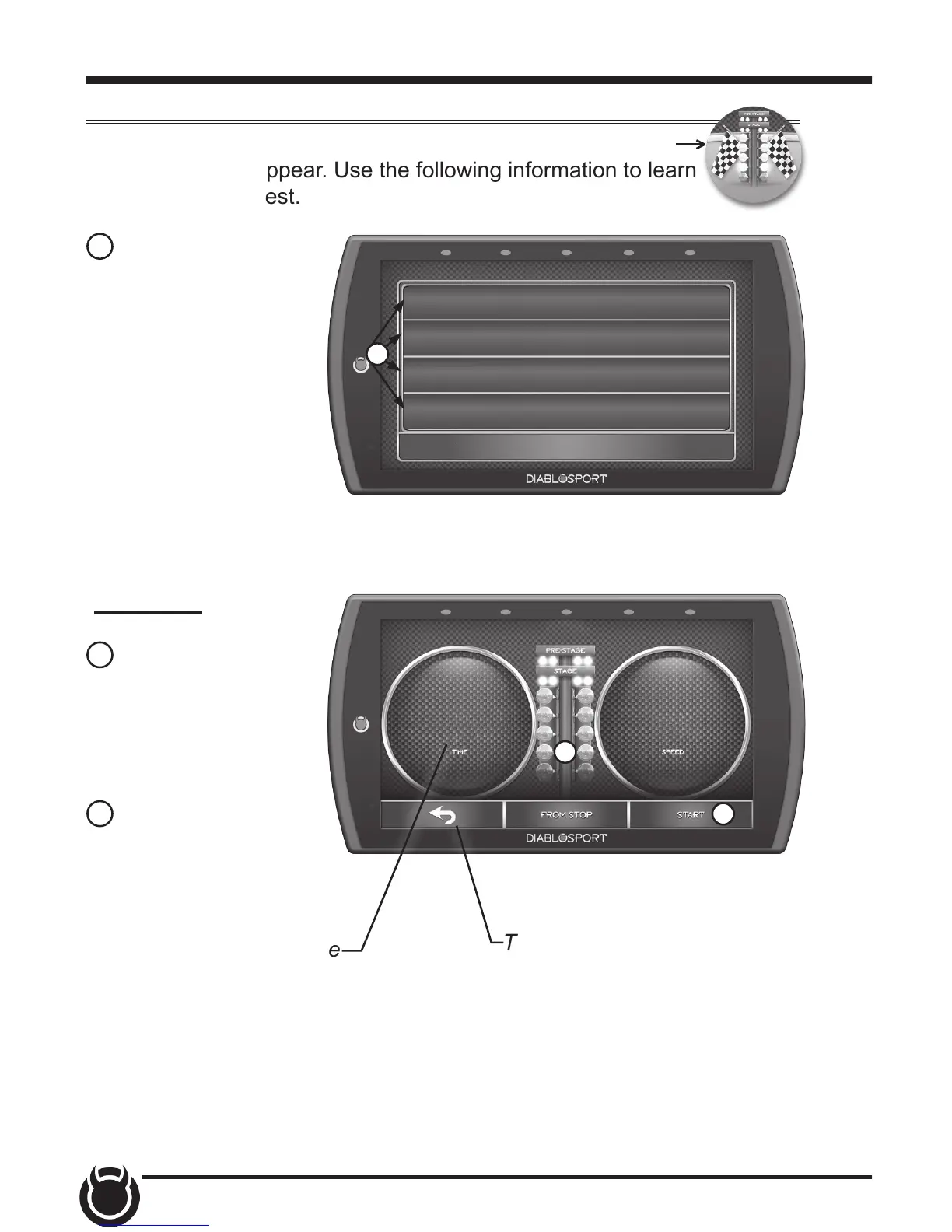
While in the Main Menu, select the Performance Tests icon.
A list of tests will appear. Use the following information to learn
more about each test.
PERFORMANCE TESTS
0-60 Test
0-100 Test
1/4 Mile Test
1/8 Mile Test
EXIT
1 Select the
Performance Test that
you would like to start.
00:00 000
Drag Tree
2 When the vehicle
is in place, select
the Start button to
initiate the drag tree
sequence.
3 Once the two green
lights are lit up, release
the brake and proceed
to accelerate.
0 TO 60
NOTE: There are two ways to perform these tests. The use of a drag
tree, or a stop light. Refer to the following for more information.
2
3
NOTE: The time gauge
will read JUMP if you’ve
started before the
drag timer completed
its countdown. If this
occurs select RESET
and start over.
TIP: Select the back arrow
to return to the main menu.
1


 To Next Page