EasyManua.ls Logo

DiabloSport Trinity 2 - Network Connectivity; Configuring WiFi Connection

DiabloSport Trinity 2
39 pages
Print Icon
To Next Page IconTo Next Page
To Previous Page IconTo Previous Page
Loading...
23
WiFi Setup
SETTINGS
Help/Info
Display Settings
Audio Settings
WiFi Setup
EXIT
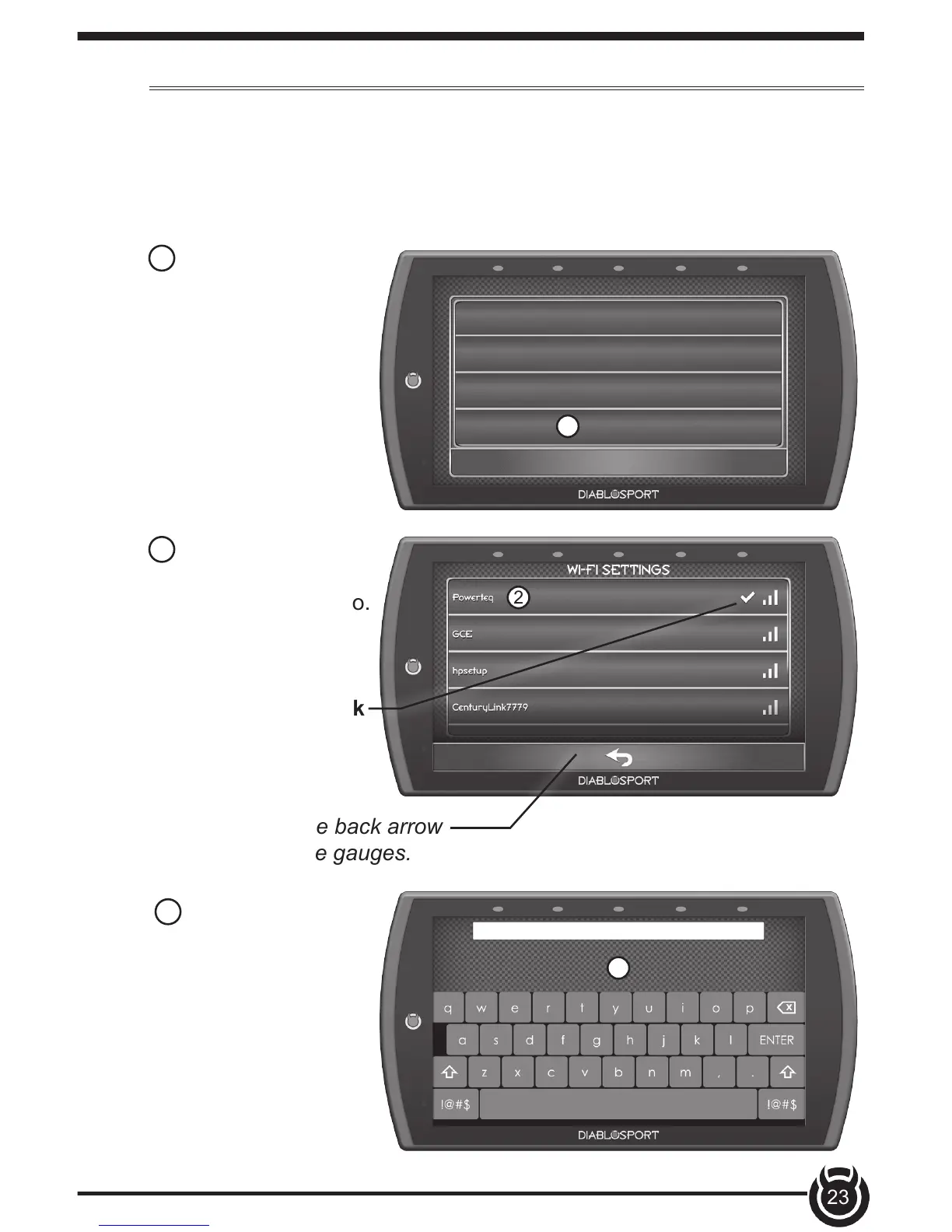
1 Select the WiFi
Setup option. A list of
available networks will
appear.
2 Select the network
that you would like to
connect the device to.
A green check mark
will appear when the
device is connected.
1
2
This device is equipped with the ability to connect to and update over
a secure WiFi connection. For more information on how to check for
updates, refer to the Check for Updates section of this manual.
TIP: Select the back arrow
to return to the gauges.
3 Use the keypad
to enter the network
password, then press
Enter. Note that most
networks are case
sensitive.
3