32
Individual Gauge Setup
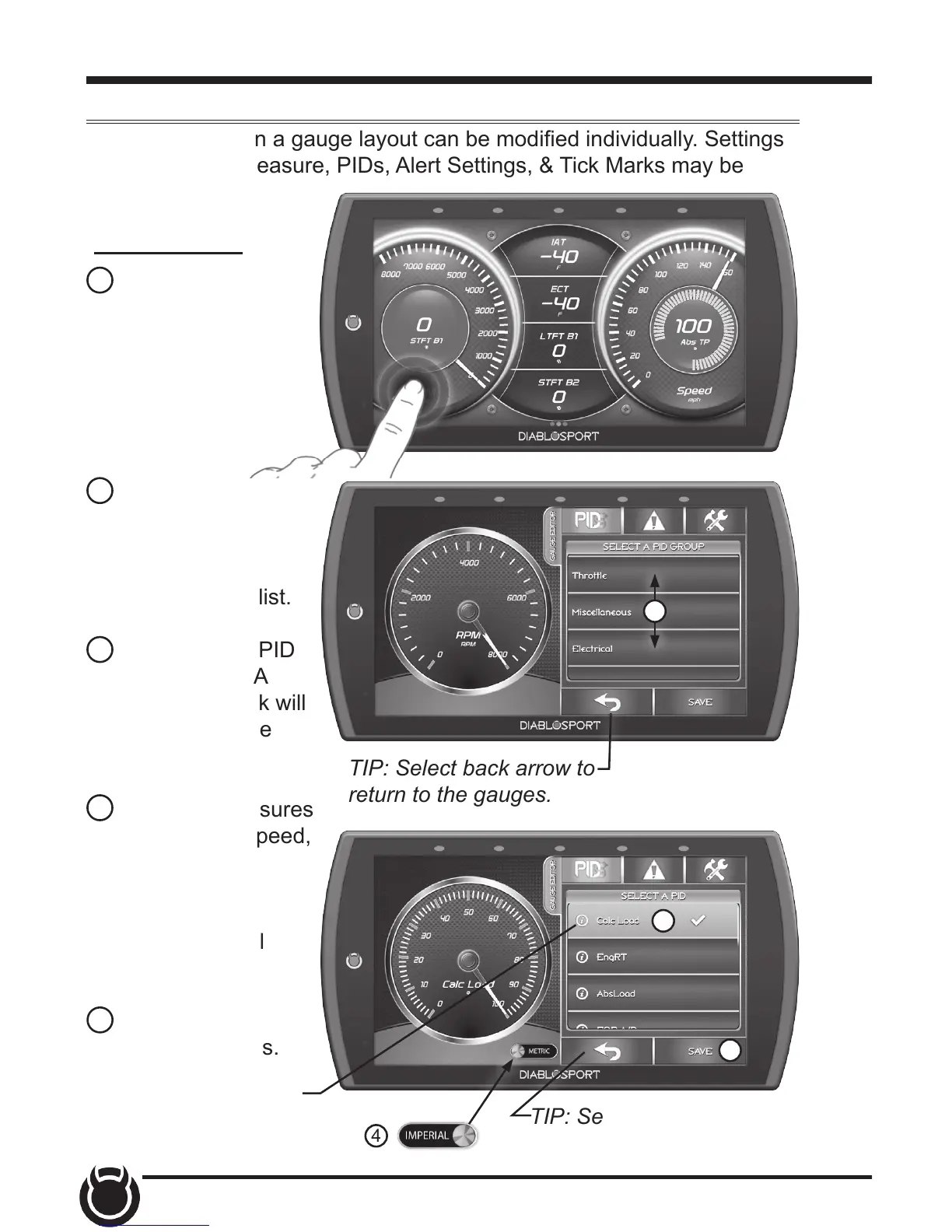
Each gauge within a gauge layout can be modied individually. Settings
such as Unit of Measure, PIDs, Alert Settings, & Tick Marks may be
modied.
1 While the
gauge screen
is in view,
Double Tap
the individual
gauge to be
modied.
2 Select a PID
group from the
provided list.
Swipe up/down
to see the entire list.
3 Next, select a PID
to be displayed. A
green check mark will
appear next to the
selected PID.
4 If the PID measures
temperature or speed,
use the provided
toggle switch to
change between
Metric or Imperial
units.
5 Select Save to
apply the changes.
PID Selection:
2
TIP: Select back arrow to
return to the gauges.
4
3
5
TIP: Select the back arrow
to return to PID groups.
1
2
TIP: The Information
icon provides more detail
regarding the PID.


 To Next Page