1 Introduction
ECO 9099 SOP05-5090F Rev.00 Effective Date: 12/20/18 Page 30 of 58
2. Press the replacement roller onto the instrument.
3. There will be a small gap between the roller and the surface of the instrument.
1.3.1.9. Peristaltic Pump Motor
The Peristaltic Pump Motor manages all fluid flow in the analyzer through the Peristaltic Pump
Rotor. These are the steps for removing the motor.
1. Remove the Peristaltic Pump Rotor according to the procedure above, Section 1.3.1.8
.
2. Remove the rear panel and CPU Board as described in Section 1.3.1.2.
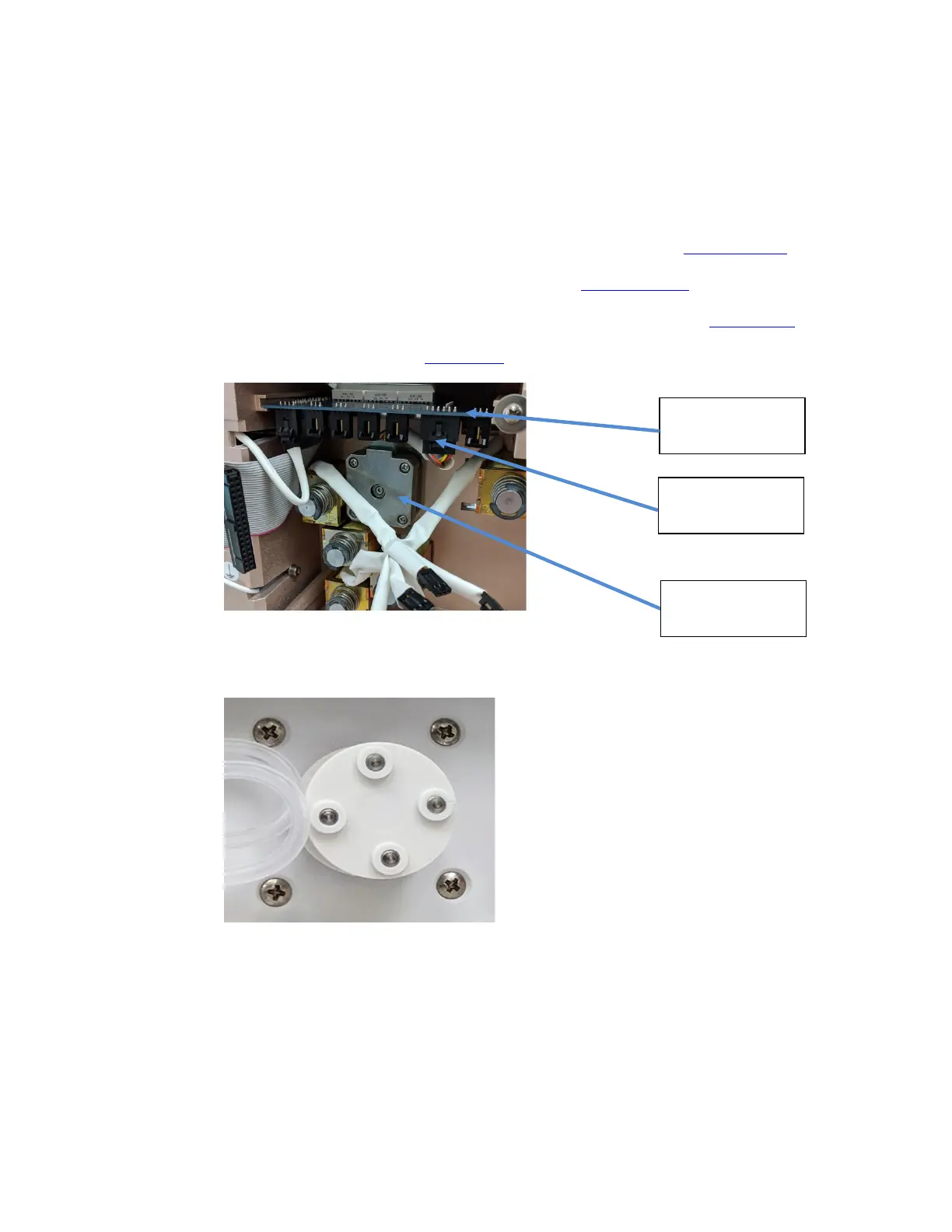
3. Locate the Pump Motor electrical connector plugged into the valve board. (Figure 1-40)
4. Disconnect the motor connector (Figure 1-40).
Figure 1-40 Connectors and cables on CPU board, Pump Motor
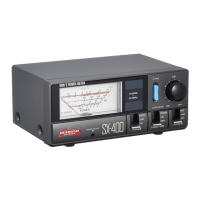
5. On the front of the analyzer remove the four screws holding the motor in place.
Figure 1-41 Pump Motor Mounting Screws
6. The motor can now be removed from the back side of the instrument.
Valve Board
Pump Motor
Connector
Pump Motor



 To Next Page