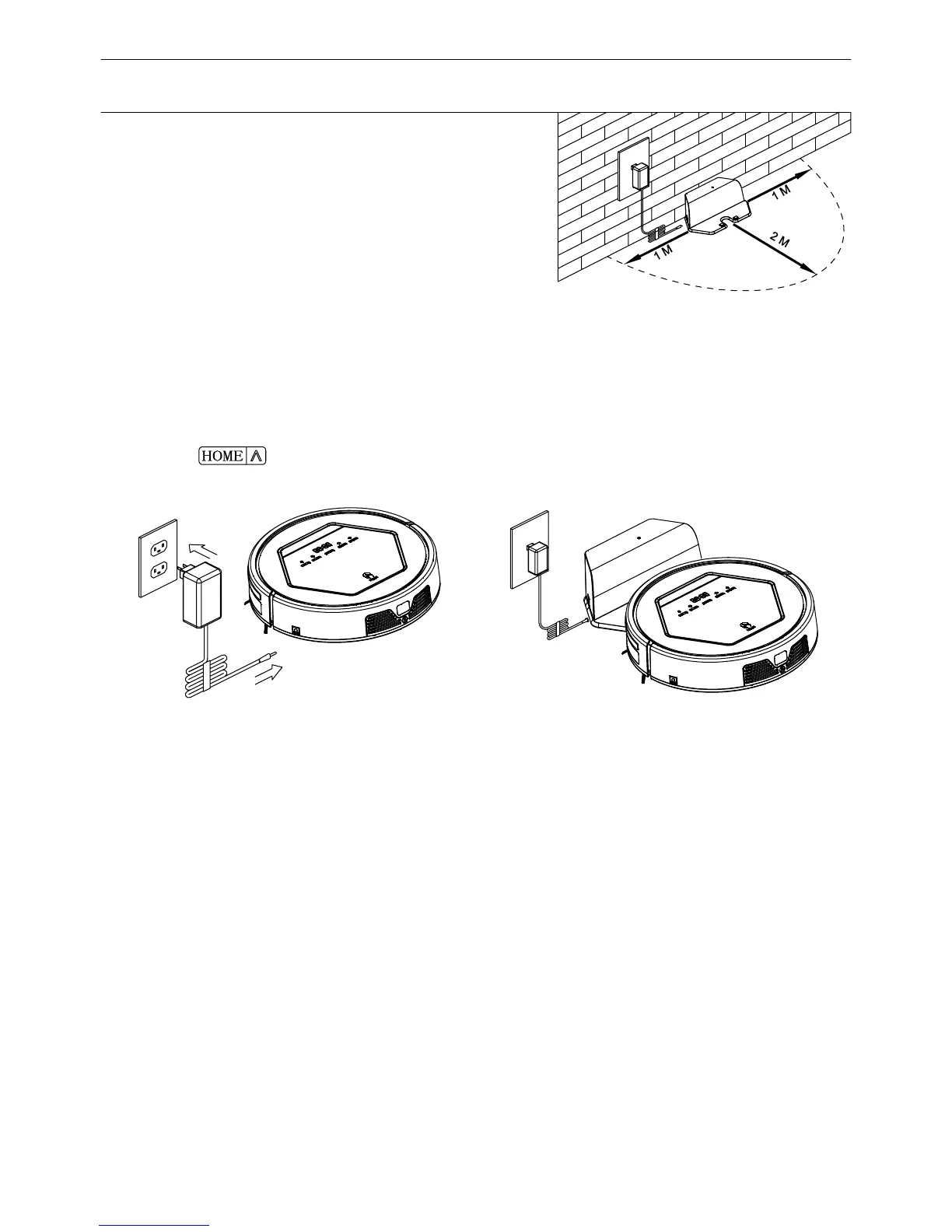
fig a
fig b
Product Operation
a. Before first use, charge the robot for 12 hours.
b. Charge the robot as soon as battery power is low.
c. The robot will return to charging station automatically when finishing cleaning or
battery power is low.
d. If the robot is not to be used for a long time, fully charge the battery, turn the
power switch off, remove and st
ore it in a cool, dry place.
e. If the robot is not used for more than 3 months, charge the robot for 12 hours
before use .
In order to extend battery's usage life:
1.Battery charging
A. Charging station placement
Place charging station against the wall and
remove obstacles about 1 meter at two sides and
about 2 meters in front of the station, as shown in
the right figure.
B. If the robot is powered off, power on the robot by pressing the power switch at right
side of the robot.
a.Plug the adapter into the robot and the other end to the power socket as
shown in Fig.a.
"HOME" on remote control to operate the robot to
Note:
a. When robot is charging, LED panel will gradually show '1111', from left to right.
b. Once charging is completed, LED panel will show 'FULL'.
c. In the standby status, the robot will say please charge when battery power is low.
d. In the working status, the robot will return to charging station automatically when
battery power is low.
10
1
M
1
M
2
M
HOME
C. Charge the robot in either way as shown below:
b. Press
or press the
go charging station for recharging as shown in Fig.b
1.Battery charging
Product Operation



 To Next Page