Press
Product Maintanance
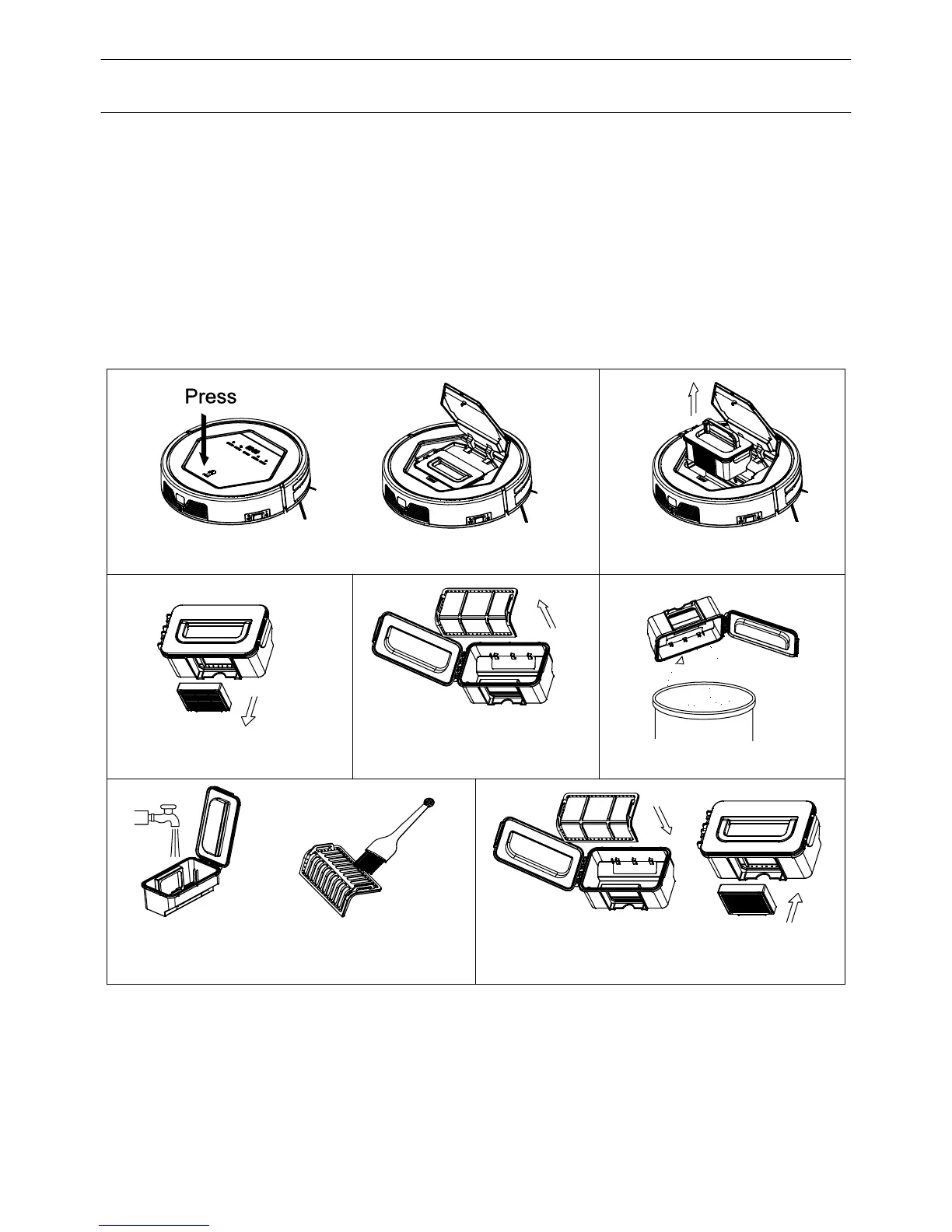
A. Press PUSH to open the cover.
B. Take out the dust bin.
C. Take out the HEPA.
E. Empty the dust bin.
D. Open dust bin cover,
take out primary filter.
G. Install the primary filter and HEPA
back into the dust bin.
F. Wash dust bin and filter,Clean the
HEPA with brush.
1. Cleaning side brushes
Note: Before replacing side brushes, check and make 'L','R' mark on side brush match
2. Cleaning dust bin and filters
side brush is 12 months.
Empty and clean dust bin after each use, following the steps as shown in the figures
below:
with the 'L','R' mark on bottom base of the robot .
Note:
a. Wash HEPA filter after used for 15~30 days. Max life span for HEPA and filter
is 24 months.
b. Reinstall the HEPA and primary filter after they are fully dry.
c. HEPA and primary filter could be replaced if needed.
d. Do not dry the filters under sunshine directly.
15
Clean the side brush when it gets dirty and replace it if it's damaged. Max life span for
Product Maintanance



 To Next Page