Horizontal-Schrumpfgerät
Horizontal Shrinking Device
HS 1100-P
Copyright © Diebold 2017-04 Ersteller: kh
19.6. Changing Standard Parameters
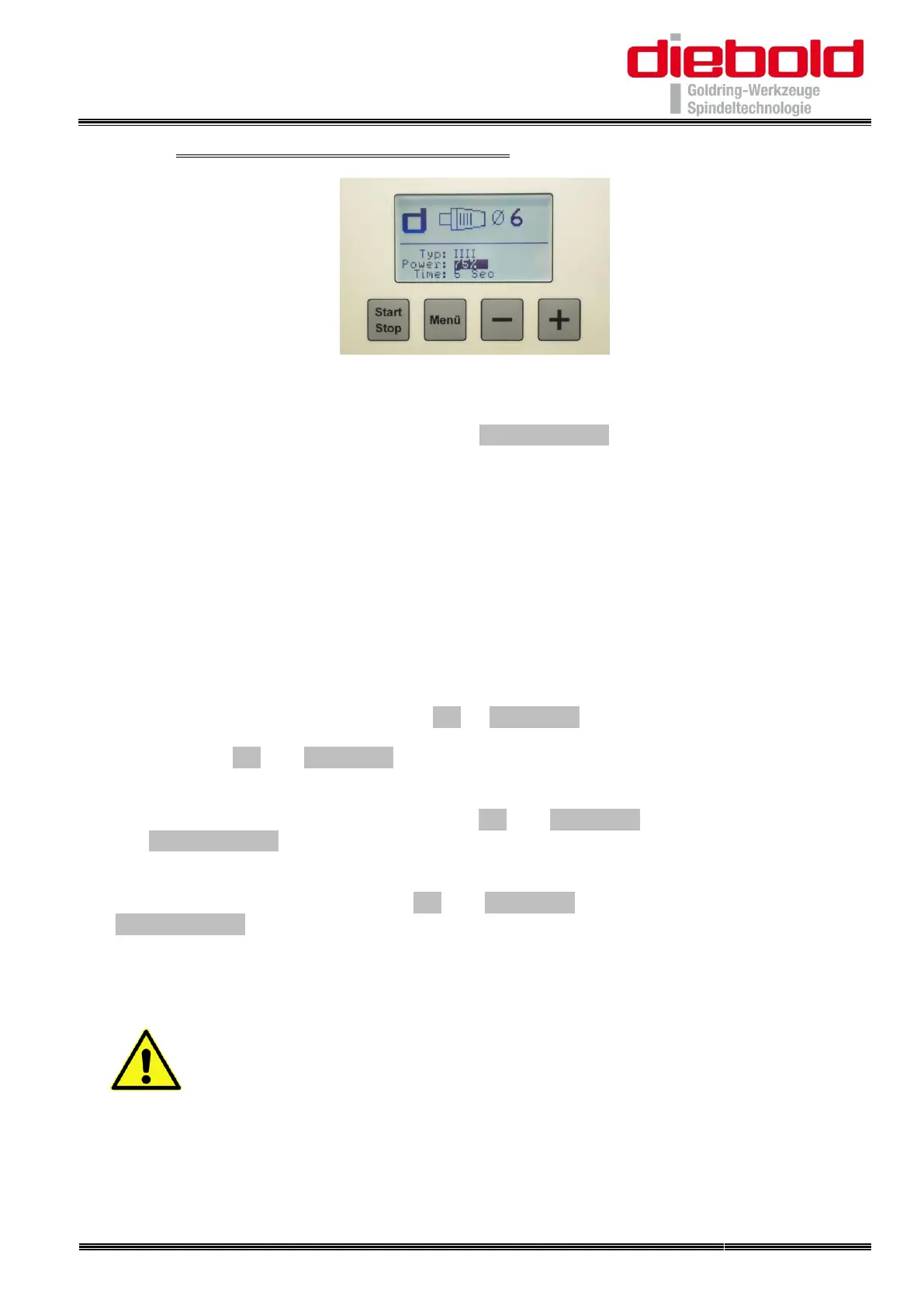
34. Turn on the unit with the main switch
35. Select the shrink chuck type with the ”Menü“ button
Menu and the shrink chuck type will appear:
Manual: Shrinking without parameters
Standard: DIN holder contour (without grooves)
II TSF: Slim holders (2 grooves)
IIII Pyroquart: Holders with Pyroquart contour (4 grooves)
TER 11 to 32: Shrink Collet TER / ER 11 to ER 32
36. Select the tool shank-Ø with the ”+“ or ”–“ button
37. Press the ”+“ and ”–“ button simultaneously
38. The power level flashes in the display when you release the buttons:
Select the required power level with the ”+“ and ”–“ button and confirm by pressing
the ”Menü“ button
39. The time flashes in the display:
Select the required time with the ”+“ and ”–“ button and confirm by pressing the
”Menü“ button
40. Parameter is successfully stored
ATTENTION!
The shrink fit chucks can be damaged by overheating through
changing the default parameters.


 To Next Page