If you have trouble with any of the steps above, please refer to Section 13.0
Troubleshooting Basic Operation.
3.0 Preparing Your Locomotives
You will be able to run one locomotive without a decoder on your Zephyr Xtra
system along with the ones with decoders. So, even if you don’t have a loco
with a decoder, you can still hook up your new system and try it out right
away!
You will need to install decoders in the locomotives you want to run in order to
take full advantage of your new Digitrax Command Control system. The
decoder allows you to individually control each locomotive’s speed, direction,
lights and other functions. We don’t include decoders with our starter sets
because there are so many different decoders available for so many different
locomotives. We want to be sure you don’t spend money on a decoder that may
not be the best choice for your particular locomotives. Your dealer can help you
select the best decoder choices for your layout from Digitrax wide variety of
decoders. Our web site www.digitrax.com contains information about decoder
installations and which decoders are best for particular locomotives.
A Digitrax Decoder Manual is included with all Starter Sets so you will have it
available to use with any Digitrax decoders you purchase.
4.0 Preparing Your Layout
Digitrax simplifies layout wiring for new layouts. If you already have a layout,
you probably won’t need to rewire to install your Digitrax Zephyr Xtra. Since
the DCC signal travels with the power on the rails, you must have power to the
track in all locations so that the decoders can receive the signal and respond to
your commands.For more information about layout wiring visit our web site.
5.0 DCS51 Front Panel Controls And Indicators
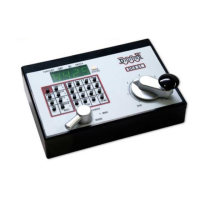
Before you select and run a locomotive, take a few minutes to look at the
DCS51’s controls and display.
. The Throttle Knob is the large silver and black knob on the right side of
the DCS51. The Throttle Knob controls locomotive speed from
'(#$ to
) speed. Turn it clockwise to increase speed and counter clockwise to
decrease speed.
. The Direction Control Lever is the small silver lever (located on the left
side of the DCS51) that controls the locomotive’s direction of travel,
#&+& or &*&'. This knob also controls the &.
. When you have a loco address selected and the Direction Control Lever
lever is in the & position, the Brake Indicator Light will blink until
the loco stops and then remain on steady to let you know that the & is
on. When you move the lever to #&+& or &*&', the Brake
Indicator Light will flash to let you know that the brake is released and the
loco is accelerating to the speed shown on the Throttle Knob.
. There are 24 -' on the DCS51’s keypad, including a full numeric key-
pad for direct entry of numeric values. Some keys have more than one use
©2012 Digitrax, Inc. www.digitrax.com 9


 To Next Page