©2012 Digitrax, Inc. www.digitrax.com 24
6/;57;5L&3/27;5A6331<23?22?3@@
1. Be sure that only the locomotive you want to program is on the program-
ming track if you use Direct, Paged or Physical CV programming.
2. Press the $&# key on the DCS51 to enter programming mode. The
DCS51 will display one of the programming modes available. Digitrax rec-
ommends the Direct Mode when you are using the programming track. If
you press the PROG key repeatedly, you will cycle through the following
programming choices: dir, OPS, PAGE, PHYS. See Table 1 for display
sequence.
Once the mode you want to use is on the screen you can go to step 3.
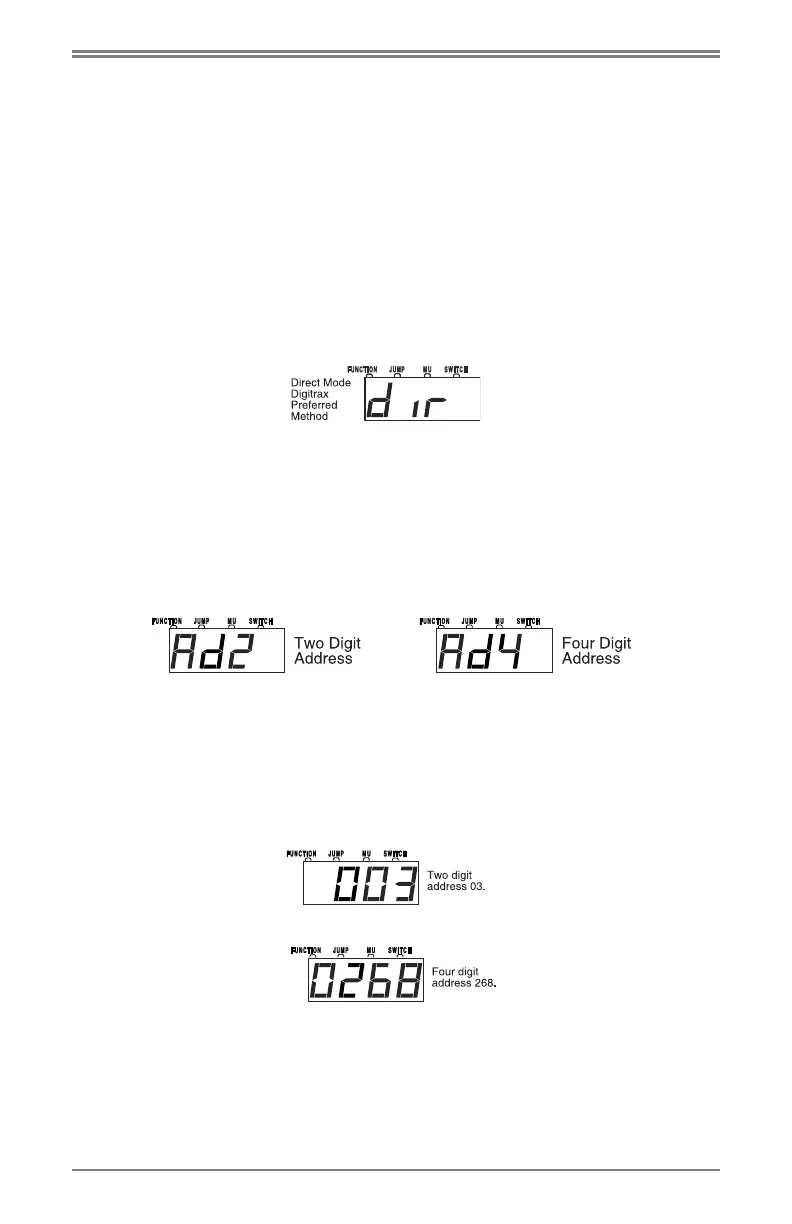
For example, to use Direct mode stop pressing the $&# key when the fol-
lowing screen appears:
If you are not using Direct programming, see Table I: DCS51 Programming
Display Table at the end of Section 16.3 for information about how your
display will be different from this example.
3. Press the ## key and you will see either Ad2 or Ad4 in the display.
Ad2 = two digit address (address must be between 01-127)
Ad4 = four digit address (address must be between 0128-9983)
Each time you press the ## key the display will toggle between Ad2 and
Ad4. When the one you want to use is in the display move to the next step.
4. Press the
*& key to to read back the address programmed into the
decoder. Your display will show Ad2 or Ad4 while it is reading then it will
display the decoder’s currently programmed address.
When reading back addresses, 2 digit addresses are displayed with 3 digits,
(001 through 127) and 4 digit addresses are displayed with 4 digits (0128
through 9983). Address 00 is reserved for analog locomotive operation.
For example, if 03 is the two digit address, the read back display will show:
If 268 is the four digit address, the read back display will show:
5. To change the address of the loco, press the
## key to choose Ad2 or
press the ## key again for Ad4. Enter the address number you want to
use for the loco, using 1through 127 for a two digit address (AD2) and 128-
9999 for a four digit address(AD4).
HINT: Many operators use the locomotive number or the last two digits of
the number for the decoder/locomotive address.


 To Next Page