'3931A&B;>B7==32 <1<:<A7C3@
Most new decoders and DCC-equipped locomotives have their decoder address
factory set to “03.” Other DCC-equipped locomotives may have had their
address changed. To run a DCC-equipped loco, you must know its address.
For detailed instructions on reading the address, see the section 16.2 Steps 1-4.
For now, let’s assume you are using a brand-new, DCC-equipped loco that is
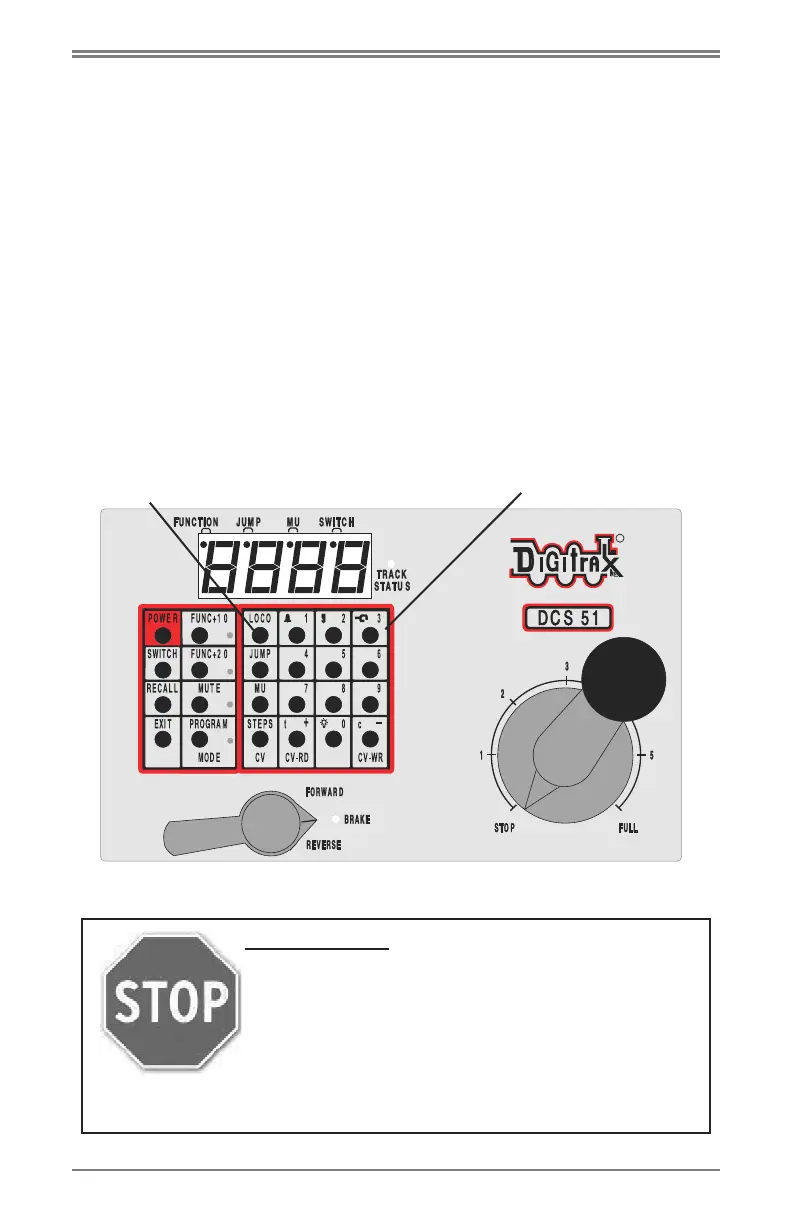
set to address “03.” To select this locomotive, press the key labeled “LOCO”
ONCE, enter “03” on the keypad, and press “LOCO” once again. You have
selected a DCC loco!
To run the locomotive, move the Direction/Brake lever to either
‘FORWARD” or “REVERSE”, depending on which way you want the loco to
move, and slowly turn the Throttle clockwise until the locomotive starts to
move. To stop the loco, either turn the Throttle back to “STOP,” or shift the
Direction/Brake lever to “BRAKE.”
##Lkey
Keypad
STOP HERE!
This is the end of the Quick Start Section of the
manual. You should now be able to run both a DCC
locomotive and a non-DCC locomotive at this point.
Enjoy running trains for a few minutes before you dive
in to the rest of the manual. The remaining sections of
the manual go into more detail about the capabilities of
the Zephyr Xtra. When you are ready to learn more, read on!
©2012 Digitrax, Inc. www.digitrax.com 8



 To Next Page