6.2 Troubleshooting
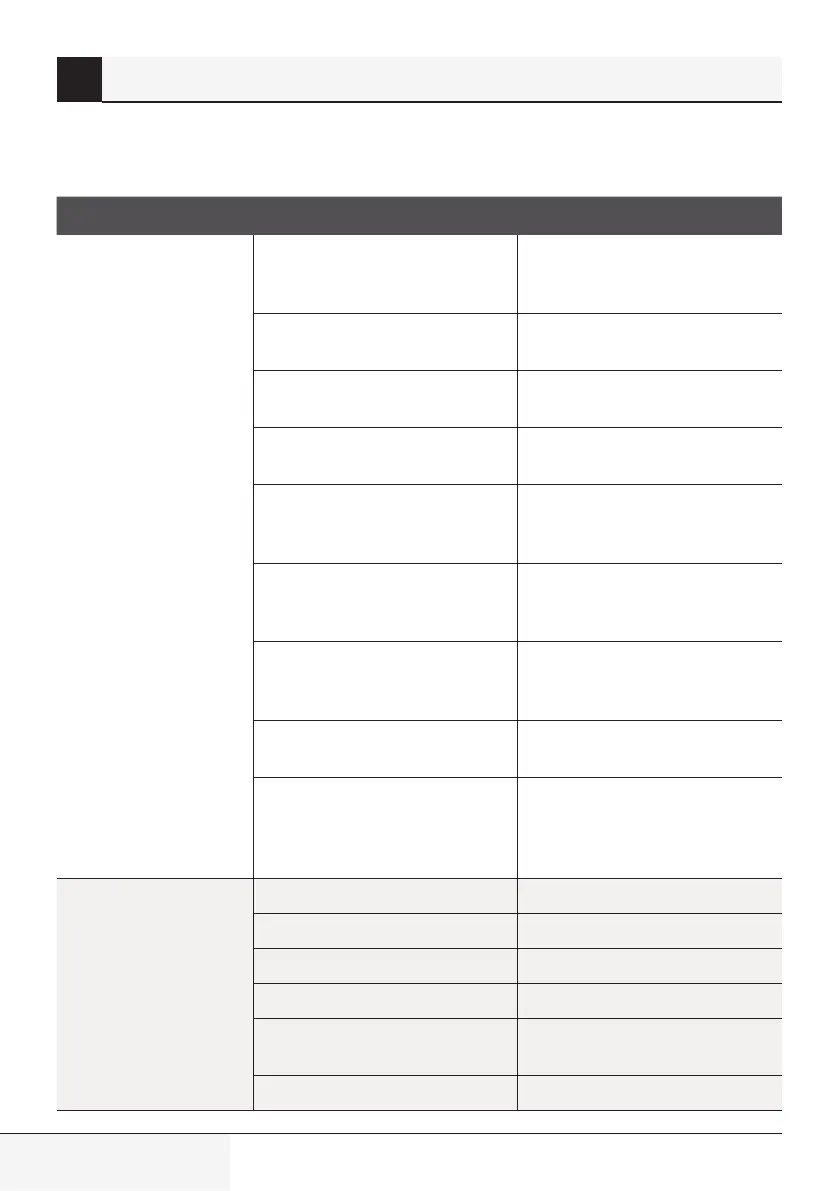
When troubles occur, please check the followng ponts before contactng a repar company.
Problem Possible causes solution
Poor cooling
performance
Temperature settng may be
hgher than ambent room
temperature
Lower the temperature settng
The heat exchanger on the ndoor
or outdoor unt s drty
Clean the affected heat exchanger
The ar flter s drty
Remove the flter and clean t
accordng to nstructons
The ar nlet or outlet of ether unt
s blocked
Turn the unt off, remove the
obstructon and turn t back on
Doors and wndows are open
Make sure that all doors and
wndows are closed whle
operatng the unt
Excessve heat s generated by
sunlght
Close wndows and curtans durng
perods of hgh heat or brght
sunshne
Too many sources of heat n
the room (people, computers,
electroncs, etc.)
Reduce amount of heat sources
Low refrgerant due to leak or
long-term use
Check for leaks, re-seal f
necessary and top off refrgerant
SILENCE functon s actvated
(optonal functon)
SILENCE functon can lower
product performance by reducng
operatng frequency. Turn off
SILENCE functon.
The unit is not
working
Power falure Wat for the power to be restored
The power s turned off Turn on the power
The fuse s burned out Replace the fuse
Remote control batteres are dead Replace batteres
The Unt’s 3-mnute protecton has
been actvated
Wat three mnutes after
restartng the unt
Tmer s actvated Turn tmer off
6 Troubleshooting
Splt-type room ar condtoner / User Manual


 To Next Page