Page 26
Reflections Collection
11.5 Turning the Stereo ON
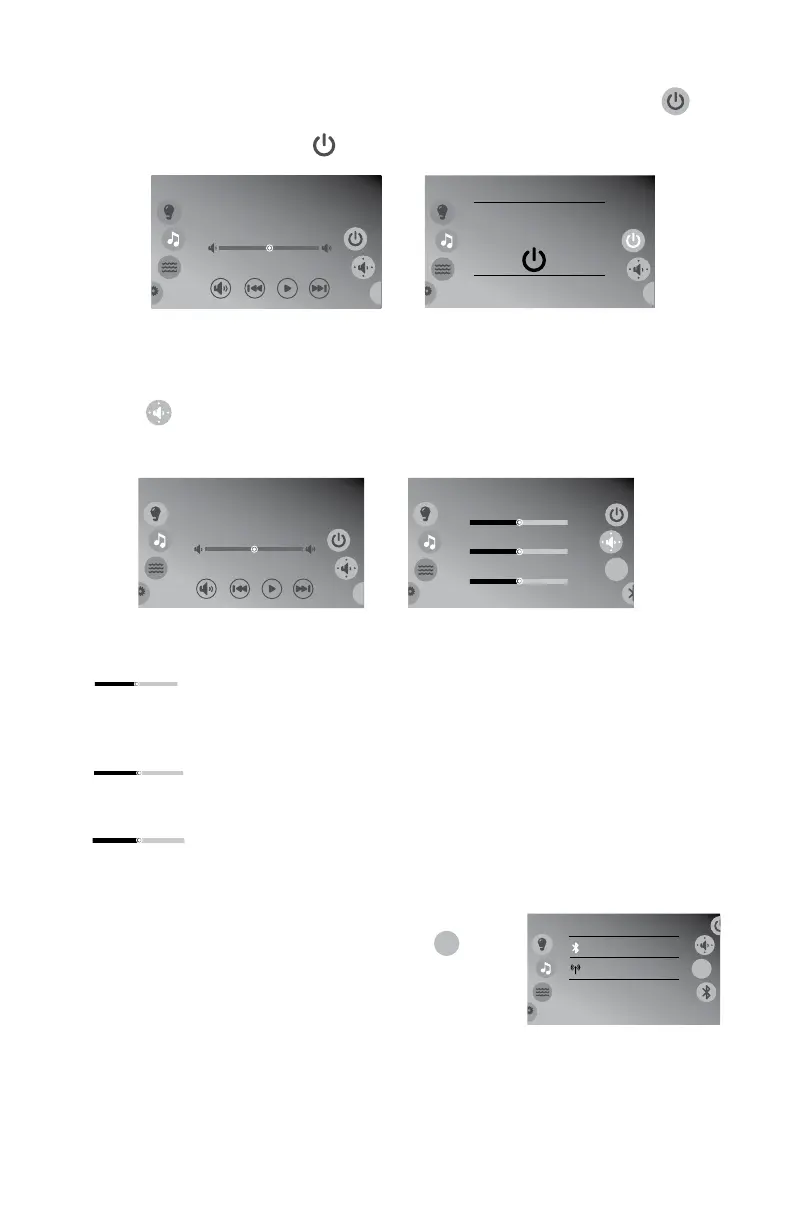
1. From the stereo menu, Figure 11.5a, press the power button ( )
to bring up the power on display, Figure 11.5b.
2. Press the power icon ( ) in the middle of the display.
11.6 Audio Settings Submenu
To enter the Audio Settings Menu, slide the right wheel to the settings
button ( ), Figure 11.6a. The display will change to Figure 11.6b. The
Audio Settings menu offers an enhanced audio experience by providing
adjustments to certain settings.
= Balance Slider: Slide from side to side to increase
and decrease the balance level between the left and
right.
= Fade Slider: Slide from side to side to increase and
decrease the fade level between the front and back.
= Subwoofer Slider: Slide from side to side to increase
and decrease the subwoofer level from minimum to
maximum.
11.7 Source Menu
Slide the right wheel to the source icon (
src
)
to select an audio source to listen to, Figure 11.7a.
Only the devices available will be displayed.
Bluetooth
Audio is off
8:01 am
Bluetooth
Power
Press icon to turn on the
audio
8:01 am
Figure 11.5b
Figure 11.5a
Bluetooth
Speakers
8:01 am
Max
Front
Right
Balance
Fade
SubWoofer
Min
Rear
Left
src
Bluetooth
Audio is off
8:01 am
Figure 11.6a
Figure 11.6b
Right
Balance
Left
Front
Fade
Rear
Max
Min
Bluetooth
Source
Bluetooth
FM
8:01 am
src
Figure 11.7a







 To Next Page