Page 30
Reflections Collection
12.0 Programming Instructions
Your D1 hot tub is equipped with setting menus that allow you to program
and activate different components of the hot tub. With our
D1 SmartHUB™ Touch Control programming your hot tub has never
been easier. In the sections that follow, we will guide you through the
processofprogrammingthehottubtotyourpersonalcomfort.Slide
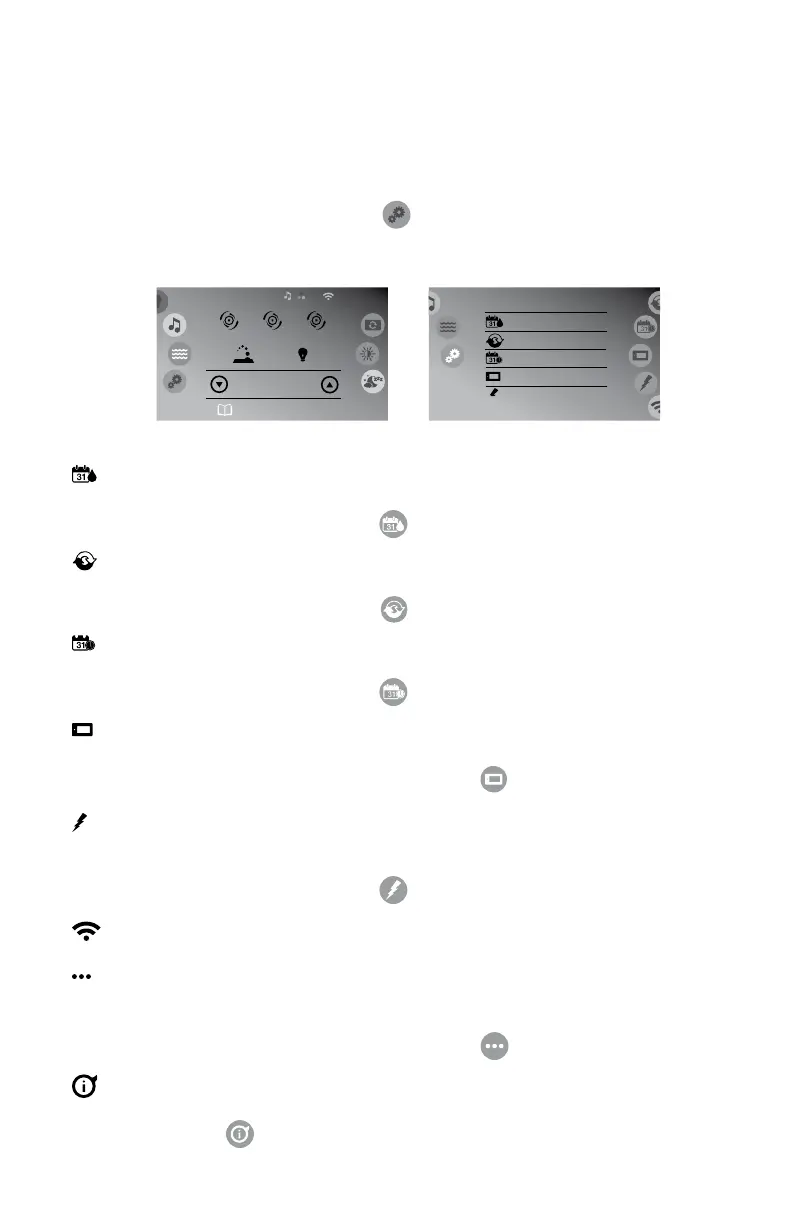
the left wheel to the settings icon ( ) to enter the Settings Menu,
Figure 12.0a and 12.0b. Slide the right wheel to select one of the settings
options.
Water Care
= Water Care: Provides access to the water care
programming, page 31. You can also access the
menu by tapping .
Maintenance
= Maintenance: Provides access to the reminders and
error log menu, page 33. You can also access the
menu by tapping .
Date & Time
= Date and Time: Provides access to the date and time
programming, page 34. You can also access the
menu by tapping .
Keypad
= Keypad: Provides access to the units, contrast, display
view and language settings, page 35. You can also
access the menu by tapping .
= Electrical Conguration: Provides access to the
electrical programming, page 36. This menu is to be
accessed by the dealer only. You can also access the
menu by tapping .
Wi-Fi
= Wi-Fi: Provides access to the Wi-Fi settings, page 36.
= Miscellaneous: Lets you program a “Warm weather”
settingthatallowslteringtooccureventhoughthe
water temperature is high, page 37. You can also
access the menu by tapping .
About
= About: Displays software and system information,
page 37. You can also access the menu by tapping
.
Settings Settings
Water Care
Maintenance
8:01 am
Keypad
Date & Time
75° F
Jet 1
Watercare: Beginner
Heating to 100°F
Jet 2
Spa
8:01 am
Jet 3
Figure 12.0b
Figure 12.0a



 To Next Page