Page 23
Reflections Collection
= Time Indicator: The time will always be shown when
the Home Menu is displayed. The appearance will vary
depending on whether the clock is set to a 12-Hour or
24-Hourconguration,page34.Thedefaultsettingis
12-Hour.
Note: The time will automatically adjust for daylight saving time.
11.0 Operating Instructions
11.1 D1 SmartHUB™ Touch Control
Your D1 hot tub is equipped with a D1 SmartHUB™ Touch Control that
offers an advanced high resolution interactive touch screen. Many of the
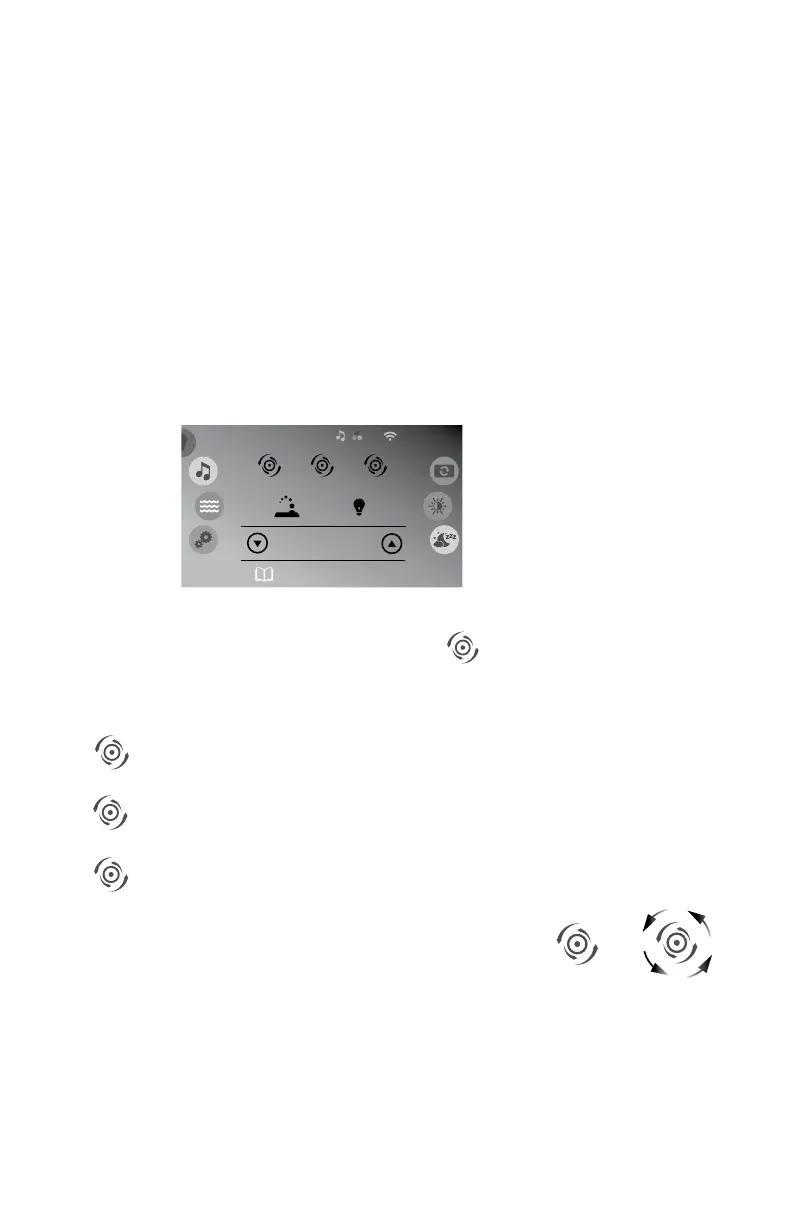
hot tub functions can be access through the Home Menu, Figure 11.1a.
11.2 Activating the Jets Pumps
From the Home Menu, (Figure 11.1a), tap to turn the Jets pumps
on. Anytime a pump has been manually turned on, it will automatically
turn off after approximately 30 minutes. If at this time you desire more jet
operation you may simply turn the pump(s) back on.
= Jet Pump 1 Button
= Jet Pump 2 Button (if equipped)
= Jet Pump 3 Button (if equipped)
1. Tap the Jet 1 button to turn the pump #1 on, in
low speed, tap again to turn the high speed on,
tap again to turn the pump off.
2. Tap the Jet 2 button to turn the pump #2 on
and off.
3. Tap the Jet 3 button to turn the pump #3 on and off.
Note: When a jets pump is on, the jets icon will spin.
75° F
Jet 1
Watercare: Beginner
Heating to 100°F
Jet 2
Spa
8:01 am
Jet 3
Figure 11.1a
Jet 1
Jet 2
Jet 3
JETS ICON
WHEN OFF
JETS ICON
WHEN ON



 To Next Page