Page 32
Reflections Collection
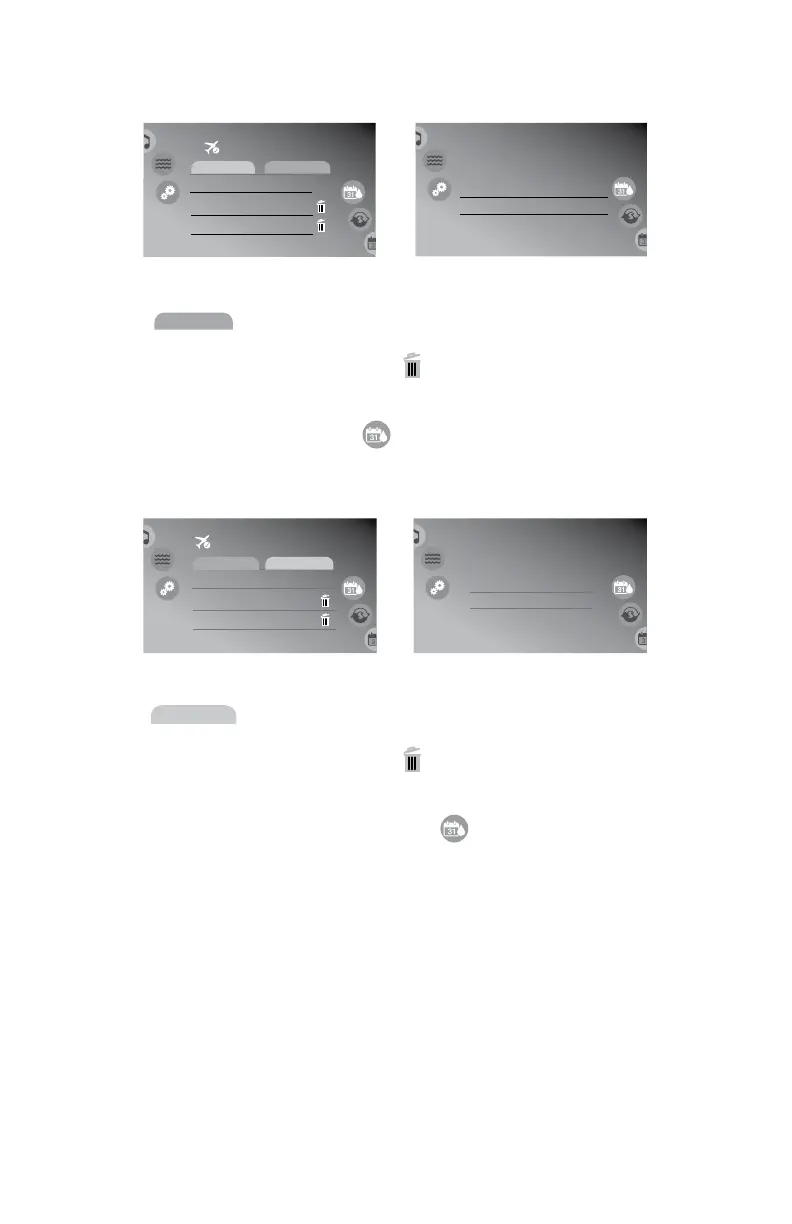
A. Programming the economy cycles for all modes
1. Tap
Economy (2)
to program cycles, Figure 12.1c.
2. Then tap the plus sign,
, to add a new cycle or tap the cycle to
change,
. The display will change to
Figure 12.1d.
3. Slide each column (Day, Start or Stop) and select the day and time
to program. When done, tap to return to the previous screen. Tap
again to return to the settings menu.
B. Programming the lter cycles for all modes
1. Tap
Filter cycle (2)
to program cycles, Figure 12.1e.
2. Then tap the plus sign,
, to add a new cycle or tap the cycle to
change,
. The display will change to
Figure 12.1f.
3. Slide each column (Day, Start or Duration) and select the day and
duration to program. When done, tap to return to the previous
screen. Tap again to return to the settings menu.
Settings Water Care
Away from home
8:01 am
Every day
Economy
Start Stop
1:00am 3:00am
12:00am 12:00am
Weekend
Economy (2)
Filter cycle (2)
+
Settings
Water Care :
8:01 am
Sunday
Monday
Weekend
Mon-Fri
6:30am 7:30am
7:00am
StartDay Stop
7:00am
6:00am
8:00am
7:30pm
8:00pm
8:30am
9:00am
Every day
Figure 12.1c
Figure 12.1d
Settings Water Care
Away from home
8:01 am
Every day
Filter cycle
Start Duration
1:00am 0h30
12:00am 0h20
Weekend
+
Economy (1)
Filter cycle (2)
Settings Water Care :
8:01 am
Sunday
Monday
Weekend
Mon-Fri
6:10am 12h10
12h00
StartDay Duration
6:20am
6:00am
12h20
6:30pm
6:40pm
12h30
12h40
Every day
Figure 12.1e
Figure 12.1f



 To Next Page