Page 39
Reflections Collection
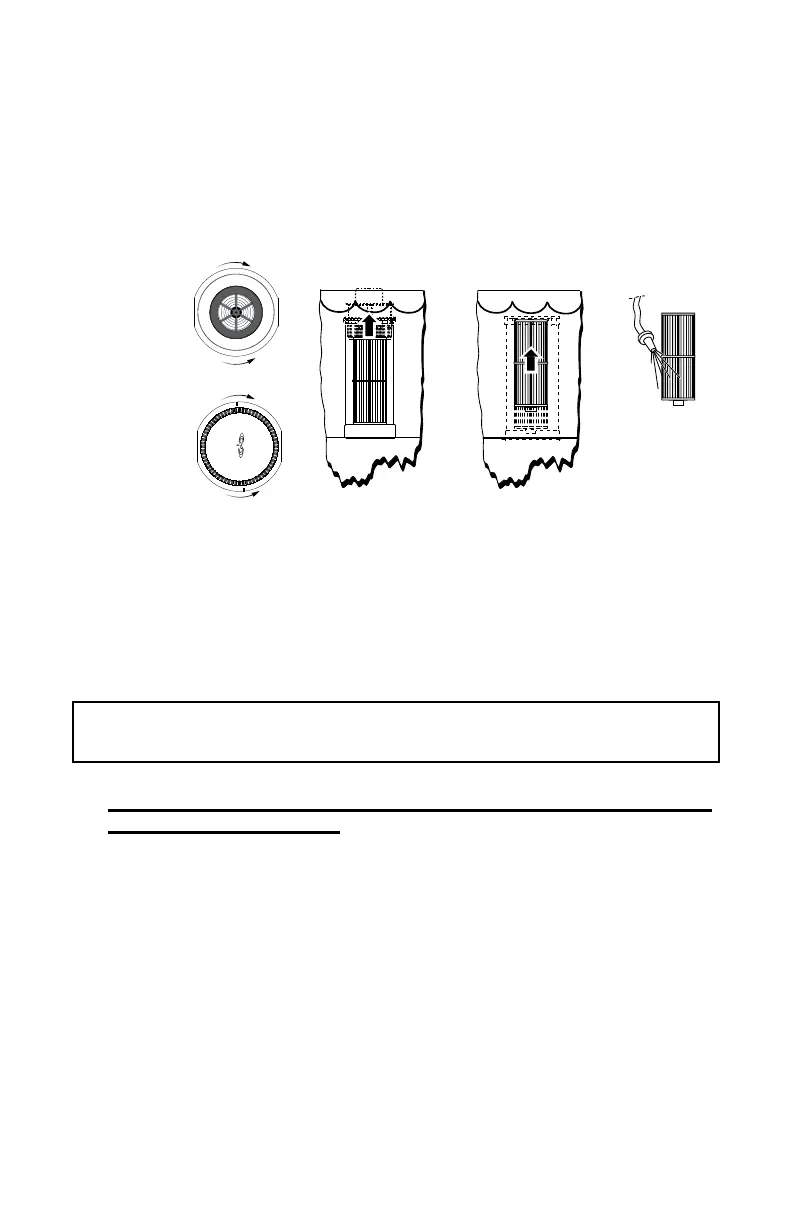
3. ToaccesstheUltraPurelter,turnlidcounterclockwiseuntiltheats
line up with the securing tabs and pull, Figure 13.1b.
4. Removeeachlterbytwistingit¼turncounterclockwiseandlifting
out of its canister, Figure 13.1d.
5. Rinsethelterswithagardenhoseandahigh-pressurenozzle,
Figure 13.1e.
6. Reinstalltheltersbyreversingthestepsforremoval,replacethe
skimmer basket or lid and turn the power back on at the GFCI.
B. Cleaning the UltraPure Inner Filter Screen
The Filter Screen is a black plastic perforated cylinder located at the
bottomofthecanisterthatholdsthelter.Itnormallyrequiresno
maintenance.However,ifthespafrequentlysaystocleanthelter,orif
thespaisreporting“lowwaterow,”cleanthescreeninadditiontothe
lter(s).
IMPORTANT: To prevent debris from getting into the pump, be sure
toremoveanyoatingdebrisBEFOREremovingthelterscreen.
1. Make sure that the breaker, to the hot tub, is OFF or put the hot
tub in “Stand By” mode!
2. First,removethelter(s)asdescribedintheCleaningtheFilter
Cartridges section.
3. ThenlocatetheblackplasticFilterScreenatthebaseofthelter
canister, Figure 13.1f.
4. Removethelterscreenbyinsertingthetipofaat-blade
screwdriver into the slot as shown, Figure 13.1g, and gently apply
outward pressure until the catch releases.
5. Thenlifttheblackscreentoremoveitfromtheltercanister,Figure
13.1h. Clean the screen with water, using pressure from the inside of
each screen.
6. PresstheFilterScreenbackontothebaseofthespaltercanister.
7. Replacethelterintoitscanisterandreplacethelid.
8. Then turn the power back on or exit the “Standby” Mode, if it was
used, as described above.
CARTRIDGE
O
F
F
O
F
F
O
N
Figure 13.1a
Figure 13.1b
Figure 13.1c
Figure 13.1d
Figure 13.1e



 To Next Page