8
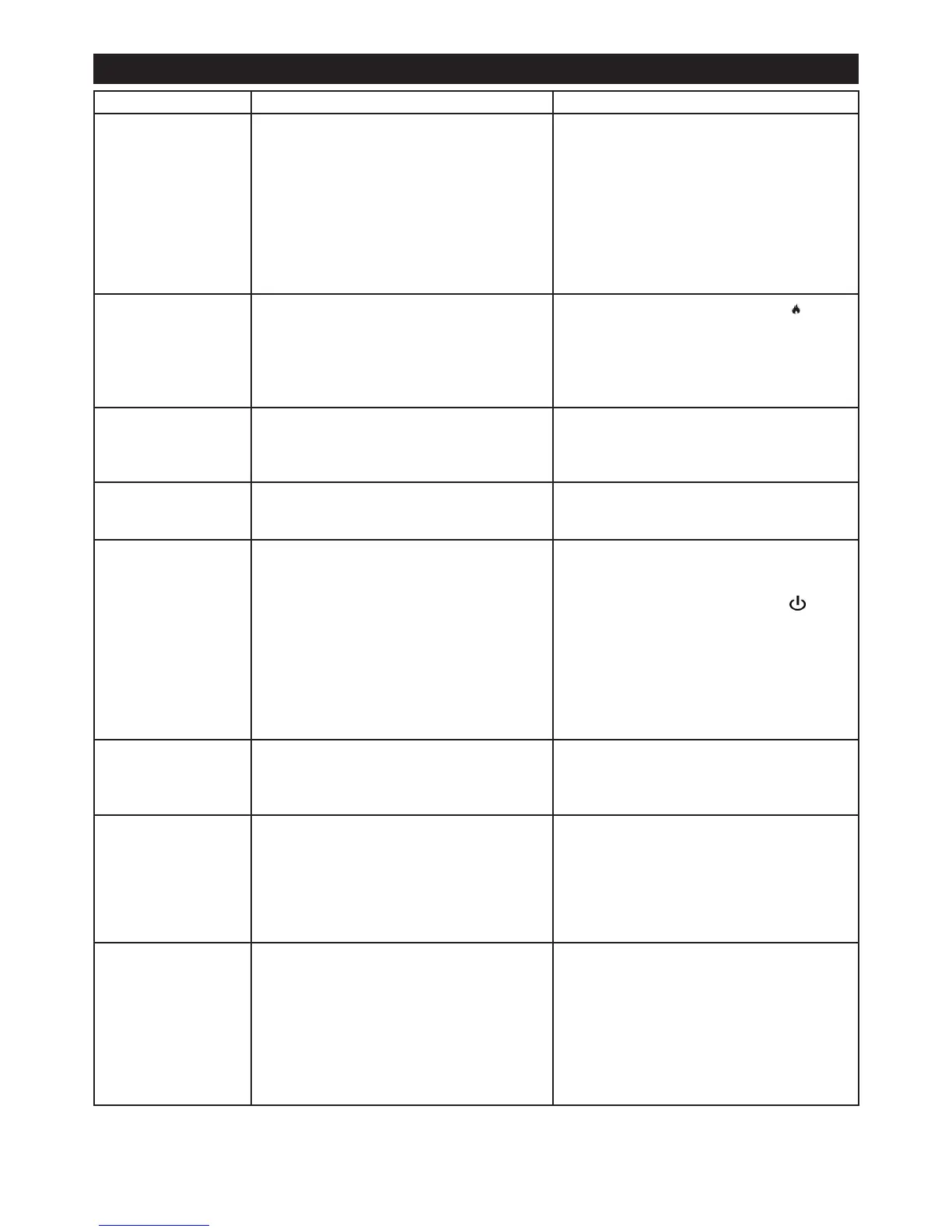
Symptom Cause Corrective Action
The ame effect will
not start.
Mains plug is not plugged in.
Low water level.
Low voltage connector not connected prop-
erly. (See Fig.10)
Check plug is connected to wall socket cor-
rectly.
Check that the water tank is full and there is
water in the sump.
Check that the connector is inserted correct-
ly. (See Fig.10)
The ame effect is too
low.
Flame effect control knob is set too low.
The Disc in the transducer might be dirty
Increase level of ame by pressing on
your remote or receiver
Clean the Disc with a soft brush. See ‘Main-
tenance.’ for a step by step procedure.
Unpleasant smell
when unit is used.
Dirty or stale water.
Using unltered tap water.
Clean the unit as described under mainte-
nance.
Use only ltered tap water.
The ame effect has
too much smoke.
Flame effect setting is too high. Turn down the ame effect. Give the ame
generator some time to adjust to the new
setting.
The product has
stopped working and
the LED’s are blinking
twice
This means that the product has run out of
water
Lift off the fuelbed and press the switch to the
off (0) position. Lift off the bottle, take it to a
tap and rell. Replace the bottle and press the
switch to the on (I) position. Press to turn
the product back on.
For product that are connected to mains water
switch the product off. Check that there are no
leaks in the tubes check that the ball valve is
in the on position. Once the mains water has
been re-established turn back on the product
as mentioned above
Product will not op-
erate. LED’s continu-
ously to blink twice
The product has no water Switch off the product. For products that use
the water bottle(s), rell the bottle(s). For
products connected to mains water check the
water supply at the inlet of the product
Product will not op-
erate. LED’s contin-
uously to blink once
every eight seconds
The product has an overow of water Switch off the product. For products that use
the water bottle(s), check the bottle lid and
ensure there is no damage to the spring or
seals. For products connected to mains wa-
ter, check all connections. If problem persists
turn the ball valve to the off position and con-
tact your Customer Support for assistance.
Product will not op-
erate. LED’s contin-
uously to blink four
times
The product did not ll from minimum
volume to maximum volume in the allotted
time. This is a safety precaution to alert the
customer to a water supply fault
Switch off the product. For products that use
the water bottle(s), check the bottle lid and
ensure there is no damage to the spring or
seals. For products connected to mains wa-
ter, check all connections. Turn the ball valve
to the off position and check mesh lter,
located under the product at the water inlet,
by unscrewing the base of it to see that it is
not clogged with dirt and debris.
Troubleshooting




 To Next Page