9
Operating the Remote Control
Note, in order to lengthen battery life, the remote control will enter sleep mode if no button is pushed for 15 seconds. In
order to ‘wake’ the remote, press and hold ‘Button 6 - Enter’ for two seconds.
- Switching the Product On/Off
1. When the product’s main switch (Fig 27A) is switched on, the product will be in standby mode.
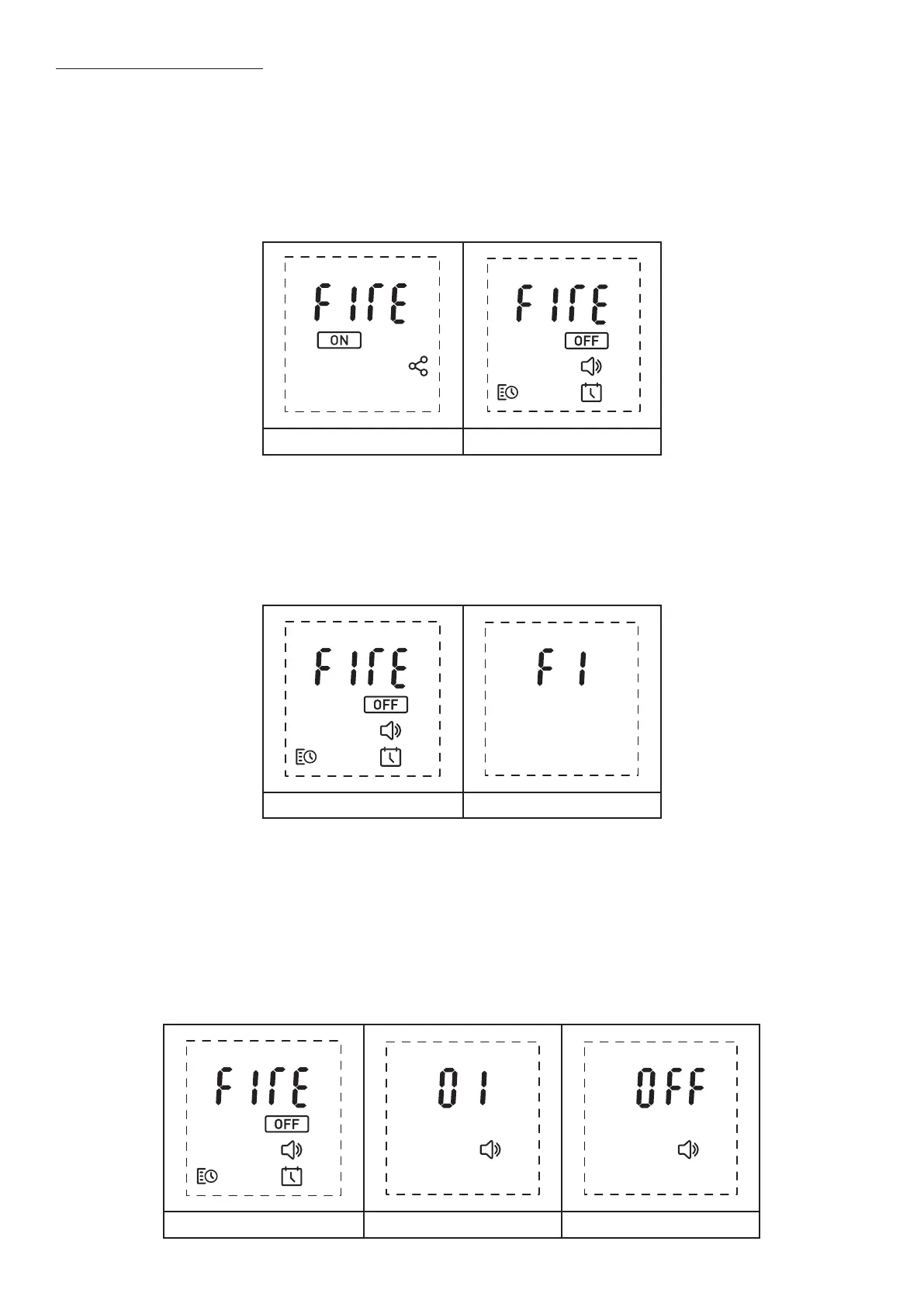
2. To turn the product on using the remote control, wake the remote and select the ashing ‘On’ icon from the on-
screen menu (Fig A).
3. When the product is operating, you will be presented with the default home screen (Fig B).
4. Select the ashing ‘Off’ icon using ‘Button 6 - Enter’ from the on-screen menu to switch the product off.
Fig A Fig B
- Setting the Flame Height
1. When on the home screen, push ‘Button 5 – Arrows’ to navigate up to the ‘Fire’ icon at the top of the screen (Fig A).
2. When the ‘Fire’ icon is ashing, press ‘Button 6 - Enter’ to enter the ame height adjustment menu (Fig B).
3. The ame height can be adjusted from F1-F6 using the ‘Button 5 – Arrows’.
Note, once the ame height setting has been changed, the command will automatically be sent to the product and a
conrmation beep will be heard. Give the product time to react to changes you may make.
Fig A Fig B
- Setting the Volume Level
1. When on the home screen, push ‘Button 5 – Arrows’ to navigate down to the Speaker icon at the bottom of the
screen (Fig A).
2. When the Speaker icon is ashing, press ‘Button 6 - Enter’ to enter the volume level adjustment menu (Fig B).
3. The volume level can be adjusted from ’01 - 06’ using the ‘Button 5 – Arrows’.
4. The product can be muted by pushing the left hand ‘Button 5 – Arrows’ when the volume level is at setting ‘01’. ‘Off’
will display on the screen to conrm that the volume has been muted (Fig C).
Note, once the volume setting has been changed, the command will automatically be sent to the product and a
conrmation beep will be heard.
Fig A Fig B Fig C





 To Next Page