16 www.dimplex.com
2.4
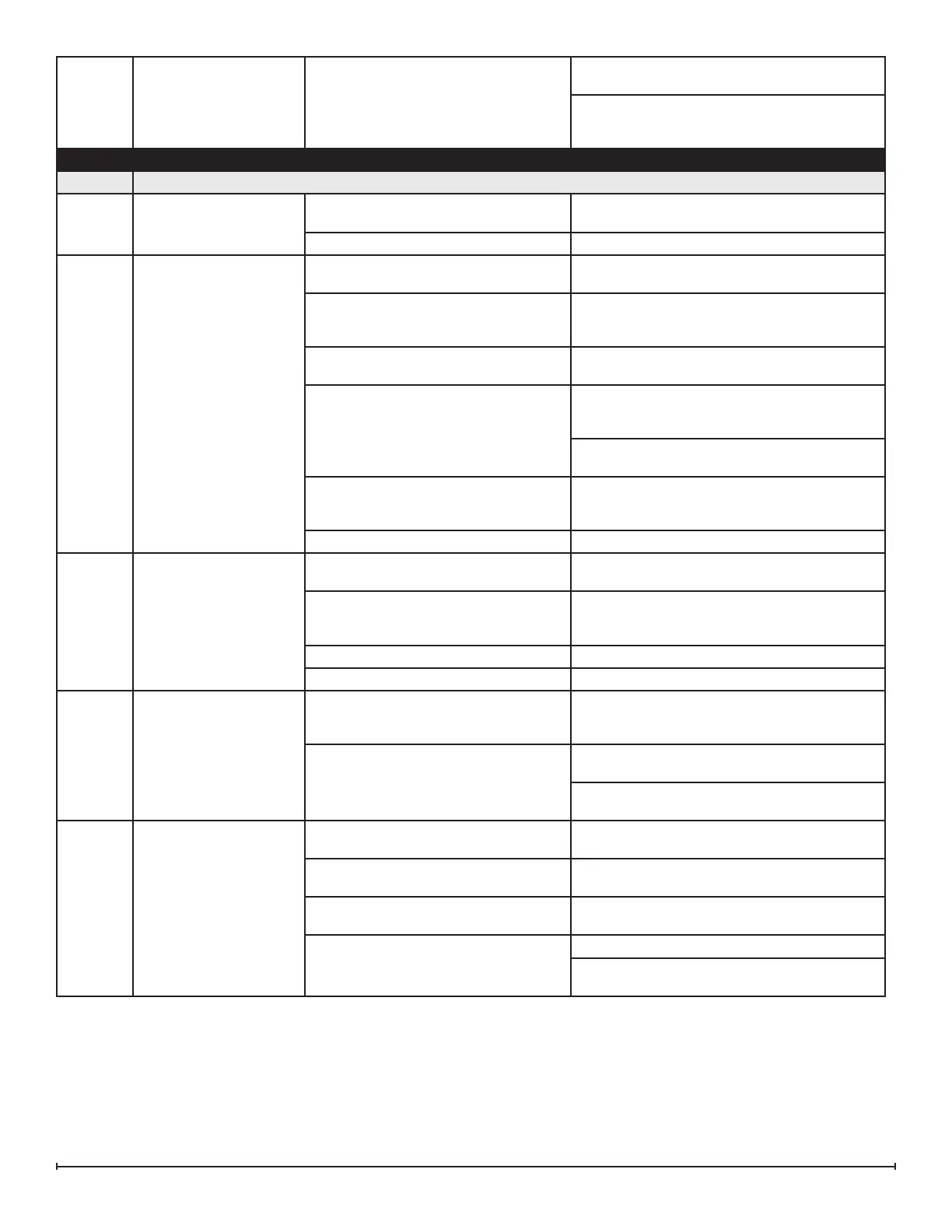
Unit continuously blinks
four times
Water is relling too slowly
Turn unit o with the main power switch. Wait 60
seconds before turning back on.
If problem persists, clean water lter and inspect
plumbing to make sure pressure is adequate
and nothing is obstructing water ow.
SECTION PROBLEM CAUSE SOLUTION
3.0 Flame
3.1
The ame eect has too
much smoke or is coming
out too fast
Flame eect control is set too high
Adjust the ame height on both the secondary
and/or primary controls
Filter is missing o of fan housing Insert fan lter
3.2
Mist is not coming out
evenly
Condensation building up on the mist
outlet
Remove the build up of condensation
Unit is not level
Adjust the feet under the unit to ensure that the
unit has been installed level, front to back and
side to side
Media is blocking air ow
Rearrange media to ensure mist outlet is not
being blocked
The transducer is not operating correctly
- put the unit in test mode to test the
transducer
If the transducer is running, ensure that the
emitter is clean and free of calcium deposits or
scaling
If the transducer is not running, replace the
transducer with the provided additional transducer
If using demineralized water, unit will not
produce a consistent mist
Add 1/8 tsp of table salt to water reservoir to
introduce electrolytes, only repeat when mist is
not being produced correctly
Water in unit is too cold Allow water to warm to room temperature.
3.3
The ame eect is too
low
Flame eect control is set too low
Adjust the ame height on both the secondary
and/or primary controls
Insucient air intake
Enlarge area for air to enter unit in such a way
that it will reach the bottom. Refer to to installa-
tion guide for requirements.
Transducer is defective Replace transducer
Flame is not rising Refer to section 3.5
3.4
Flame appears to be roll-
ing back into the unit
Insucient air intake
Enlarge area for air to enter unit in such a way
that it will reach the bottom. Refer to to installa-
tion guide for requirements.
The heating element is not operating
correctly- put unit in test mode to test the
operation of the heating element
If no click is heard from the relay, replace the
main board
If a click can be heard, but the element does not
get warm, replace the heating element
3.5
Mist is being produced
under the top cover, but
does not rise to create a
ame eect
Cord is located over emitter on trans-
ducer
Relocate cord so that mist is free to rise o of
transducer
Transducer is not installed correctly
Ensure that the connection has clicked into
place, and that transducer is seated correctly
Water in fan duct
Ensure there is no water in the duct that blows
air up to the ame
Fan is not operating correctly - put unit in
test mode to test the fan
Ensure fan lter is clean and dry
If fan is not working in test mode, replace fan. If
issue persists, replace main board




 To Next Page