17
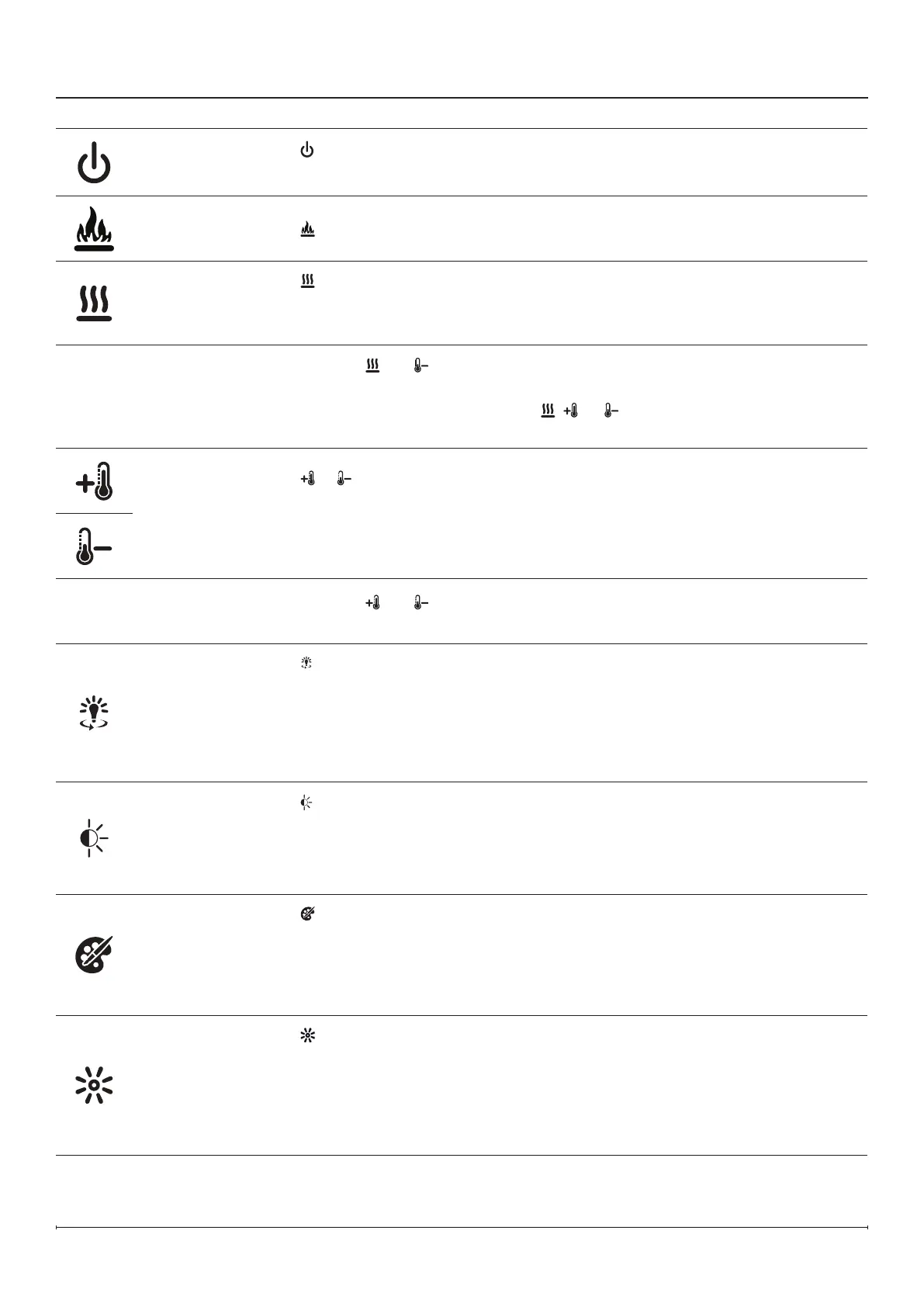
Standby
Press
to turn the unit on or put it in standby mode.
When the unit is turned back on, it will retain the previously used settings.
Flame
Press
to turn the ame effect on or off.
Heat
Press
to turn the heat on or off.
The replace can be operated in heat only mode by turning off the ame and color
effects.
Heat Disable
Press and hold
and at the same time for 2 seconds to disable or enable the heat
function. This action must be performed on the hidden touch controls.
When the heat is disabled and either the , , or is pressed, --- will appear on the
display.
Thermostat
Control
Press
or to adjust the temperature setting of the thermostat.
When the temperature setting is adjusted, the set temperature will ash for 2 seconds,
then the ambient room temperature will be displayed briey.
The temperature can be set from 5°C to 37°C (41°F to 99°F).
Temperature
Display
(°C ↔ °F)
Press and hold
and at the same time for 2 seconds. This action must be
performed on the hidden touch controls.
360° Light
Press
repeatedly to cycle through the different lighting options:
0 - Off
1 - White
2 - Yellow
3 - Red
This feature is only available when the ame effect is on.
Light
Sensor
Press
to turn the ambient light sensor on or off.
The light sensor will adjust the brightness of the replace based on the ambient light in
the room.
This feature is only available when the ame effect is on.
Flame Accents
Press
repeatedly to cycle through the different ame accent options:
Yellow and red ame base ( r)
Orange ame base ( o )
Flame base off
This feature is only available when the ame effect is on.
Brightness
Press
repeatedly to cycle through the brightness and icker modes:
Solid H - High Brightness
Solid L - Low Brightness
Cycle H - High Brightness with ickering
Cycle L - Low Brightness with ickering
This feature is only available when the ame effect is on.
Operation



 To Next Page