42
7 Before every use
7.1 Adjusting the sensitivity of the fall sensors
1. Make sure that the appliance is switched
off (position ‘0’).
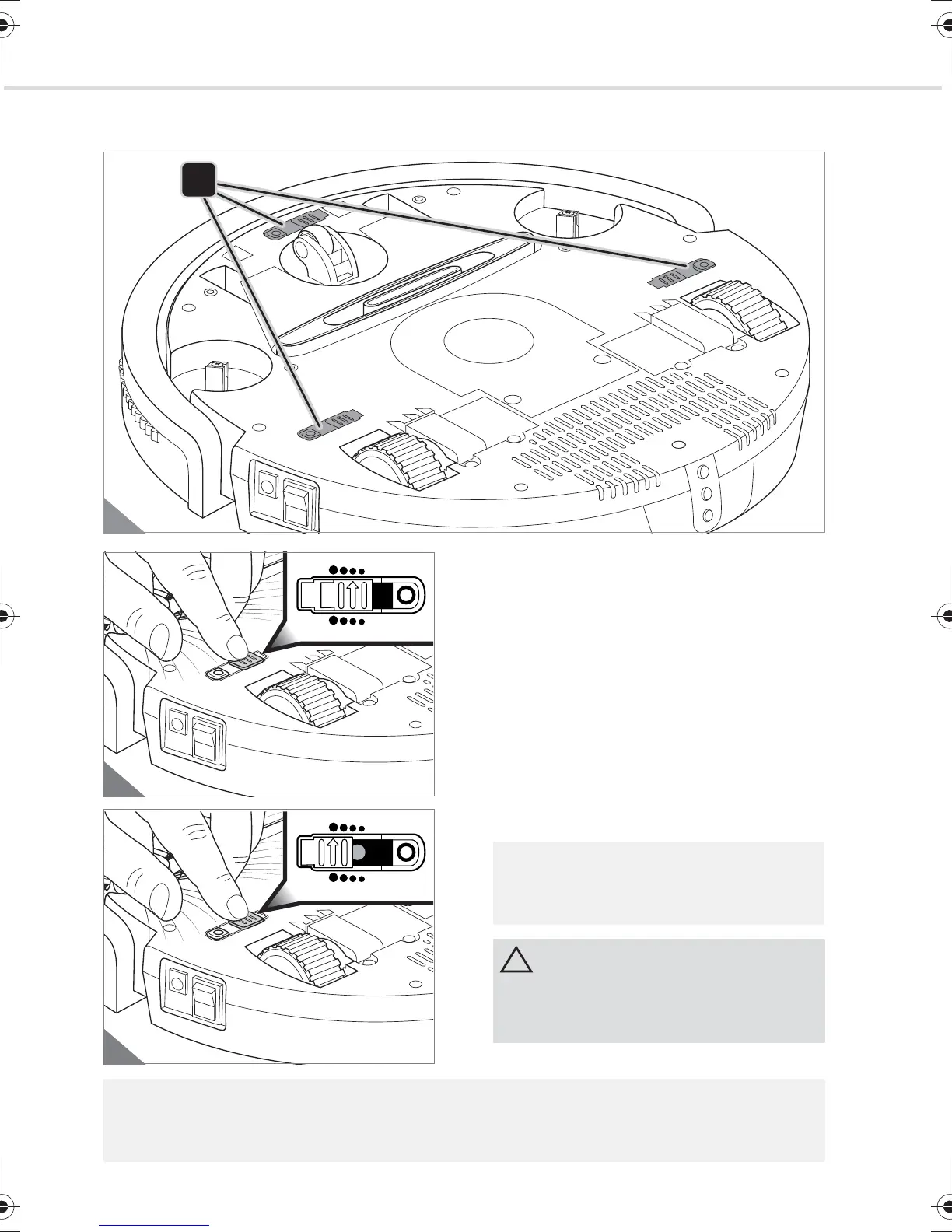
2. Adjust the position of the slide controller to
set the sensitivity of the 3 cliff sensors
(Fig. 19):
- Position 0 for light floors and low raised
edges
- Position 1 (Fig. 20) for light floors and
steps with a normal height
- Position 2 for dark floors and steps with
a normal height
- Position 3 (Fig. 21) for dark floors and
high steps
All 3 slide controllers have to be set to the
same setting.
Test the setting several times before you
allow the appliance to work unsupervised.
Clean the cliff sensors regularly.
If your robot constantly travels backward on dark floors, you will need to select the setting "3"
(Fig. 21).
M611.book Seite 42 Donnerstag, 2. Juli 2015 8:54 08




 To Next Page