21
Control Amplier Volume
When the remote control is set up to operate your
TV, the MUTE and VOLUME buttons adjust your
TV volume when in SAT mode. To use the remote
to adjust the volume of a remote-controllable audio
receiver or amplier instead of adjusting the TV’s
volume setting, use the steps on this page.
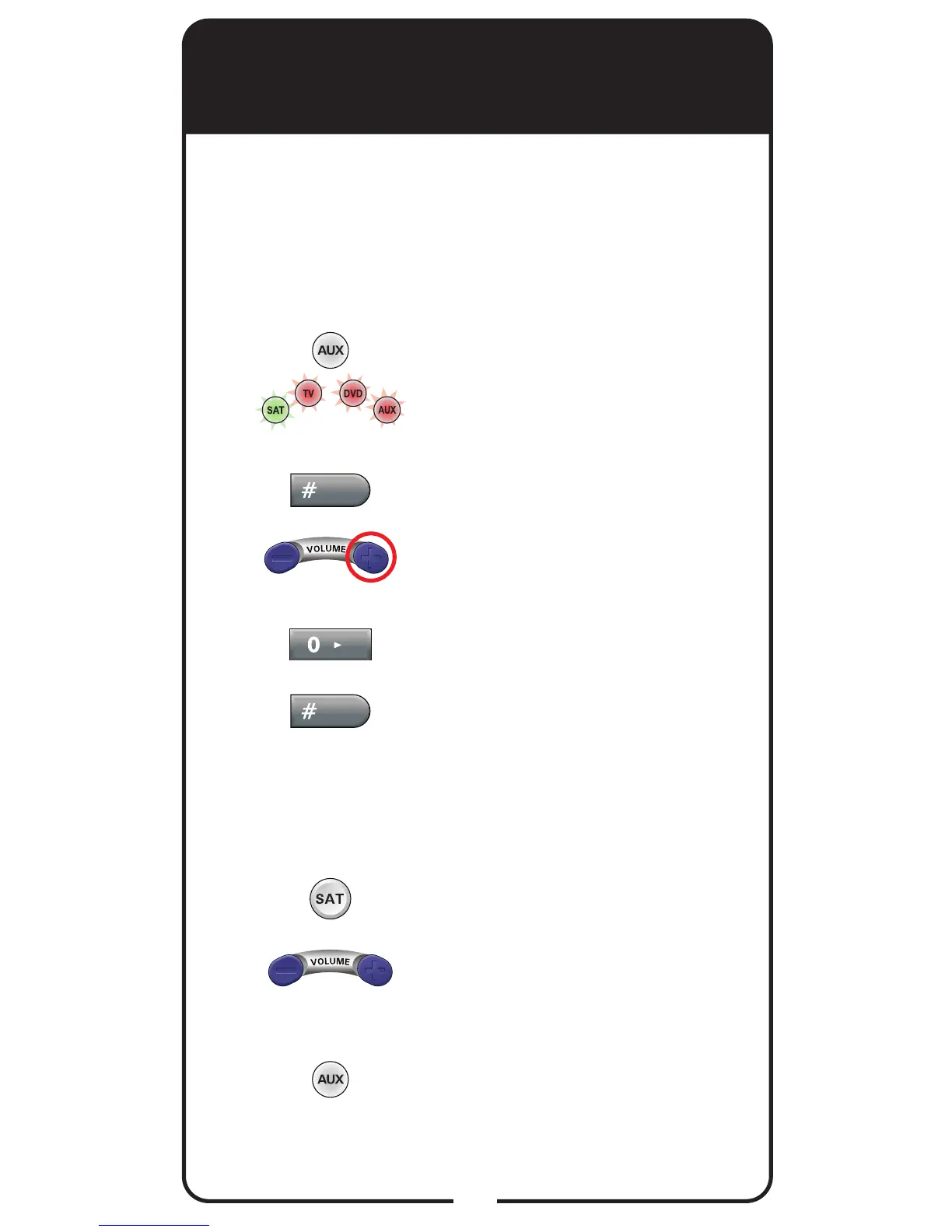
Press and hold AUX until all
Mode buttons are lit, then
release it. The AUX mode
button blinks.
Press POUND (#).
Press the plus (+) side of the
VOLUME button.
Press the 0 number button.
Press POUND (#). The AUX
mode button ashes three
times.
Press SAT.
Press the plus (+) and minus
(-) sides of the VOLUME
button.
Your tuner/amplier’s volume
changes, and the AUX mode
button lights.
1
2
3
4
5
6
7
8
Make sure the remote controls the amplier’s
volume in other modes:














 To Next Page