EasyManua.ls Logo

Dish Network 20.1 - Making UHF Remote Work with Receiver

Dish Network 20.1
64 pages
Print Icon
To Next Page IconTo Next Page
To Previous Page IconTo Previous Page
Loading...
5
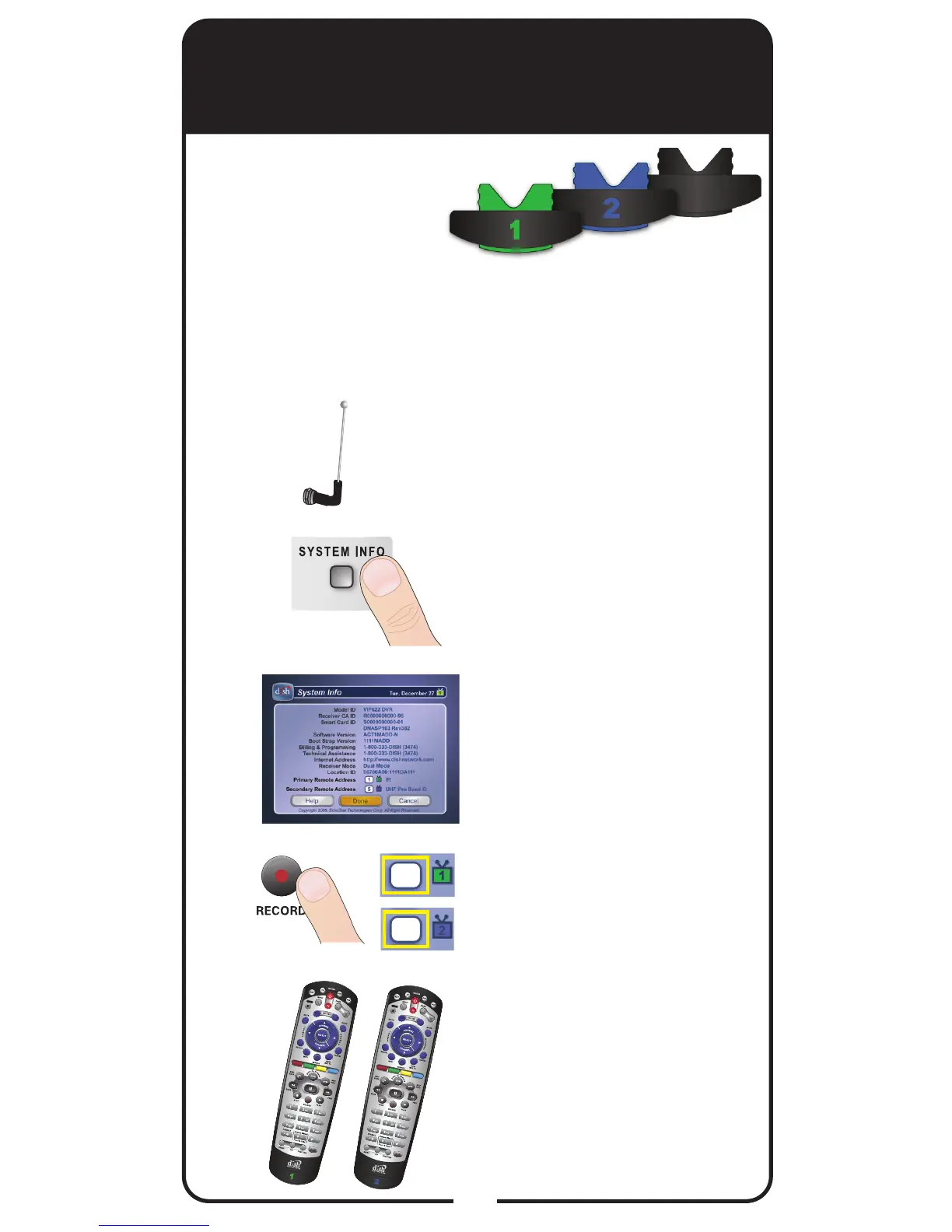
Making 21.1 UHF Remote
Work with Receiver
Verify the UHF antenna
is installed on the back
of the receiver.
Turn your receiver and
TV on, and press
SYSTEM INFO on the
front of the receiver.
Conrm that you
see the System
Info screen.
Press RECORD on
your remote. The remote
address will probably
change on the screen.
Conrm that your remote
operates your receiver
by pressing remote
buttons. If this is not
working, go back to
step 4.
3
2
1
4
5
For 21.1 UHF
Use the following
instructions if you
have congured
your remote to use
UHF signals.
1
1
Note: Use these instructions if your receiver
does not support System Wizard.

Related product manuals