10
4. USE AND OPERATION INSTRUCTION OF WIRE
CONTROLLER
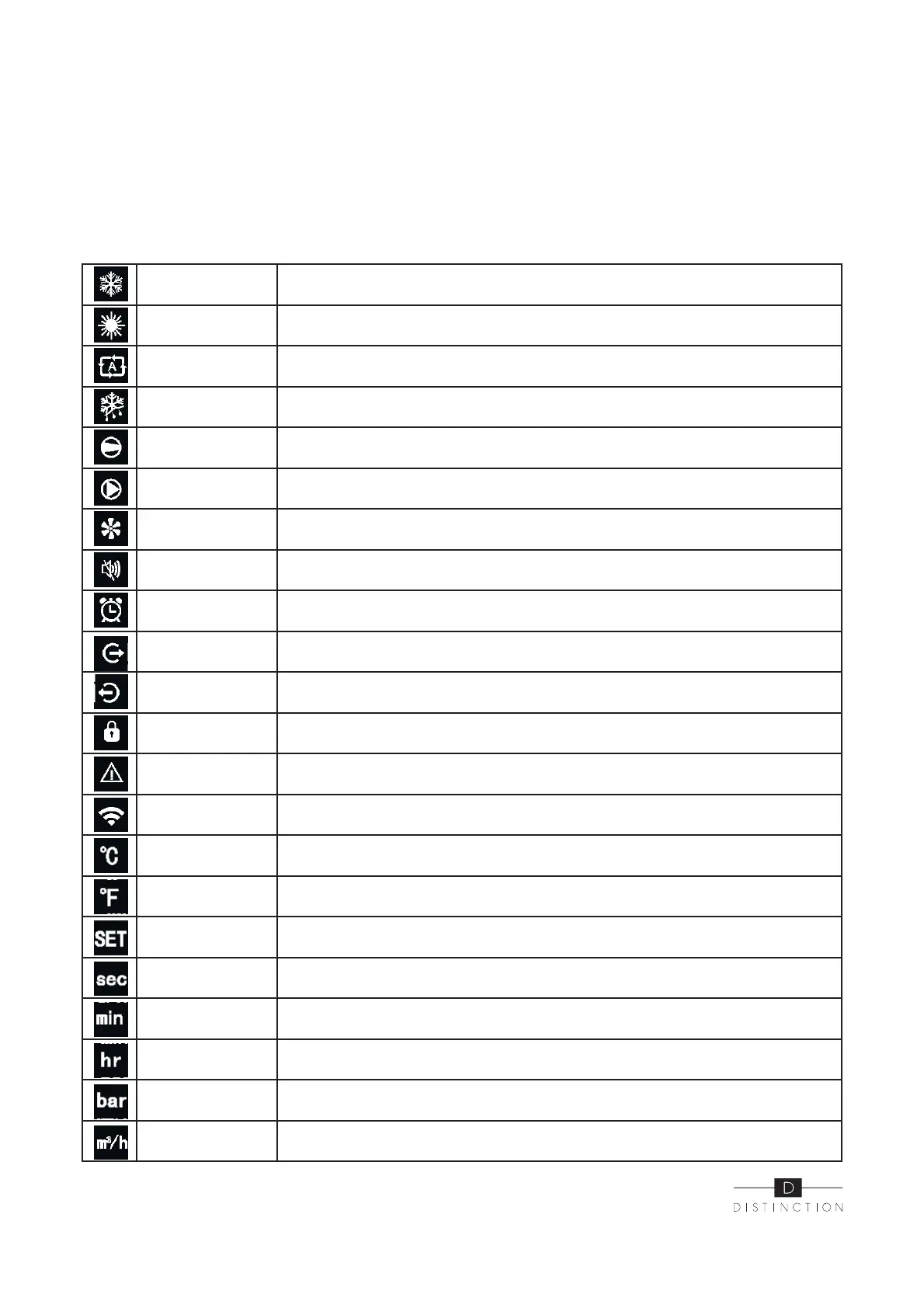
4.2.2 Icon function instruction
Cooling symbol
It will display during cooling (there is no limit to startup and shutdown, and
it is optional when the unit is cooling-only unit or heating-and-cooling unit).
Heating symbol
It will display during heating (there is no limit to startup and shutdown and
it is optional when the unit is heating-only unit or heating-and-cooling unit.
Automatic symbol
It will display under the automatic mode (there is no limit to startup and
shutdown and it is optional when the unit is heating-and-cooling unit).
Defrosting symbol It will display in the defrosting process of the unit.
Compressor symbol It will display when compressor is started.
Waterpump symbol It will display when water pump is started.
Fan symbol It will display when fan is started.
Mute symbol
When the timing mute function is started, it keeps bright for a long time.
When it is in mute state, it will flash, otherwise, it is off.
Timing symbol It will display after the user sets the timing and multiple timing intervals can be set.
Water outlet symbol
When the axillary display shows the water temperature at the outlet,the indicator
light is on.
Water inlet symbol The light is on.
Locking key symbol When the keyboard is locked, it is on.
Fault symbol In case of unit fault, it is on.
Wireless signal
symbol
When the unit is connected to WIFI module, it will display according to the
strength of WIFI signal.
Degrees Celsius
symbol
When main display or auxiliary display shows the temperature in Celsius,
it is on.
Degrees Fahrenheit
symbol
When main display area or auxiliary display shows the temperature in Fahrenheit,
it is on.
Setting symbol When the parameter is adjustable, it is on.
Second symbol When main display area displays second digit, it is on.
Minute symbol When main display area displays minute digit, it is on.
Hour symbol When main display area displays hour digit, it is on.
Pressure symbol When main display area displays pression, it is on.
Flow symbol w, it is on.


 To Next Page