3 Firmware Update and Parameter
Adjustment
After connecting the microphone to the DJI Mimo app, you can update the rmware or
adjust parameter settings using your phone.
3.1 Connecting to the DJI Mimo App
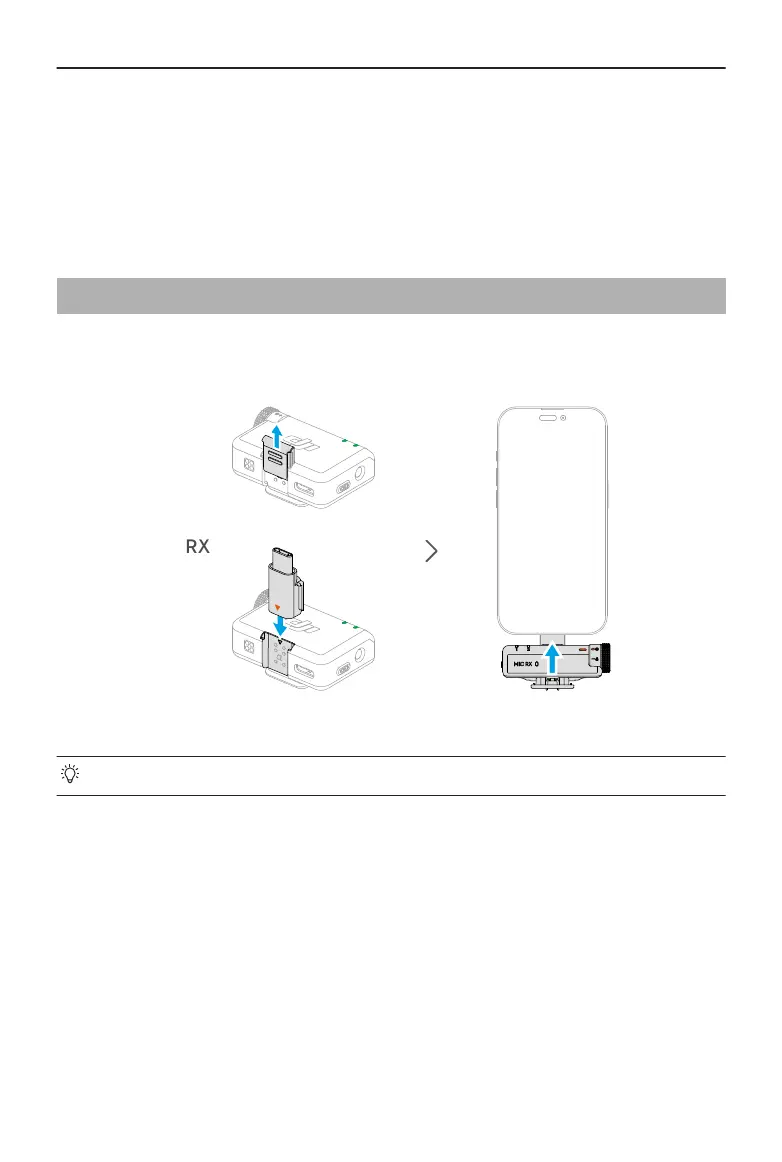
Connecting via the Adapter
• Make sure that the transmitter and receiver are linked.
Connecting via Bluetooth
Connecting the Transmitter
1. Refer to Connecting to a Phone to connect the transmitter to a phone via Bluetooth.
2. Open the DJI Mimo app to automatically search for nearby available devices. Tap to
connect once the transmitter is discovered. After successful connection, the app will
automatically enter the device settings interface.
Connecting the Receiver
DJI Mic Mini User Manual
16 © 2024 DJI All Rights Reserved.


 To Next Page