2.3 Powering on
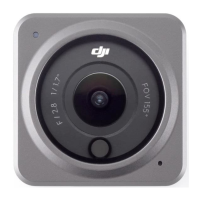
Press and hold the Quick Switch Button to power on. The SnapShot function on the
camera is enabled by default.
SnapShot is the quickest way to start shooting and never miss a moment of the action.
When the camera is o, you can quickly power it on and start shooting instantly in
SnapShot mode by pressing and holding the Shutter/Record button. After shooting, the
camera will automatically power o if left idle for three seconds.
Users can press and hold the Quick Switch button to power o.
2.4 Activation
Make sure to activate the camera using DJI Mimo before rst use.
1. Press and hold the Quick Switch button to power on.
2. Enable Wi-Fi and Bluetooth on the mobile device.
3. Launch DJI Mimo on the mobile device, tap the camera icon to connect to the camera,
and then follow the instructions to activate the camera.
Osmo Action 5 Pro User Manual
14 © 2024 DJI All Rights Reserved.



 To Next Page