3 Basic Operations
3.1 Button Features
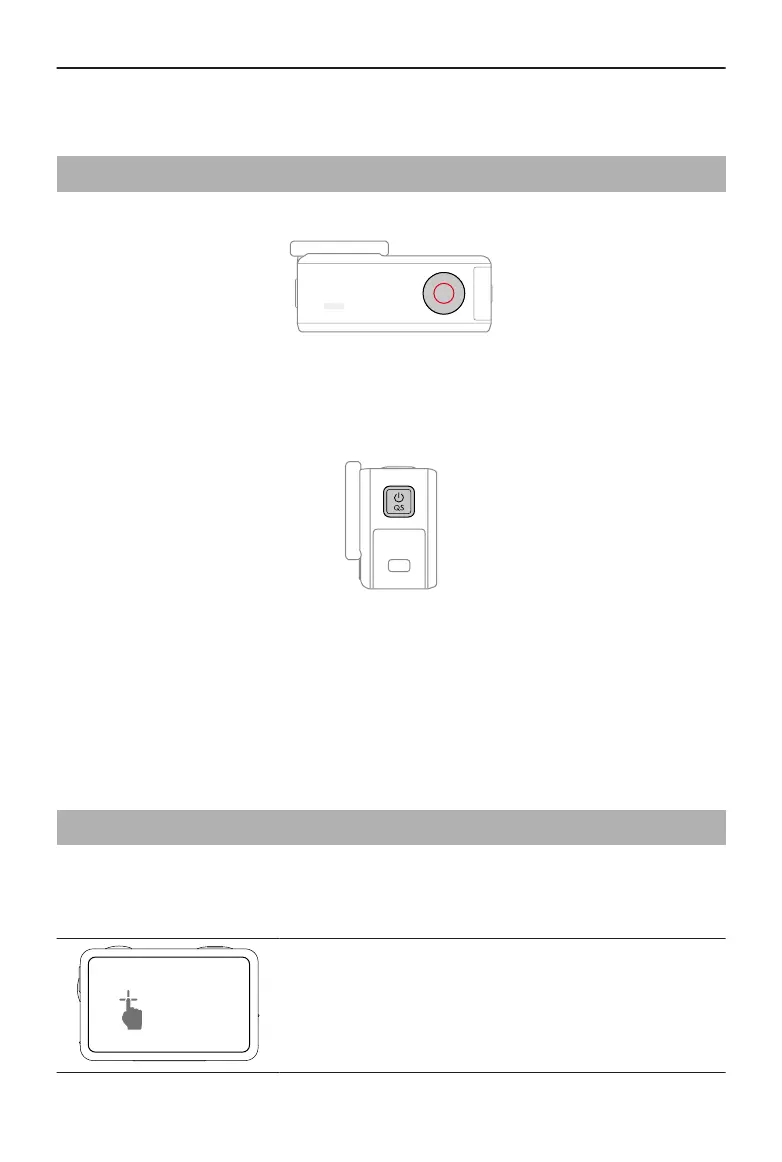
Shutter/Record Button
• Press once: Take a photo or start/stop recording.
• Press and hold when powered o: Power on quickly and begin shooting. The
shooting mode will depend on the SnapShot settings. After shooting, the camera will
automatically power o if left idle for three seconds.
Quick Switch Button
• Press and hold: Power on/o.
• Press once: Switch between shooting modes. During video and slow-motion
recording, press to mark a highlight moment in the footage, allowing to quickly
locate specic shots during post-editing and reducing the time spent searching for
highlights.
3.2 Operating the Touchscreen
After the camera is powered on, both touchscreens of the camera display the liveview as
well as the shooting mode, battery level, and microSD card information. Tap or swipe on
the touchscreen to interact with the camera.
Tap
Select the icons on both sides of the screen to playback
footage and change the camera settings.
Osmo Action 5 Pro User Manual
© 2024 DJI All Rights Reserved. 17



 To Next Page