Osmo Action Curved Adhesive Base Kit
The camera can be securely mounted on smooth and clean curved surfaces using the
curved adhesive base kit.
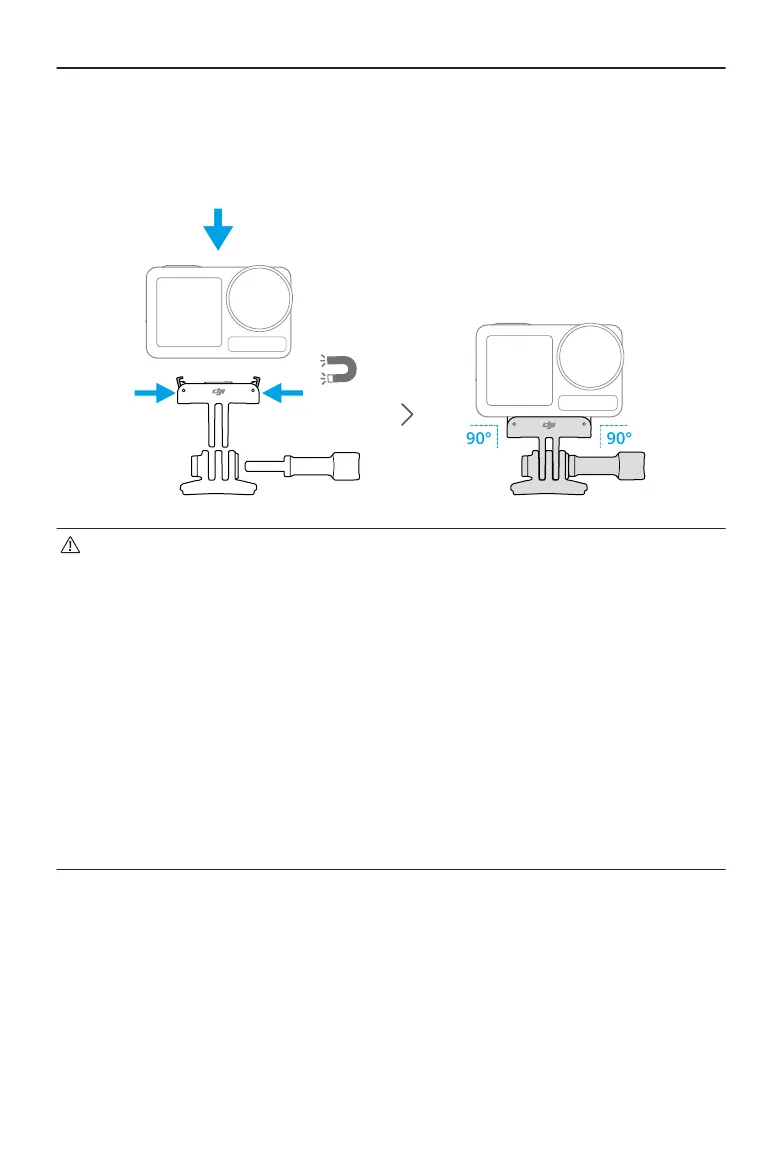
• Press down on the camera until the clips of the quick-release adapter mount
are rmly inserted into the quick-release slots on the camera, and then tighten
the locking screws. Press both clips of the quick-release adapter mount when
removing the camera.
• Attach and press the adhesive base down rmly, and hold for at least 10
seconds. It is recommended to wait 30 minutes before attaching the camera.
• The adhesive base can only be applied to clean curved surfaces once. DO NOT
attach the adhesive base to surfaces that are at, rough, powdered, peeling,
covered in dust or sand, or have oil, wax, or water stains. Otherwise, the adapter
mount may not be attached rmly.
• The recommended application temperature for the adhesive base is -10° to 40°
C (14° to 104° F). DO NOT attach the adhesive base to a surface with a higher or
lower temperature.
Osmo Action Horizontal-Vertical Protective Frame
With the horizontal-vertical protective frame, users can ip the camera from the
horizontal to the vertical position for dierent shooting angles.
Osmo Action 5 Pro User Manual
© 2024 DJI All Rights Reserved. 9



 To Next Page